
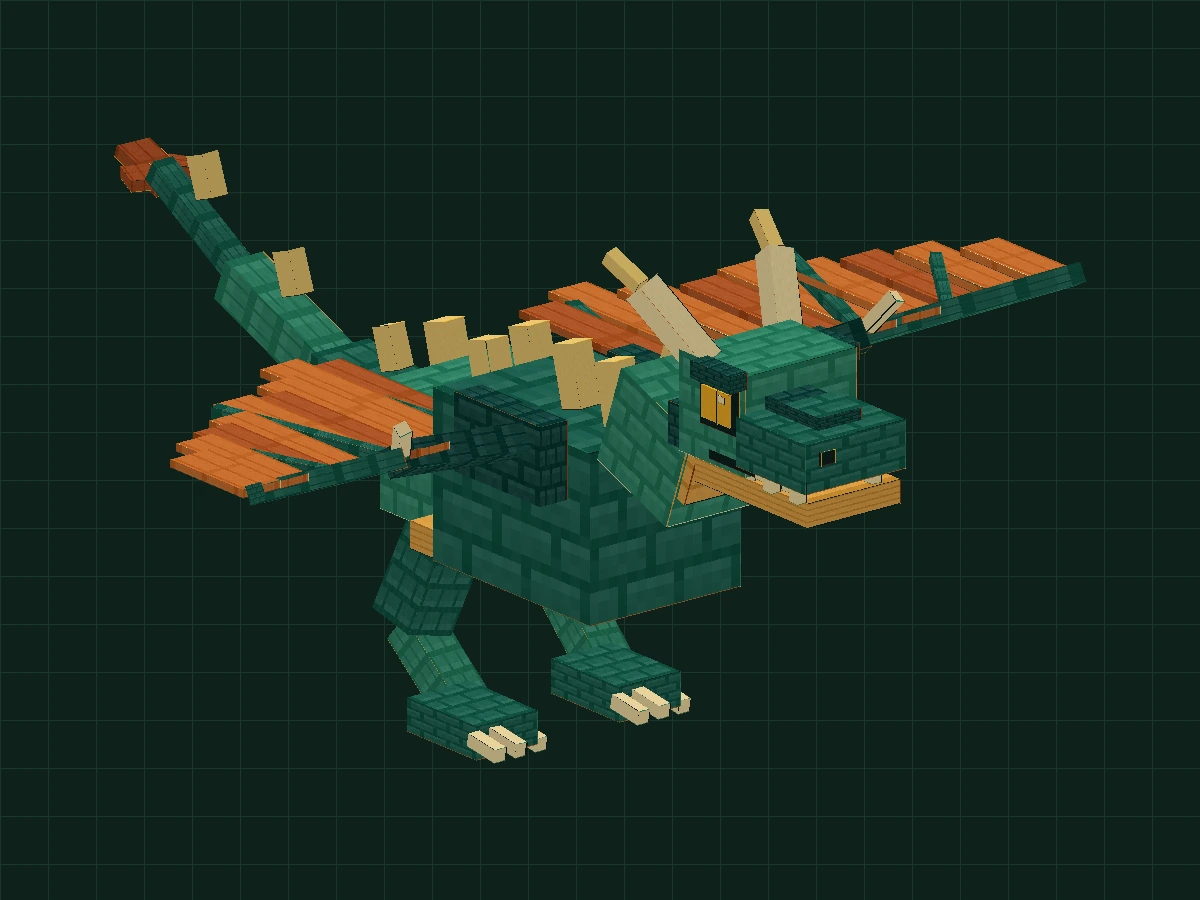
BEFORE YOU BUILD
Take your time. You can spend three afternoons building this wyvern.
It is recommended to complete firstLesson 01: Halloween Pumpkin Lantern. You can do it in three stages:Shape and joints → Texture → Two animations. This lesson uses the native Blockbench Generic Model, no need to run Minecraft first.
Download the exercise package for this lesson · 64 KB ↓01-body.bbmodel13 parts · 3 groups · 0 animations02-head-legs.bbmodel59 parts · 10 groups · 0 animations03-wings-tail-rig.bbmodel98 parts · 17 groups · 0 animations04-flight.bbmodel106 parts · 19 groups · 1 animation05-finished-animated.bbmodel106 parts · 19 groups · 2 animations
Each of the five .bbmodels can be opened independently, with embedded textures and joints set for easy comparison and continued practice. The following 8 software screenshots were taken when the corresponding checkpoints were opened in the Chinese version of Blockbench. They were not recorded one after another from a blank project; the structural diagram is marked separately. Click on the screenshot to see the original image. Please save your own exercises and do not overwrite the reference project.
First build a strong body
Do the chest cavity, plastron and neck first, ignoring the wings for the time being.
- New Generic Model, project name
my_wyvernTexture sizes 64 × 64, use the face-to-face UV. Save Asmy-wyvern.bbmodel. - Establish
Wyvern → Body → NeckGrouping. addchestCube put into Body: position −4.2 / 10 / −5.5Dimensions 8.4 / 8 / 11. This is the ribcage, not the bounding box of the entire creature. - Add the hindquarters, plastron, pauldrons and dorsal spines according to the table; put the neck into Neck. Complete the main body first and then add decorations. Compare after completion
01-body.bbmodel.
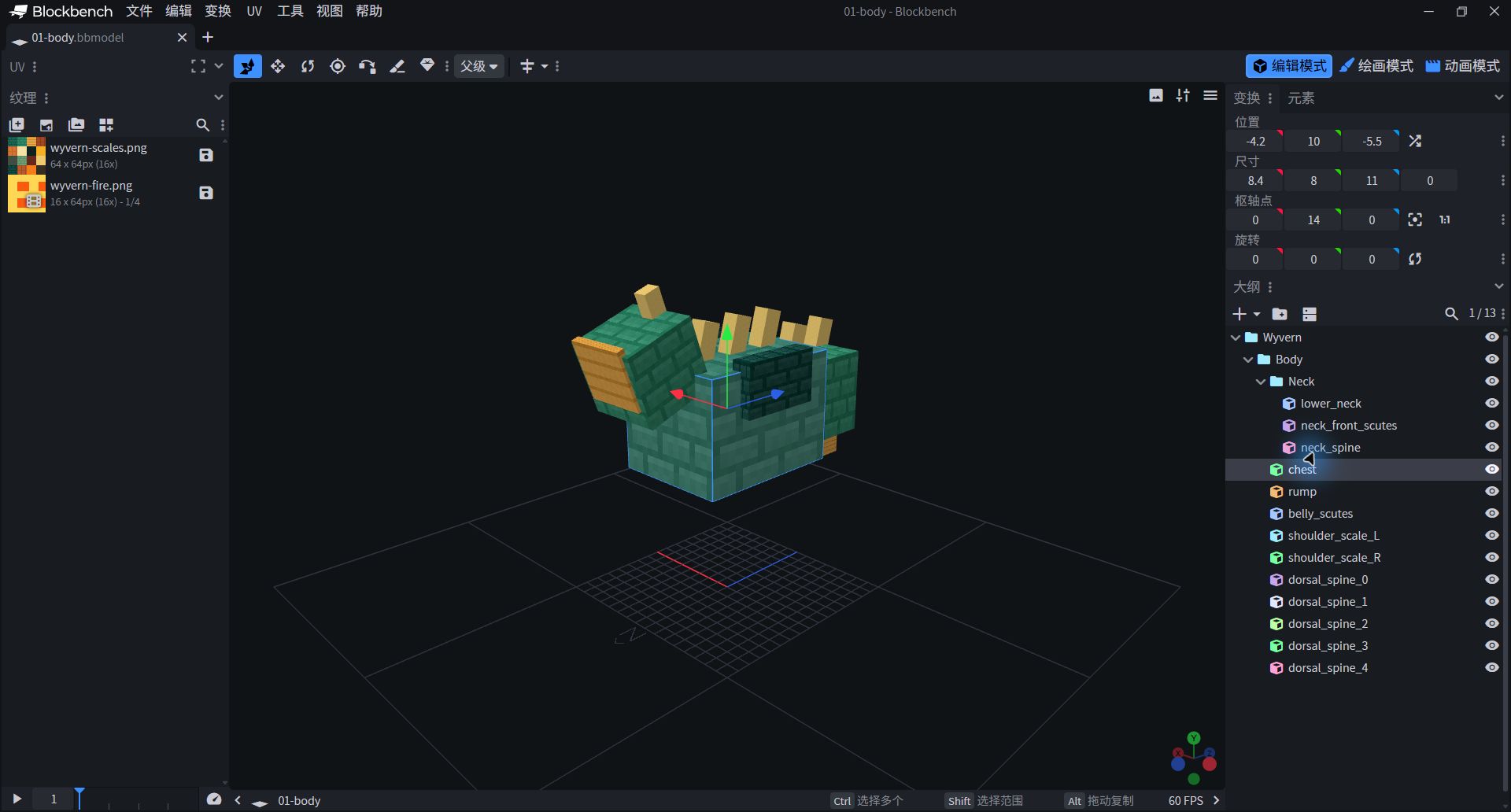
- Select chest in the lower right outline; the first line in the upper right is the position, and the second line is the size.
- Now there are only 13 parts. The back spines, shoulder armor and neck are already present, but the head, legs, wings and tail are missing.
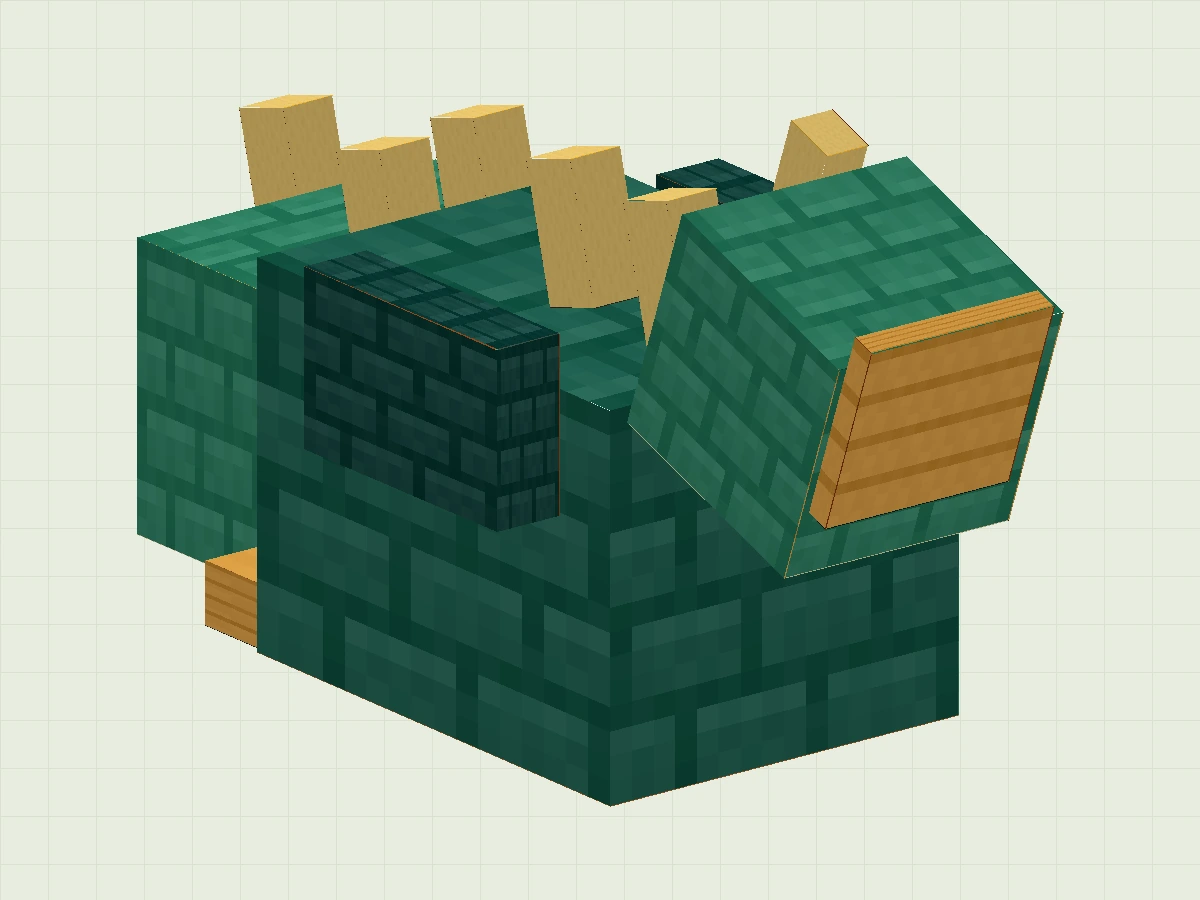
Expand all 13 parts of the body and neck
| Part / Group | Position | Size | Rotation ° | Pivot | Texture/UV |
|---|---|---|---|---|---|
| chest Body | -4.2 / 10 / -5.5 | 8.4 / 8 / 11 | 0 / 0 / 0 | 0 / 14 / 0 | Scales 0 / 0 / 16 / 16 |
| rump Body | -3.6 / 11 / 5.2 | 7.2 / 6 / 4.8 | 0 / 0 / 0 | 0 / 14 / 7.6 | Scales 16 / 0 / 32 / 16 |
| belly_scutes Body | -3.5 / 9.7 / -4.7 | 7 / 1.3 / 12.7 | 0 / 0 / 0 | 0 / 10.35 / 1.65 | Scales 32 / 0 / 48 / 16 |
| shoulder_scale_L Body | 3.5 / 15 / -3 | 1.5 / 3.7 / 6 | 0 / 0 / 0 | 4.25 / 16.85 / 0 | Scales 0 / 48 / 16 / 64 |
| shoulder_scale_R Body | -5 / 15 / -3 | 1.5 / 3.7 / 6 | 0 / 0 / 0 | -4.25 / 16.85 / 0 | Scales 0 / 48 / 16 / 64 |
| dorsal_spine_0 Body | -0.6 / 17.6 / -3 | 1.2 / 2.9 / 1.4 | 15 / 0 / 0 | 0 / 19.05 / -2.3 | Scales 48 / 32 / 64 / 48 |
| dorsal_spine_1 Body | -0.6 / 17.6 / 0 | 1.2 / 2.9 / 1.4 | 15 / 0 / 0 | 0 / 19.05 / 0.7 | Scales 48 / 32 / 64 / 48 |
| dorsal_spine_2 Body | -0.6 / 17.6 / 3 | 1.2 / 2.9 / 1.4 | 15 / 0 / 0 | 0 / 19.05 / 3.7 | Scales 48 / 32 / 64 / 48 |
| dorsal_spine_3 Body | -0.6 / 16.6 / 6 | 1.2 / 2.4 / 1.4 | 15 / 0 / 0 | 0 / 17.8 / 6.7 | Scales 48 / 32 / 64 / 48 |
| dorsal_spine_4 Body | -0.6 / 16.6 / 9 | 1.2 / 2.4 / 1.4 | 15 / 0 / 0 | 0 / 17.8 / 9.7 | Scales 48 / 32 / 64 / 48 |
| lower_neck Neck | -2.7 / 16 / -10 | 5.4 / 5 / 5.2 | -20 / 0 / 0 | 0 / 18.5 / -7.4 | Scales 16 / 0 / 32 / 16 |
| neck_front_scutes Neck | -2.2 / 16.3 / -10.35 | 4.4 / 4.2 / 0.55 | -20 / 0 / 0 | 0 / 18.4 / -10.075 | Scales 32 / 0 / 48 / 16 |
| neck_spine Neck | -0.5 / 20.2 / -7 | 1 / 3 / 1.2 | -20 / 0 / 0 | 0 / 21.7 / -6.4 | Scales 48 / 32 / 64 / 48 |
Give the Head Expression and Make the Jaw Move
The mouth must be able to be opened independently, and the teeth must be aligned with the owner.
Create under Neck Head, create under Head Jaw with Horns. Put the skull, upper snout, and eyes into Head; put the lower jaw, tongue, and lower teeth into Jaw; put the two horns into Horns.The lower jaw is not part of the head texture, but a set of movable parts.
skull: Location -3.1 / 19.3 /− 15, Size 6.2 / 4.7 / 4.6.upper_muzzle: Location -2.8 / 19.5 / −18.8, Size 5.6 / 2.3 / 4.8.lower_jaw: Location −2.6 / 17.9 / −18.7, Size 5.2 / 1.1 / 7.8.

- The right Jaw is located within the Head, and the lower jaw is highlighted together with the lower row of teeth.
- Look at the "pivot point": 0/19/−11, near the back of the jaw. Open your mouth around here during animation.
Then establish two hind legs under Body Leg_L / Leg_R, each of them Foot_L / Foot_R. When the legs are bent, the feet will follow, and the claws can be retracted independently. This lesson isFlying dragonThere are no other two front legs; the wings are its most visible forelegs.
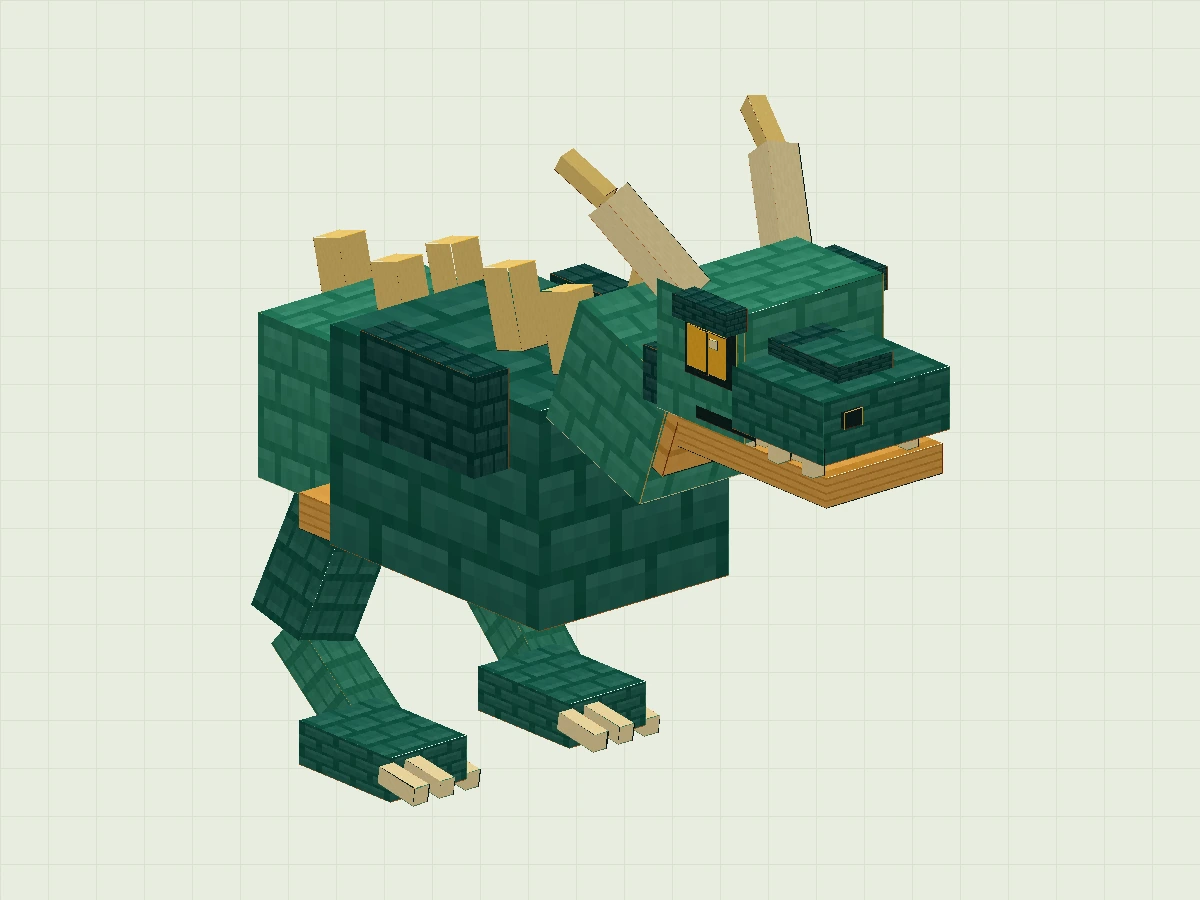
Expand parameters of head, jaw, horns and legs
| Part / Group | Position | Size | Rotation ° | Pivot | Texture/UV |
|---|---|---|---|---|---|
| skull Head | -3.1 / 19.3 / -15 | 6.2 / 4.7 / 4.6 | 0 / 0 / 0 | 0 / 21.65 / -12.7 | Scales 16 / 0 / 32 / 16 |
| upper_muzzle Head | -2.8 / 19.5 / -18.8 | 5.6 / 2.3 / 4.8 | 0 / 0 / 0 | 0 / 20.65 / -16.4 | Scales 0 / 0 / 16 / 16 |
| nose_ridge Head | -1.2 / 21.8 / -17.7 | 2.4 / 0.6 / 3.7 | 0 / 0 / 0 | 0 / 22.1 / -15.85 | Scales 0 / 48 / 16 / 64 |
| mouth_dark_interior Head | -2.3 / 19.05 / -17.8 | 4.6 / 0.45 / 6.3 | 0 / 0 / 0 | 0 / 19.275 / -14.65 | Scales 32 / 16 / 48 / 32 |
| eye_socket_L Head | 3.05 / 21.1 / -14.5 | 0.18 / 2.2 / 2.5 | 0 / 0 / 0 | 3.14 / 22.2 / -13.25 | Scales 32 / 16 / 48 / 32 |
| amber_eye_L Head | 3.23 / 21.45 / -14.2 | 0.11 / 1.5 / 1.95 | 0 / 0 / 0 | 3.285 / 22.2 / -13.225 | Scales 48 / 16 / 64 / 32 |
| vertical_pupil_L Head | 3.34 / 21.4 / -13.35 | 0.09 / 1.55 / 0.4 | 0 / 0 / 0 | 3.385 / 22.175 / -13.15 | Scales 32 / 16 / 48 / 32 |
| eye_glint_L Head | 3.43 / 22.5 / -13.95 | 0.07 / 0.32 / 0.35 | 0 / 0 / 0 | 3.465 / 22.66 / -13.775 | Scales 16 / 16 / 32 / 32 |
| brow_L Head | 2.65 / 23.15 / -14.6 | 0.95 / 0.85 / 2.8 | 0 / 0 / 0 | 3.125 / 23.575 / -13.2 | Scales 0 / 48 / 16 / 64 |
| nostril_L Head | 1.2 / 20.7 / -18.93 | 0.8 / 0.6 / 0.12 | 0 / 0 / 0 | 1.6 / 21 / -18.87 | Scales 32 / 16 / 48 / 32 |
| cheek_L Head | 2.7 / 19.8 / -12.7 | 1.1 / 2 / 2.2 | 0 / 0 / 0 | 3.25 / 20.8 / -11.6 | Scales 0 / 48 / 16 / 64 |
| horn_base_L Horns | 2.325 / 22.7063 / -10.425 | 1.25 / 4.3875 / 1.25 | 39.0939 / 0 / -19.9916 | 2.95 / 24.9 / -9.8 | Scales 16 / 16 / 32 / 32 |
| horn_tip_L Horns | 3.6 / 26.0072 / -8 | 0.7 / 2.0857 / 0.7 | 57.0948 / 0 / -13.8707 | 3.95 / 27.05 / -7.65 | Scales 48 / 32 / 64 / 48 |
| upper_fang_L_-17.7 Head | 1.85 / 18.65 / -17.7 | 0.5 / 0.95 / 0.55 | 0 / 0 / 0 | 2.1 / 19.125 / -17.425 | Scales 16 / 16 / 32 / 32 |
| upper_fang_L_-15.9 Head | 1.85 / 18.65 / -15.9 | 0.5 / 0.95 / 0.55 | 0 / 0 / 0 | 2.1 / 19.125 / -15.625 | Scales 16 / 16 / 32 / 32 |
| upper_fang_L_-14.1 Head | 1.85 / 18.65 / -14.1 | 0.5 / 0.95 / 0.55 | 0 / 0 / 0 | 2.1 / 19.125 / -13.825 | Scales 16 / 16 / 32 / 32 |
| eye_socket_R Head | -3.23 / 21.1 / -14.5 | 0.18 / 2.2 / 2.5 | 0 / 0 / 0 | -3.14 / 22.2 / -13.25 | Scales 32 / 16 / 48 / 32 |
| amber_eye_R Head | -3.34 / 21.45 / -14.2 | 0.11 / 1.5 / 1.95 | 0 / 0 / 0 | -3.285 / 22.2 / -13.225 | Scales 48 / 16 / 64 / 32 |
| vertical_pupil_R Head | -3.43 / 21.4 / -13.35 | 0.09 / 1.55 / 0.4 | 0 / 0 / 0 | -3.385 / 22.175 / -13.15 | Scales 32 / 16 / 48 / 32 |
| eye_glint_R Head | -3.5 / 22.5 / -13.95 | 0.07 / 0.32 / 0.35 | 0 / 0 / 0 | -3.465 / 22.66 / -13.775 | Scales 16 / 16 / 32 / 32 |
| brow_R Head | -3.6 / 23.15 / -14.6 | 0.95 / 0.85 / 2.8 | 0 / 0 / 0 | -3.125 / 23.575 / -13.2 | Scales 0 / 48 / 16 / 64 |
| nostril_R Head | -2 / 20.7 / -18.93 | 0.8 / 0.6 / 0.12 | 0 / 0 / 0 | -1.6 / 21 / -18.87 | Scales 32 / 16 / 48 / 32 |
| cheek_R Head | -3.8 / 19.8 / -12.7 | 1.1 / 2 / 2.2 | 0 / 0 / 0 | -3.25 / 20.8 / -11.6 | Scales 0 / 48 / 16 / 64 |
| horn_base_R Horns | -3.575 / 22.7063 / -10.425 | 1.25 / 4.3875 / 1.25 | 39.0939 / 0 / 19.9916 | -2.95 / 24.9 / -9.8 | Scales 16 / 16 / 32 / 32 |
| horn_tip_R Horns | -4.3 / 26.0072 / -8 | 0.7 / 2.0857 / 0.7 | 57.0948 / 0 / 13.8707 | -3.95 / 27.05 / -7.65 | Scales 48 / 32 / 64 / 48 |
| upper_fang_R_-17.7 Head | -2.35 / 18.65 / -17.7 | 0.5 / 0.95 / 0.55 | 0 / 0 / 0 | -2.1 / 19.125 / -17.425 | Scales 16 / 16 / 32 / 32 |
| upper_fang_R_-15.9 Head | -2.35 / 18.65 / -15.9 | 0.5 / 0.95 / 0.55 | 0 / 0 / 0 | -2.1 / 19.125 / -15.625 | Scales 16 / 16 / 32 / 32 |
| upper_fang_R_-14.1 Head | -2.35 / 18.65 / -14.1 | 0.5 / 0.95 / 0.55 | 0 / 0 / 0 | -2.1 / 19.125 / -13.825 | Scales 16 / 16 / 32 / 32 |
| lower_jaw Jaw | -2.6 / 17.9 / -18.7 | 5.2 / 1.1 / 7.8 | 0 / 0 / 0 | 0 / 18.45 / -14.8 | Scales 32 / 0 / 48 / 16 |
| tongue Jaw | -1.2 / 19 / -17.2 | 2.4 / 0.2 / 5.2 | 0 / 0 / 0 | 0 / 19.1 / -14.6 | Scales 32 / 32 / 48 / 48 |
| lower_fang_-1_-17 Jaw | -2.27 / 19 / -17 | 0.44 / 0.55 / 0.45 | 0 / 0 / 0 | -2.05 / 19.275 / -16.775 | Scales 16 / 16 / 32 / 32 |
| lower_fang_-1_-15.1 Jaw | -2.27 / 19 / -15.1 | 0.44 / 0.55 / 0.45 | 0 / 0 / 0 | -2.05 / 19.275 / -14.875 | Scales 16 / 16 / 32 / 32 |
| lower_fang_1_-17 Jaw | 1.83 / 19 / -17 | 0.44 / 0.55 / 0.45 | 0 / 0 / 0 | 2.05 / 19.275 / -16.775 | Scales 16 / 16 / 32 / 32 |
| lower_fang_1_-15.1 Jaw | 1.83 / 19 / -15.1 | 0.44 / 0.55 / 0.45 | 0 / 0 / 0 | 2.05 / 19.275 / -14.875 | Scales 16 / 16 / 32 / 32 |
| thigh_L Leg_L | 2.3 / 6.5625 / 5.2 | 2.6 / 4.5749 / 2.6 | 166.9081 / 0 / -15.2065 | 3.6 / 8.85 / 6.5 | Scales 0 / 0 / 16 / 16 |
| shin_L Leg_L | 3.2 / 2.9306 / 4.4 | 1.8 / 4.5387 / 1.8 | -131.4237 / 0 / 2.5256 | 4.1 / 5.2 / 5.3 | Scales 16 / 0 / 32 / 16 |
| foot_L Foot_L | 2.3 / 2.4 / 0.6 | 3.4 / 1.6 / 4.8 | 0 / 0 / 0 | 4 / 3.2 / 3 | Scales 0 / 0 / 16 / 16 |
| claw_L_-1 Foot_L | 2.55 / 2.6 / -0.4 | 0.6 / 0.65 / 1.9 | -8 / 0 / 0 | 2.85 / 2.925 / 0.55 | Scales 16 / 16 / 32 / 32 |
| claw_L_0 Foot_L | 3.7 / 2.6 / -0.4 | 0.6 / 0.65 / 1.9 | -8 / 0 / 0 | 4 / 2.925 / 0.55 | Scales 16 / 16 / 32 / 32 |
| claw_L_1 Foot_L | 4.85 / 2.6 / -0.4 | 0.6 / 0.65 / 1.9 | -8 / 0 / 0 | 5.15 / 2.925 / 0.55 | Scales 16 / 16 / 32 / 32 |
| thigh_R Leg_R | -4.9 / 6.5625 / 5.2 | 2.6 / 4.5749 / 2.6 | 166.9081 / 0 / 15.2065 | -3.6 / 8.85 / 6.5 | Scales 0 / 0 / 16 / 16 |
| shin_R Leg_R | -5 / 2.9306 / 4.4 | 1.8 / 4.5387 / 1.8 | -131.4237 / 0 / -2.5256 | -4.1 / 5.2 / 5.3 | Scales 16 / 0 / 32 / 16 |
| foot_R Foot_R | -5.7 / 2.4 / 0.6 | 3.4 / 1.6 / 4.8 | 0 / 0 / 0 | -4 / 3.2 / 3 | Scales 0 / 0 / 16 / 16 |
| claw_R_-1 Foot_R | -5.45 / 2.6 / -0.4 | 0.6 / 0.65 / 1.9 | -8 / 0 / 0 | -5.15 / 2.925 / 0.55 | Scales 16 / 16 / 32 / 32 |
| claw_R_0 Foot_R | -4.3 / 2.6 / -0.4 | 0.6 / 0.65 / 1.9 | -8 / 0 / 0 | -4 / 2.925 / 0.55 | Scales 16 / 16 / 32 / 32 |
| claw_R_1 Foot_R | -3.15 / 2.6 / -0.4 | 0.6 / 0.65 / 1.9 | -8 / 0 / 0 | -2.85 / 2.925 / 0.55 | Scales 16 / 16 / 32 / 32 |
Spread the wings, leaving the second joint
One wing, two joints. Do not weld the wingtips to the shoulders.
- Create under Body
Wing_L, then create inside itWing_Tip_L. Also create Wing_R and Wing_Tip_R on the other side. L / R is the naming in the project,Not equal to the left and right on your screen. - Put the dark green wing bone first, and then lay the copper orange wing membrane. The wing membrane on each side is composed of 9 thin cuboids with a thickness of 0.38; the four sections nearest the body belong to Wing, and the rest belong to Wing_Tip.
- The left and right positions are symmetrical about X=0: the X interval [a, b] of a square becomes [−b, −a] after mirroring. For the already tilted wing bone, please set the rotation and pivot according to the parameter table. Do not just add a negative sign to X.
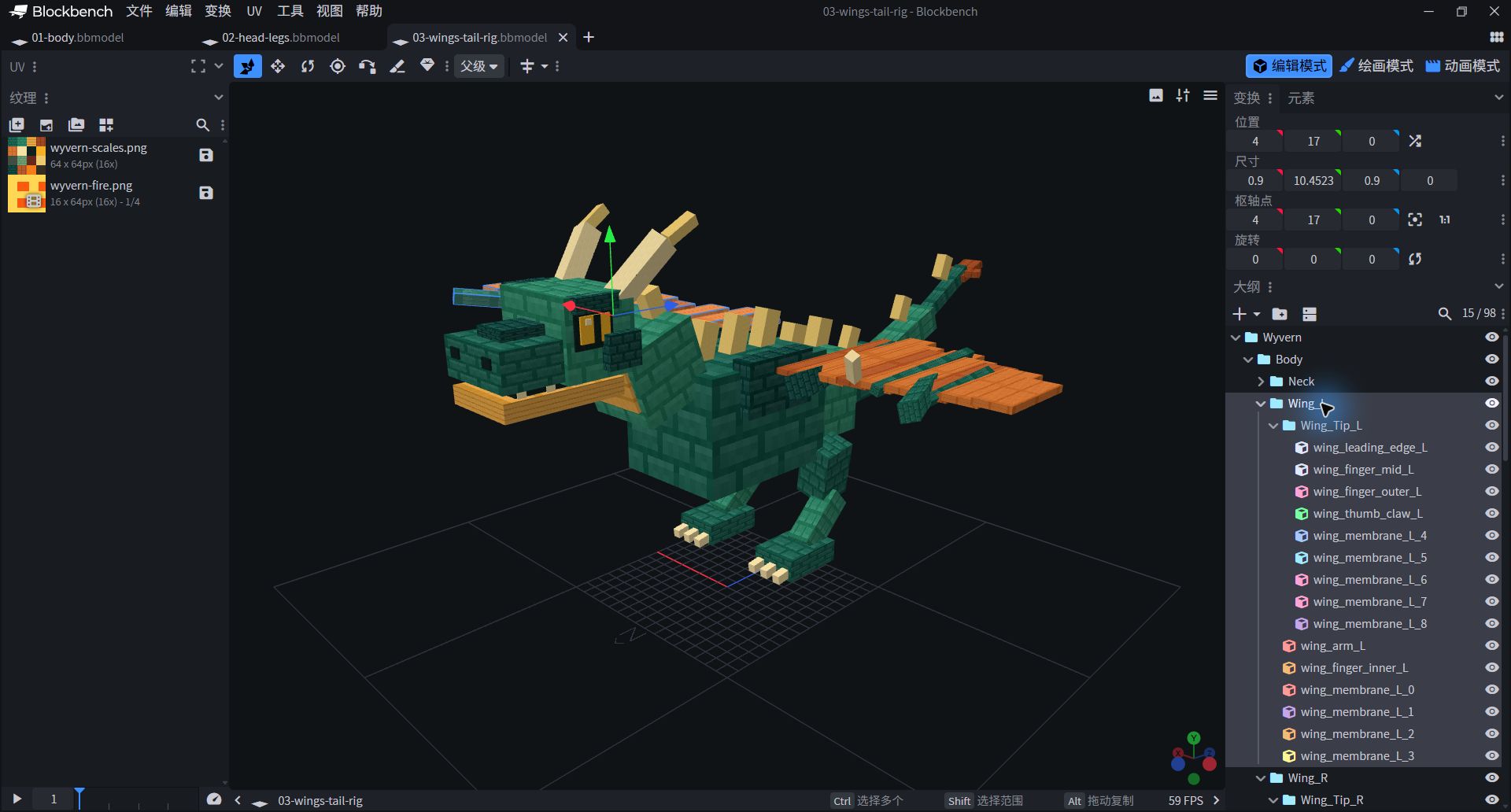
- After Wing_L is expanded, Wing_Tip_L is its subgroup. Look at the level first, then set the rotation.
- The shoulder joint is responsible for the large fanning, and the outer wingtip is responsible for following; they are not an indivisible flat plate.
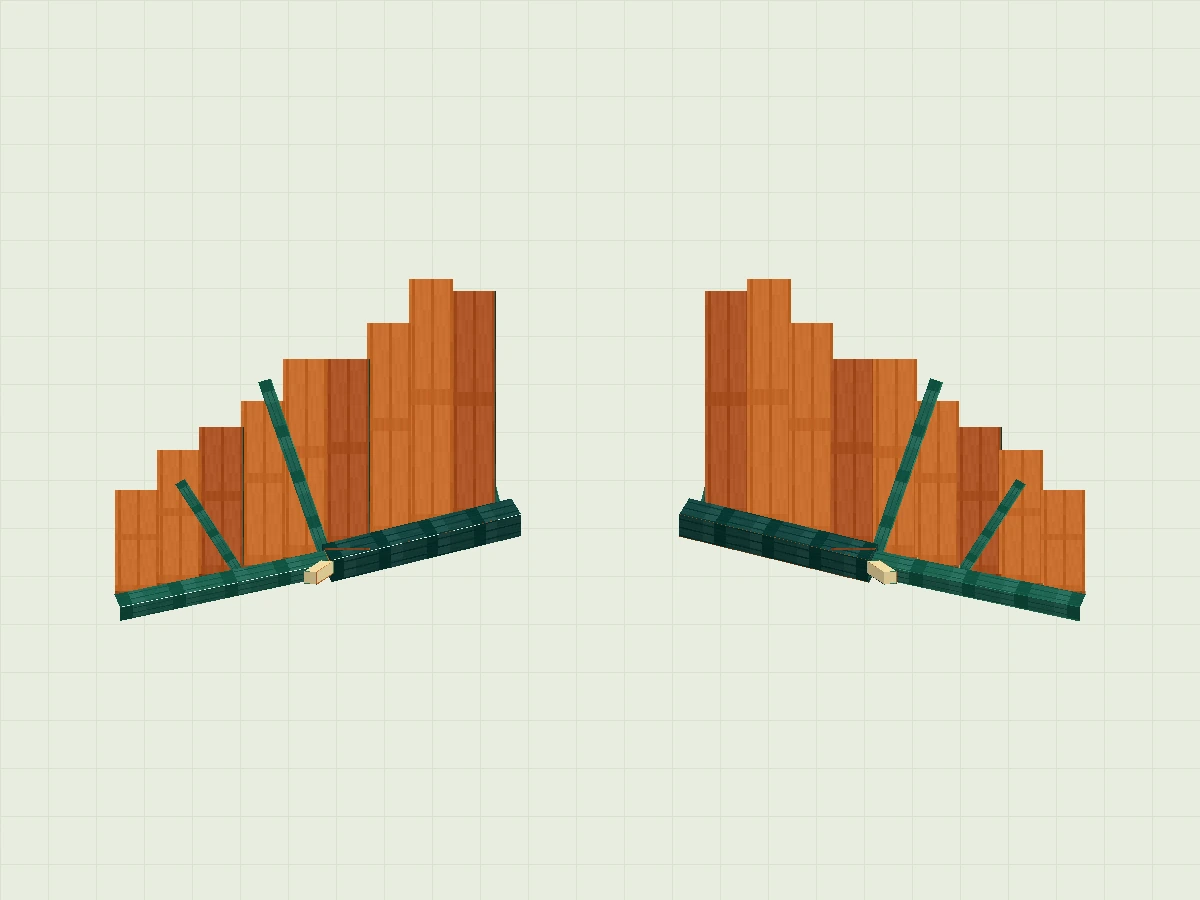
Expand wings, wing bones and wing membrane parameters
| Part / Group | Position | Size | Rotation ° | Pivot | Texture/UV |
|---|---|---|---|---|---|
| wing_arm_L Wing_L | 7.825 / 13.1523 / -2.175 | 1.35 / 9.6954 / 1.35 | -56.3099 / 0 / -68.1681 | 8.5 / 18 / -1.5 | Scales 0 / 48 / 16 / 64 |
| wing_leading_edge_L Wing_Tip_L | 17.55 / 14.4739 / -4.8 | 0.9 / 10.4523 / 0.9 | -62.5924 / 0 / -73.0835 | 18 / 19.7 / -4.35 | Scales 0 / 0 / 16 / 16 |
| wing_finger_inner_L Wing_L | 5.925 / 12.0475 / 4.925 | 0.65 / 10.8051 / 0.65 | 87.2737 / 0 / -13.3779 | 6.25 / 17.45 / 5.25 | Scales 0 / 0 / 16 / 16 |
| wing_finger_mid_L Wing_Tip_L | 14.21 / 14.4524 / 1.21 | 0.58 / 9.4953 / 0.58 | 87.4552 / 0 / -18.418 | 14.5 / 19.2 / 1.5 | Scales 0 / 0 / 16 / 16 |
| wing_finger_outer_L Wing_Tip_L | 18.25 / 16.9509 / -1.9 | 0.5 / 5.5982 / 0.5 | 83.9275 / 0 / -32.404 | 18.5 / 19.75 / -1.65 | Scales 0 / 0 / 16 / 16 |
| wing_thumb_claw_L Wing_Tip_L | 13.1 / 19.15 / -4.15 | 0.6 / 2.1 / 0.6 | -34.5085 / 0 / -22.3927 | 13.4 / 20.2 / -3.85 | Scales 16 / 16 / 32 / 32 |
| wing_membrane_L_0 Wing_L | 5 / 17.6 / -0.57 | 2.1 / 0.38 / 11.57 | 0 / 0 / 0 | 6.05 / 17.79 / 5.215 | Scales 16 / 48 / 32 / 64 |
| wing_membrane_L_1 Wing_L | 7 / 17.9 / -1.11 | 2.1 / 0.38 / 12.61 | 0 / 0 / 0 | 8.05 / 18.09 / 5.195 | Scales 0 / 16 / 16 / 32 |
| wing_membrane_L_2 Wing_L | 9 / 18.2 / -1.65 | 2.1 / 0.38 / 10.85 | 0 / 0 / 0 | 10.05 / 18.39 / 3.775 | Scales 0 / 16 / 16 / 32 |
| wing_membrane_L_3 Wing_L | 11 / 18.5 / -2.19 | 2.1 / 0.38 / 9.49 | 0 / 0 / 0 | 12.05 / 18.69 / 2.555 | Scales 16 / 48 / 32 / 64 |
| wing_membrane_L_4 Wing_Tip_L | 13 / 18.8 / -2.73 | 2.1 / 0.38 / 9.93 | 0 / 0 / 0 | 14.05 / 18.99 / 2.235 | Scales 0 / 16 / 16 / 32 |
| wing_membrane_L_5 Wing_Tip_L | 15 / 19.1 / -3.27 | 2.1 / 0.38 / 8.27 | 0 / 0 / 0 | 16.05 / 19.29 / 0.865 | Scales 0 / 16 / 16 / 32 |
| wing_membrane_L_6 Wing_Tip_L | 17 / 19.4 / -3.81 | 2.1 / 0.38 / 7.41 | 0 / 0 / 0 | 18.05 / 19.59 / -0.105 | Scales 16 / 48 / 32 / 64 |
| wing_membrane_L_7 Wing_Tip_L | 19 / 19.7 / -4.35 | 2.1 / 0.38 / 6.65 | 0 / 0 / 0 | 20.05 / 19.89 / -1.025 | Scales 0 / 16 / 16 / 32 |
| wing_membrane_L_8 Wing_Tip_L | 21 / 20 / -4.89 | 2.1 / 0.38 / 5.09 | 0 / 0 / 0 | 22.05 / 20.19 / -2.345 | Scales 0 / 16 / 16 / 32 |
| wing_arm_R Wing_R | -9.175 / 13.1523 / -2.175 | 1.35 / 9.6954 / 1.35 | -56.3099 / 0 / 68.1681 | -8.5 / 18 / -1.5 | Scales 0 / 48 / 16 / 64 |
| wing_leading_edge_R Wing_Tip_R | -18.45 / 14.4739 / -4.8 | 0.9 / 10.4523 / 0.9 | -62.5924 / 0 / 73.0835 | -18 / 19.7 / -4.35 | Scales 0 / 0 / 16 / 16 |
| wing_finger_inner_R Wing_R | -6.575 / 12.0475 / 4.925 | 0.65 / 10.8051 / 0.65 | 87.2737 / 0 / 13.3779 | -6.25 / 17.45 / 5.25 | Scales 0 / 0 / 16 / 16 |
| wing_finger_mid_R Wing_Tip_R | -14.79 / 14.4524 / 1.21 | 0.58 / 9.4953 / 0.58 | 87.4552 / 0 / 18.418 | -14.5 / 19.2 / 1.5 | Scales 0 / 0 / 16 / 16 |
| wing_finger_outer_R Wing_Tip_R | -18.75 / 16.9509 / -1.9 | 0.5 / 5.5982 / 0.5 | 83.9275 / 0 / 32.404 | -18.5 / 19.75 / -1.65 | Scales 0 / 0 / 16 / 16 |
| wing_thumb_claw_R Wing_Tip_R | -13.7 / 19.15 / -4.15 | 0.6 / 2.1 / 0.6 | -34.5085 / 0 / 22.3927 | -13.4 / 20.2 / -3.85 | Scales 16 / 16 / 32 / 32 |
| wing_membrane_R_0 Wing_R | -7.1 / 17.6 / -0.57 | 2.1 / 0.38 / 11.57 | 0 / 0 / 0 | -6.05 / 17.79 / 5.215 | Scales 16 / 48 / 32 / 64 |
| wing_membrane_R_1 Wing_R | -9.1 / 17.9 / -1.11 | 2.1 / 0.38 / 12.61 | 0 / 0 / 0 | -8.05 / 18.09 / 5.195 | Scales 0 / 16 / 16 / 32 |
| wing_membrane_R_2 Wing_R | -11.1 / 18.2 / -1.65 | 2.1 / 0.38 / 10.85 | 0 / 0 / 0 | -10.05 / 18.39 / 3.775 | Scales 0 / 16 / 16 / 32 |
| wing_membrane_R_3 Wing_R | -13.1 / 18.5 / -2.19 | 2.1 / 0.38 / 9.49 | 0 / 0 / 0 | -12.05 / 18.69 / 2.555 | Scales 16 / 48 / 32 / 64 |
| wing_membrane_R_4 Wing_Tip_R | -15.1 / 18.8 / -2.73 | 2.1 / 0.38 / 9.93 | 0 / 0 / 0 | -14.05 / 18.99 / 2.235 | Scales 0 / 16 / 16 / 32 |
| wing_membrane_R_5 Wing_Tip_R | -17.1 / 19.1 / -3.27 | 2.1 / 0.38 / 8.27 | 0 / 0 / 0 | -16.05 / 19.29 / 0.865 | Scales 0 / 16 / 16 / 32 |
| wing_membrane_R_6 Wing_Tip_R | -19.1 / 19.4 / -3.81 | 2.1 / 0.38 / 7.41 | 0 / 0 / 0 | -18.05 / 19.59 / -0.105 | Scales 16 / 48 / 32 / 64 |
| wing_membrane_R_7 Wing_Tip_R | -21.1 / 19.7 / -4.35 | 2.1 / 0.38 / 6.65 | 0 / 0 / 0 | -20.05 / 19.89 / -1.025 | Scales 0 / 16 / 16 / 32 |
| wing_membrane_R_8 Wing_Tip_R | -23.1 / 20 / -4.89 | 2.1 / 0.38 / 5.09 | 0 / 0 / 0 | -22.05 / 20.19 / -2.345 | Scales 0 / 16 / 16 / 32 |
Connect the tail into a kinematic chain
When the father joint moves, the joints behind follow.
Establish Tail_Base → Tail_Mid → Tail_Tip, then add the tail base, middle, tip and their corresponding spines in order. Do not place all three tail sections alongside each other under Body: rotating the tail base should also move the other two sections.
Wyvern
└─ Body
   ├─ Neck → Head
   │          ├─ Jaw
   │          ├─ Horns
   │          └─ Fire → Embers(第 7 步加入)
   ├─ Wing_L → Wing_Tip_L
   ├─ Wing_R → Wing_Tip_R
   ├─ Leg_L → Foot_L
   ├─ Leg_R → Foot_R
   └─ Tail_Base → Tail_Mid → Tail_Tip
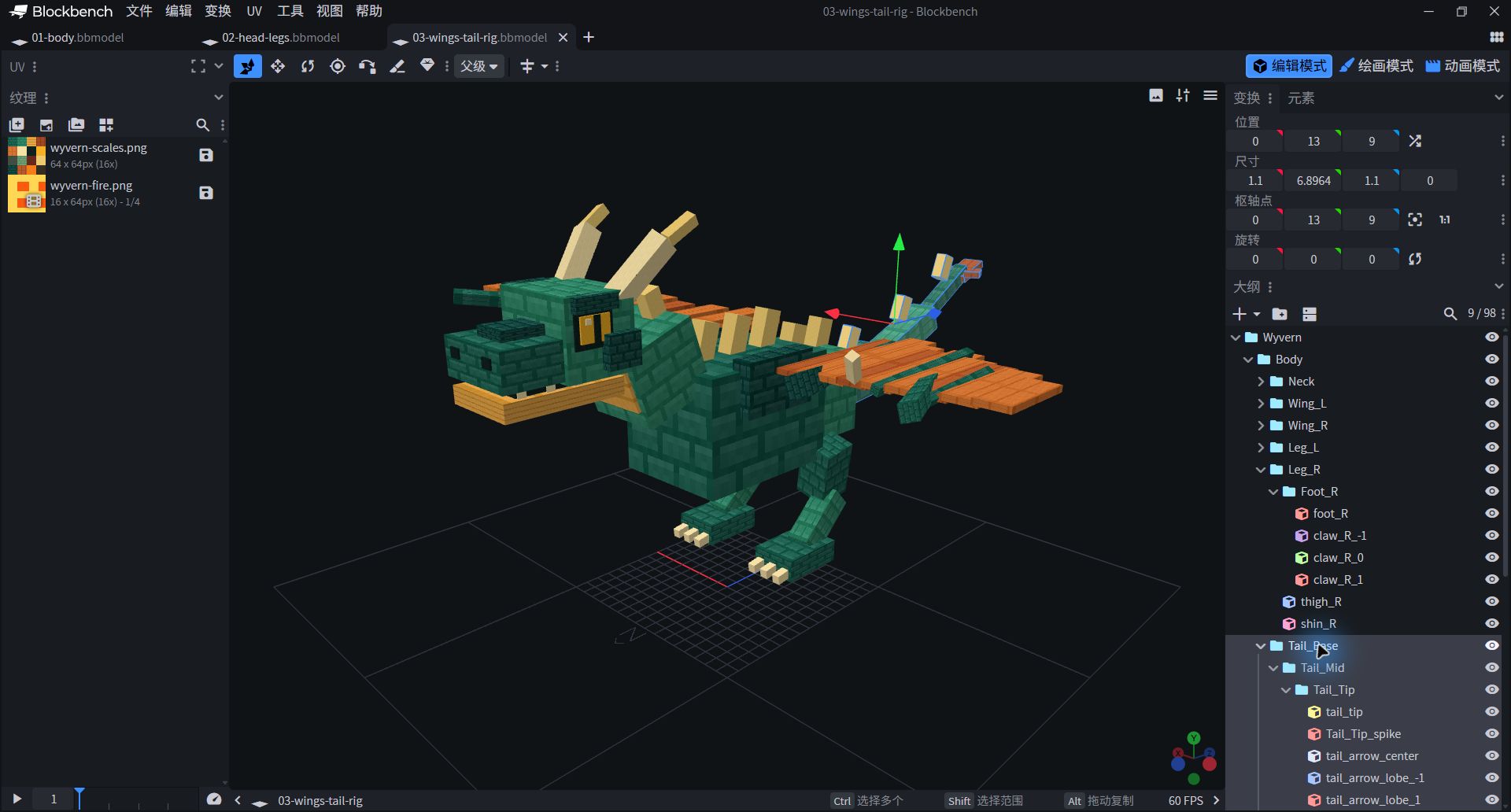
- Tail_Base is highlighted; Tail_Mid and Tail_Tip are indented step by step, and all parts at the tail are selected together.
- The upper right "pivot point" is 0/13/9. The pivots for all 19 groups are given below; Fire and Embers were added in step 7.
Expand all grouped Pivot Points·X/Y/Z
| Grouping | Pivot Point |
|---|---|
| Wyvern | 0 / 14 / 0 |
| Body | 0 / 14 / 1 |
| Neck | 0 / 17 / -5 |
| Head | 0 / 21 / -12 |
| Jaw | 0 / 19 / -11 |
| Horns | 0 / 23 / -10 |
| Wing_L | 4 / 17 / 0 |
| Wing_Tip_L | 13 / 19 / -3 |
| Wing_R | -4 / 17 / 0 |
| Wing_Tip_R | -13 / 19 / -3 |
| Leg_L | 3 / 11 / 6 |
| Foot_L | 4 / 5 / 4 |
| Leg_R | -3 / 11 / 6 |
| Foot_R | -4 / 5 / 4 |
| Tail_Base | 0 / 13 / 9 |
| Tail_Mid | 0 / 14 / 17 |
| Tail_Tip | 0 / 17 / 24 |
| Fire | 0 / 19.1 / -18.6 |
| Embers | 0 / 19.1 / -18.6 |
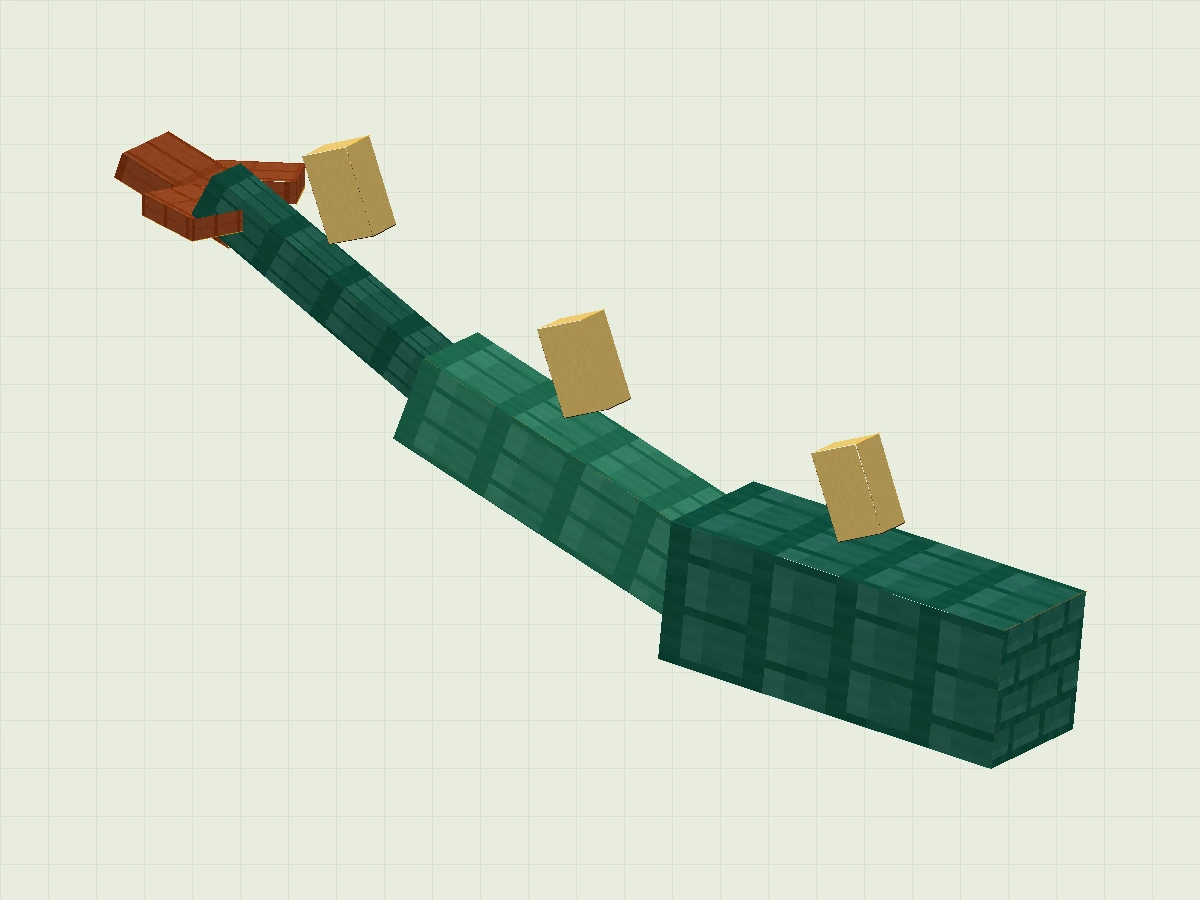
Expand the parameters of each component of the tail
| Part / Group | Position | Size | Rotation ° | Pivot | Texture/UV |
|---|---|---|---|---|---|
| tail_thick Tail_Base | -1.6 / 9.3762 / 11.65 | 3.2 / 8.5475 / 3.2 | 83.9559 / 0 / -0 | 0 / 13.65 / 13.25 | Scales 0 / 0 / 16 / 16 |
| tail_middle Tail_Mid | -1.05 / 11.576 / 19.65 | 2.1 / 7.948 / 2.1 | 68.6002 / 0 / -0 | 0 / 15.55 / 20.7 | Scales 16 / 0 / 32 / 16 |
| tail_tip Tail_Tip | -0.55 / 15.2518 / 26.45 | 1.1 / 6.8964 / 1.1 | 60.4612 / 0 / -0 | 0 / 18.7 / 27 | Scales 0 / 0 / 16 / 16 |
| Tail_Base_spike Tail_Base | -0.45 / 15.7 / 13 | 0.9 / 2 / 1.2 | 20 / 0 / 0 | 0 / 16.7 / 13.6 | Scales 48 / 32 / 64 / 48 |
| Tail_Mid_spike Tail_Mid | -0.45 / 17.2 / 20 | 0.9 / 2 / 1.2 | 20 / 0 / 0 | 0 / 18.2 / 20.6 | Scales 48 / 32 / 64 / 48 |
| Tail_Tip_spike Tail_Tip | -0.45 / 20 / 26 | 0.9 / 2 / 1.2 | 20 / 0 / 0 | 0 / 21 / 26.6 | Scales 48 / 32 / 64 / 48 |
| tail_arrow_center Tail_Tip | -0.9 / 20 / 28.9 | 1.8 / 0.6 / 3.1 | -20 / 0 / 0 | 0 / 20.3 / 30.45 | Scales 48 / 0 / 64 / 16 |
| tail_arrow_lobe_-1 Tail_Tip | -1.85 / 20 / 28.8 | 1.3 / 0.5 / 2 | 0 / 25 / 0 | -1.2 / 20.25 / 29.8 | Scales 48 / 0 / 64 / 16 |
| tail_arrow_lobe_1 Tail_Tip | 0.55 / 20 / 28.8 | 1.3 / 0.5 / 2 | 0 / -25 / 0 | 1.2 / 20.25 / 29.8 | Scales 48 / 0 / 64 / 16 |
Assign colors to scales and wing membranes
Use a small amount of color to differentiate the body, wing membranes, horns and plastron.
- Import practice package
textures/wyvern-scales.png, a 64 × 64 pixel atlas divided into sixteen 16 × 16 color blocks. Switch to Paint, change a small area with a 1-pixel brush, and observe where it appears on the model. - Return to edit mode, select a square face, and assign texture and sampling area to it in the UV panel. Each part uses the same color block on six sides in this model; the UV of the parameter table is U1 / V1 / U2 / V2, not wide. Select all six sides of the setup first.
- Use light and dark green for the scales, gold for the belly armor, copper-orange for the wing membranes, and ivory for the horns and teeth. Related parts should have similar colors so that the structure is easy to recognize.

For example, the UV of chest is 0 / 0 / 16 / 16. The plastron is taken as 32/0/48/16; the beige horn is taken as 16/16/32/32.
The exact sampling area for each component is in the rightmost column of the dimension table. Preserve pixel edges when zooming in without blurring.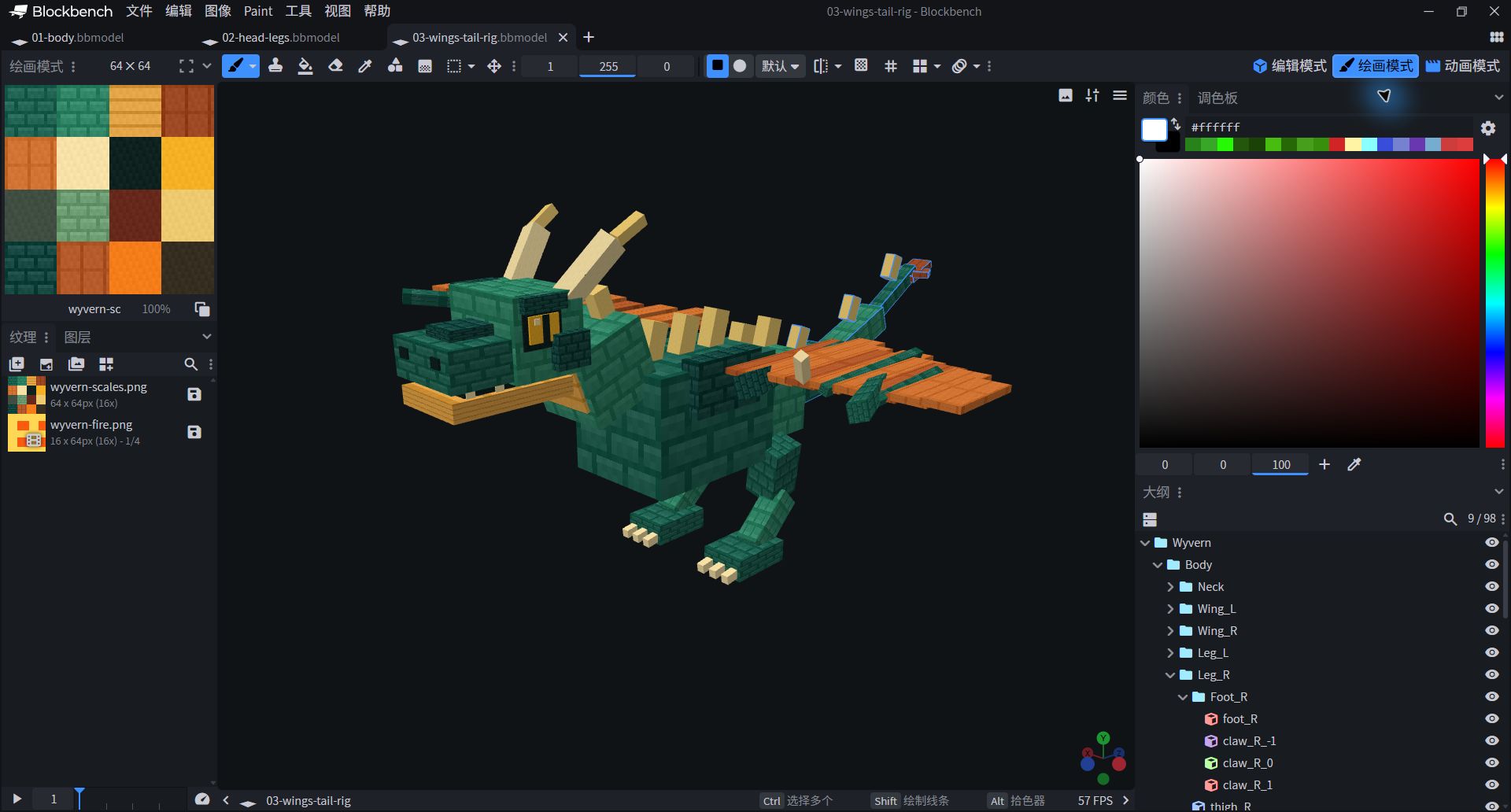
- Paint mode brings the pixel map, 3D model, and color tools together to make it easy to check which side the color falls on.
- The checkpoint already has a texture; please save your own project first, and then try to change the color to avoid overwriting the reference image.
First breath: flap your wings and fly
Make the main wings right first, then add the wing tips, body and tail.
- Switch to Animation mode (Animate)New
wyvern.fly, duration 1.2 seconds, with Loop enabled. Select Wing_L, add the following five keyframes to its Rotation track, and choose Linear interpolation. - Wing_L only changes Z; Wing_R uses the opposite Z value. Play it back first and make sure both sides are lifting up and down together, not up and down like a seesaw.
| seconds | Wing_L · Z° | Wing_R · Z° | Wyvern · Position Y |
|---|---|---|---|
| 0 | 8 | -8 | 0.6 |
| 0.3 | -32 | 32 | 1.6 |
| 0.6 | 8 | -8 | 0.6 |
| 0.9 | 30 | -30 | 0 |
| 1.2 | 8 | -8 | 0.6 |
Then fill in Y in the table for Wyvern's Position track, and keep X and Z at 0.This animation offset is relative to the original position., instead of changing the body model coordinates to Y=0.6. Each time you add only one change, make sure it goes on.
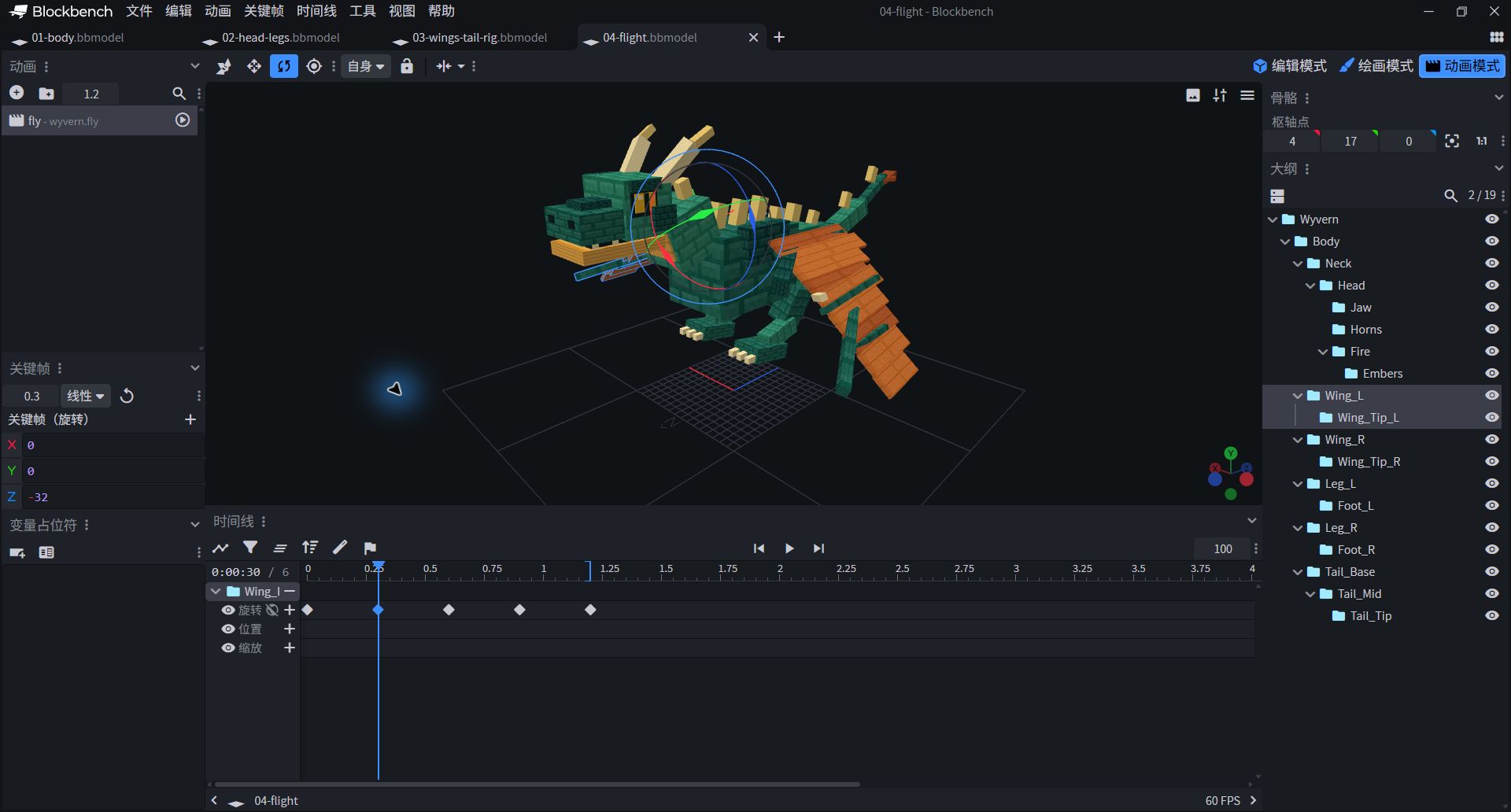
- Select fly · wyvern.fly on the upper left, and Wing_L on the right; the values on the lower left are X=0, Y=0, Z=−32.
- In this screenshot, both the playhead and the selected keyframe are at 0.3 seconds. Drag the playhead to preview the pose; click a diamond keyframe to edit its values. These are different actions.
The wing tip also participates in the action: Wing_Tip_L at 0 / 0.3 / 0.6 / 0.9 / 1.2 seconds Y and Z are respectively (0,4), (−6,−10), (0,4), (8,13), (0,4); negate both Y and Z for the right wingtip, keeping X at 0. Finally, add gentle head motion, movement for all three tail sections, and folded legs. The complete values are listed below, so you do not need to guess them from screenshots.
Expand all key frames of wyvern.fly
Rotation unit is degree, Position is model unit, Scale is magnification; all frames use Linear. The scaling of Fire is 0, which is used to hide the fire when flying. It will be added after setting up Fire in step 7.
| Grouping | Track | seconds | X / Y / Z |
|---|---|---|---|
| Wyvern | position | 0 | 0 / 0.6 / 0 |
| Wyvern | position | 0.3 | 0 / 1.6 / 0 |
| Wyvern | position | 0.6 | 0 / 0.6 / 0 |
| Wyvern | position | 0.9 | 0 / 0 / 0 |
| Wyvern | position | 1.2 | 0 / 0.6 / 0 |
| Head | rotation | 0 | 3 / 0 / 0 |
| Head | rotation | 0.6 | -3 / 0 / 0 |
| Head | rotation | 1.2 | 3 / 0 / 0 |
| Tail_Base | rotation | 0 | 0 / -7 / 0 |
| Tail_Base | rotation | 0.6 | 0 / 7 / 0 |
| Tail_Base | rotation | 1.2 | 0 / -7 / 0 |
| Tail_Mid | rotation | 0 | 0 / 9 / 0 |
| Tail_Mid | rotation | 0.6 | 0 / -9 / 0 |
| Tail_Mid | rotation | 1.2 | 0 / 9 / 0 |
| Tail_Tip | rotation | 0 | 0 / -12 / 0 |
| Tail_Tip | rotation | 0.6 | 0 / 12 / 0 |
| Tail_Tip | rotation | 1.2 | 0 / -12 / 0 |
| Jaw | rotation | 0 | 0 / 0 / 0 |
| Jaw | rotation | 1.2 | 0 / 0 / 0 |
| Fire | scale | 0 | 0 / 0 / 0 |
| Fire | scale | 1.2 | 0 / 0 / 0 |
| Wing_L | rotation | 0 | 0 / 0 / 8 |
| Wing_L | rotation | 0.3 | 0 / 0 / -32 |
| Wing_L | rotation | 0.6 | 0 / 0 / 8 |
| Wing_L | rotation | 0.9 | 0 / 0 / 30 |
| Wing_L | rotation | 1.2 | 0 / 0 / 8 |
| Wing_Tip_L | rotation | 0 | 0 / 0 / 4 |
| Wing_Tip_L | rotation | 0.3 | 0 / -6 / -10 |
| Wing_Tip_L | rotation | 0.6 | 0 / 0 / 4 |
| Wing_Tip_L | rotation | 0.9 | 0 / 8 / 13 |
| Wing_Tip_L | rotation | 1.2 | 0 / 0 / 4 |
| Leg_L | rotation | 0 | 25 / 0 / 0 |
| Leg_L | rotation | 0.6 | 32 / 0 / 0 |
| Leg_L | rotation | 1.2 | 25 / 0 / 0 |
| Foot_L | rotation | 0 | -18 / 0 / 0 |
| Foot_L | rotation | 1.2 | -18 / 0 / 0 |
| Wing_R | rotation | 0 | 0 / 0 / -8 |
| Wing_R | rotation | 0.3 | 0 / 0 / 32 |
| Wing_R | rotation | 0.6 | 0 / 0 / -8 |
| Wing_R | rotation | 0.9 | 0 / 0 / -30 |
| Wing_R | rotation | 1.2 | 0 / 0 / -8 |
| Wing_Tip_R | rotation | 0 | 0 / 0 / -4 |
| Wing_Tip_R | rotation | 0.3 | 0 / 6 / 10 |
| Wing_Tip_R | rotation | 0.6 | 0 / 0 / -4 |
| Wing_Tip_R | rotation | 0.9 | 0 / -8 / -13 |
| Wing_Tip_R | rotation | 1.2 | 0 / 0 / -4 |
| Leg_R | rotation | 0 | 25 / 0 / 0 |
| Leg_R | rotation | 0.6 | 32 / 0 / 0 |
| Leg_R | rotation | 1.2 | 25 / 0 / 0 |
| Foot_R | rotation | 0 | -18 / 0 / 0 |
| Foot_R | rotation | 1.2 | -18 / 0 / 0 |
The second breath: open your mouth and spit fire again
Open your mouth first, then vent your anger; first close your mouth, then shut up.
In Head Establish under Fire, then create inside it Embers. Both sets of pivots are set to 0 / 19.1 / −18.6, close to the mouth. Add the eight flame and spark parts from the size table, using the flame texture and UV coordinates 0 / 0 / 16 / 16.Fire belongs to Head, not Jaw; otherwise, if the lower jaw opens, fire will spray downward.
8 components to unfold flames and sparks
| Part / Group | Position | Size | Rotation ° | Pivot | Texture/UV |
|---|---|---|---|---|---|
| flame_jet_0 Fire | -0.325 / 18.775 / -19.5 | 0.65 / 0.65 / 0.8 | 0 / 0 / 0 | 0 / 19.1 / -19.1 | Flame 0 / 0 / 16 / 16 |
| flame_jet_1 Fire | -0.575 / 18.525 / -20.15 | 1.15 / 1.15 / 0.8 | 0 / 0 / 0 | 0 / 19.1 / -19.75 | Flame 0 / 0 / 16 / 16 |
| flame_jet_2 Fire | -0.85 / 18.25 / -20.8 | 1.7 / 1.7 / 0.8 | 0 / 0 / 0 | 0 / 19.1 / -20.4 | Flame 0 / 0 / 16 / 16 |
| flame_jet_3 Fire | -0.475 / 18.625 / -21.45 | 0.95 / 0.95 / 0.8 | 0 / 0 / 0 | 0 / 19.1 / -21.05 | Flame 0 / 0 / 16 / 16 |
| ember_0 Embers | -1.45 / 19.75 / -21.7 | 0.3 / 0.3 / 0.4 | 0 / 0 / 0 | -1.3 / 19.9 / -21.5 | Flame 0 / 0 / 16 / 16 |
| ember_1 Embers | 1.25 / 18.25 / -21.2 | 0.3 / 0.3 / 0.4 | 0 / 0 / 0 | 1.4 / 18.4 / -21 | Flame 0 / 0 / 16 / 16 |
| ember_2 Embers | 0.45 / 20.15 / -22.3 | 0.3 / 0.3 / 0.4 | 0 / 0 / 0 | 0.6 / 20.3 / -22.1 | Flame 0 / 0 / 16 / 16 |
| ember_3 Embers | -0.95 / 17.95 / -22.1 | 0.3 / 0.3 / 0.4 | 0 / 0 / 0 | -0.8 / 18.1 / -21.9 | Flame 0 / 0 / 16 / 16 |
In the flight animation, increase the Scale of Fire at 0 seconds and 1.2 seconds. 0 / 0 / 0, hiding the flame and its child groups. At this point, compare your work with 04-flight.bbmodelIt already contains flame structures, but it can't be seen while flying.
- New
wyvern.fire_breath, duration 3.2 seconds, Loop. Choose Jaw, Rotation X on 0 / 0.45 / 0.85 / 2.35 / 2.8 / 3.2 secondsSet to respectively 0 / −27 / −30 / −30 / 0 / 0 degreesY, Z hold 0. - Select Fire and add Scale keyframes using the table below. Z is larger than X and Y so that the fire stretches forward from the mouth instead of expanding into a ball.
| Grouping | Track | seconds | X / Y / Z |
|---|---|---|---|
| Fire | scale | 0 | 0 / 0 / 0 |
| Fire | scale | 0.6 | 0 / 0 / 0 |
| Fire | scale | 0.75 | 0.6 / 0.6 / 1.5 |
| Fire | scale | 1 | 1.7 / 1.7 / 4.8 |
| Fire | scale | 1.3 | 1.4 / 1.4 / 5.4 |
| Fire | scale | 1.6 | 1.9 / 1.9 / 4.8 |
| Fire | scale | 1.9 | 1.5 / 1.5 / 5.6 |
| Fire | scale | 2.2 | 1.7 / 1.7 / 5 |
| Fire | scale | 2.5 | 0 / 0 / 0 |
| Fire | scale | 3.2 | 0 / 0 / 0 |
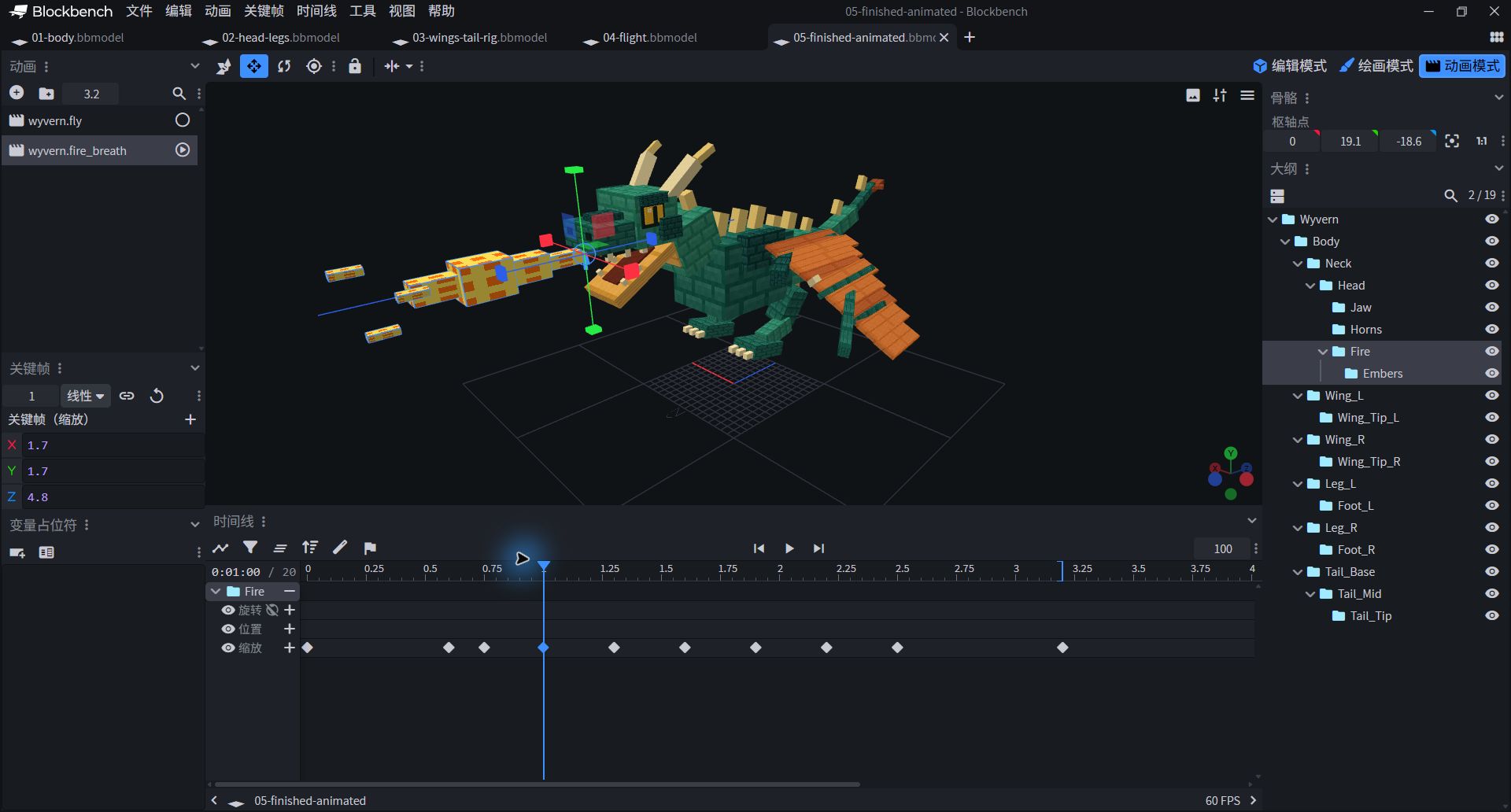
- The right Fire's pivot is 0 / 19.1 / −18.6; the left 1 second keyframe scale is 1.7 / 1.7 / 4.8.
- The bottom 10 key frames are arranged for firing and closing. Embers are in Fire and will inherit its scaling.
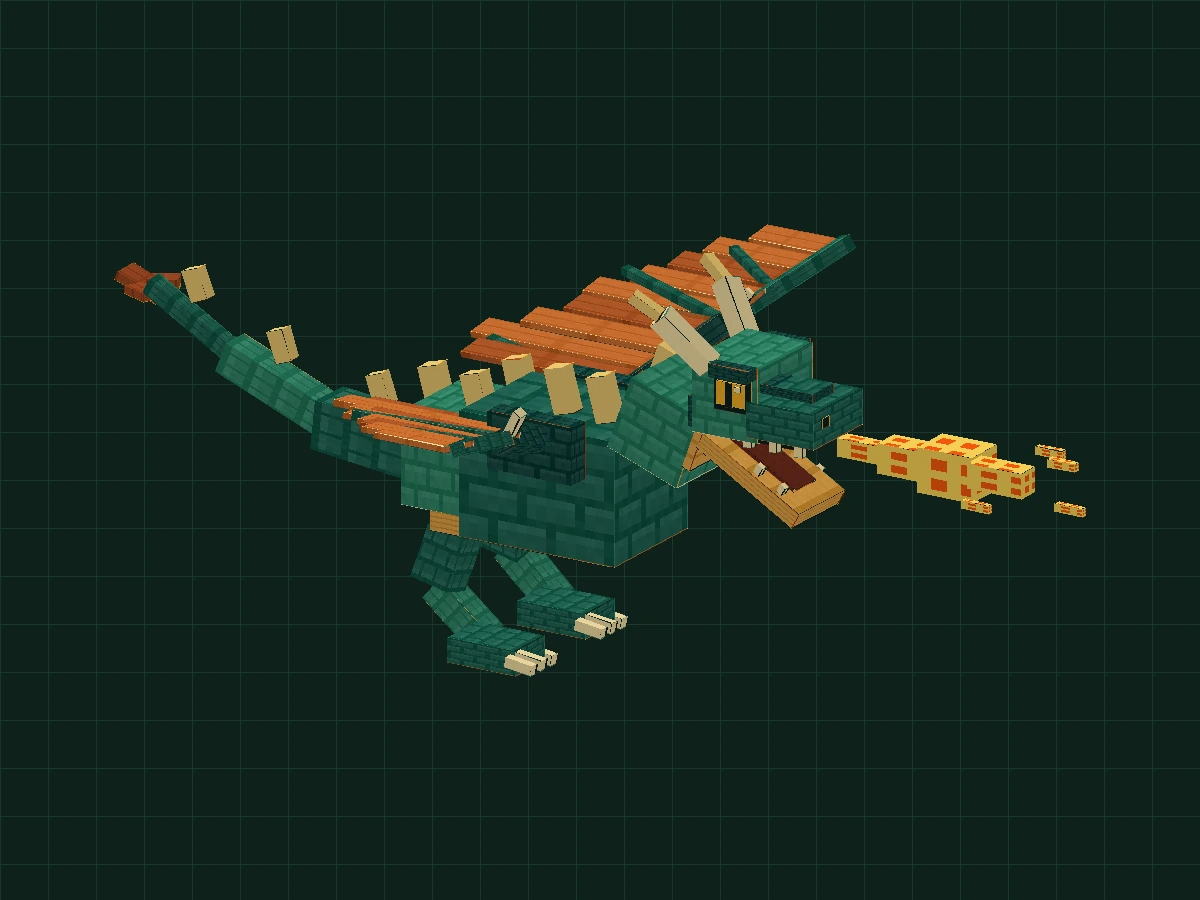
The wings must continue flapping during this action. Change the five keyframe times for the main wings and body to 0 / 0.8 / 1.6 / 2.4 / 3.2 seconds, the position remains constant and is suspended at a slower pace.The two segments are complete segments that are switched and played, not stacked together for playback.
Expand all key frames of wyvern.fire_breath (including head, lower jaw and flight posture)
| Grouping | Track | seconds | X / Y / Z |
|---|---|---|---|
| Wyvern | position | 0 | 0 / 0.6 / 0 |
| Wyvern | position | 0.8 | 0 / 1.6 / 0 |
| Wyvern | position | 1.6 | 0 / 0.6 / 0 |
| Wyvern | position | 2.4 | 0 / 0 / 0 |
| Wyvern | position | 3.2 | 0 / 0.6 / 0 |
| Head | rotation | 0 | 0 / 0 / 0 |
| Head | rotation | 0.5 | -8 / 0 / 0 |
| Head | rotation | 1.1 | 0 / 0 / 0 |
| Head | rotation | 2.3 | 0 / 0 / 0 |
| Head | rotation | 2.7 | -3 / 0 / 0 |
| Head | rotation | 3.2 | 0 / 0 / 0 |
| Tail_Base | rotation | 0 | 0 / -7 / 0 |
| Tail_Base | rotation | 1.6 | 0 / 7 / 0 |
| Tail_Base | rotation | 3.2 | 0 / -7 / 0 |
| Tail_Mid | rotation | 0 | 0 / 9 / 0 |
| Tail_Mid | rotation | 1.6 | 0 / -9 / 0 |
| Tail_Mid | rotation | 3.2 | 0 / 9 / 0 |
| Tail_Tip | rotation | 0 | 0 / -12 / 0 |
| Tail_Tip | rotation | 1.6 | 0 / 12 / 0 |
| Tail_Tip | rotation | 3.2 | 0 / -12 / 0 |
| Jaw | rotation | 0 | 0 / 0 / 0 |
| Jaw | rotation | 0.45 | -27 / 0 / 0 |
| Jaw | rotation | 0.85 | -30 / 0 / 0 |
| Jaw | rotation | 2.35 | -30 / 0 / 0 |
| Jaw | rotation | 2.8 | 0 / 0 / 0 |
| Jaw | rotation | 3.2 | 0 / 0 / 0 |
| Fire | scale | 0 | 0 / 0 / 0 |
| Fire | scale | 0.6 | 0 / 0 / 0 |
| Fire | scale | 0.75 | 0.6 / 0.6 / 1.5 |
| Fire | scale | 1 | 1.7 / 1.7 / 4.8 |
| Fire | scale | 1.3 | 1.4 / 1.4 / 5.4 |
| Fire | scale | 1.6 | 1.9 / 1.9 / 4.8 |
| Fire | scale | 1.9 | 1.5 / 1.5 / 5.6 |
| Fire | scale | 2.2 | 1.7 / 1.7 / 5 |
| Fire | scale | 2.5 | 0 / 0 / 0 |
| Fire | scale | 3.2 | 0 / 0 / 0 |
| Wing_L | rotation | 0 | 0 / 0 / 8 |
| Wing_L | rotation | 0.8 | 0 / 0 / -32 |
| Wing_L | rotation | 1.6 | 0 / 0 / 8 |
| Wing_L | rotation | 2.4 | 0 / 0 / 30 |
| Wing_L | rotation | 3.2 | 0 / 0 / 8 |
| Wing_Tip_L | rotation | 0 | 0 / 0 / 4 |
| Wing_Tip_L | rotation | 0.8 | 0 / -6 / -10 |
| Wing_Tip_L | rotation | 1.6 | 0 / 0 / 4 |
| Wing_Tip_L | rotation | 2.4 | 0 / 8 / 13 |
| Wing_Tip_L | rotation | 3.2 | 0 / 0 / 4 |
| Leg_L | rotation | 0 | 25 / 0 / 0 |
| Leg_L | rotation | 1.6 | 32 / 0 / 0 |
| Leg_L | rotation | 3.2 | 25 / 0 / 0 |
| Foot_L | rotation | 0 | -18 / 0 / 0 |
| Foot_L | rotation | 3.2 | -18 / 0 / 0 |
| Wing_R | rotation | 0 | 0 / 0 / -8 |
| Wing_R | rotation | 0.8 | 0 / 0 / 32 |
| Wing_R | rotation | 1.6 | 0 / 0 / -8 |
| Wing_R | rotation | 2.4 | 0 / 0 / -30 |
| Wing_R | rotation | 3.2 | 0 / 0 / -8 |
| Wing_Tip_R | rotation | 0 | 0 / 0 / -4 |
| Wing_Tip_R | rotation | 0.8 | 0 / 6 / 10 |
| Wing_Tip_R | rotation | 1.6 | 0 / 0 / -4 |
| Wing_Tip_R | rotation | 2.4 | 0 / -8 / -13 |
| Wing_Tip_R | rotation | 3.2 | 0 / 0 / -4 |
| Leg_R | rotation | 0 | 25 / 0 / 0 |
| Leg_R | rotation | 1.6 | 32 / 0 / 0 |
| Leg_R | rotation | 3.2 | 25 / 0 / 0 |
| Foot_R | rotation | 0 | -18 / 0 / 0 |
| Foot_R | rotation | 3.2 | -18 / 0 / 0 |
| Embers | rotation | 0 | 0 / 0 / 0 |
| Embers | rotation | 1.6 | 0 / 0 / 25 |
| Embers | rotation | 3.2 | 0 / 0 / 0 |
Switch, check, save your dragon
In the end, it is not to add an extra decoration, but to check the completeness of the action.
- Open
05-finished-animated.bbmodelComparison: 106 parts, 19 groups, 2 textures, 2 animations. Drag the playhead to view 0 seconds, mouth opening, maximum fire breathing, fire closing, and loop junction. - Play fly → fire_breath → fly. When you return to flight, the mouth should be closed, the Fire scale returned to zero, and the wings continuing to cycle. Look again at the side and front, and check whether the mouth, wing roots and tail roots are falling apart.
- Save as own
my-wyvern.bbmodel. Open it again and confirm that the texture and two animations are there; then make your own changes.
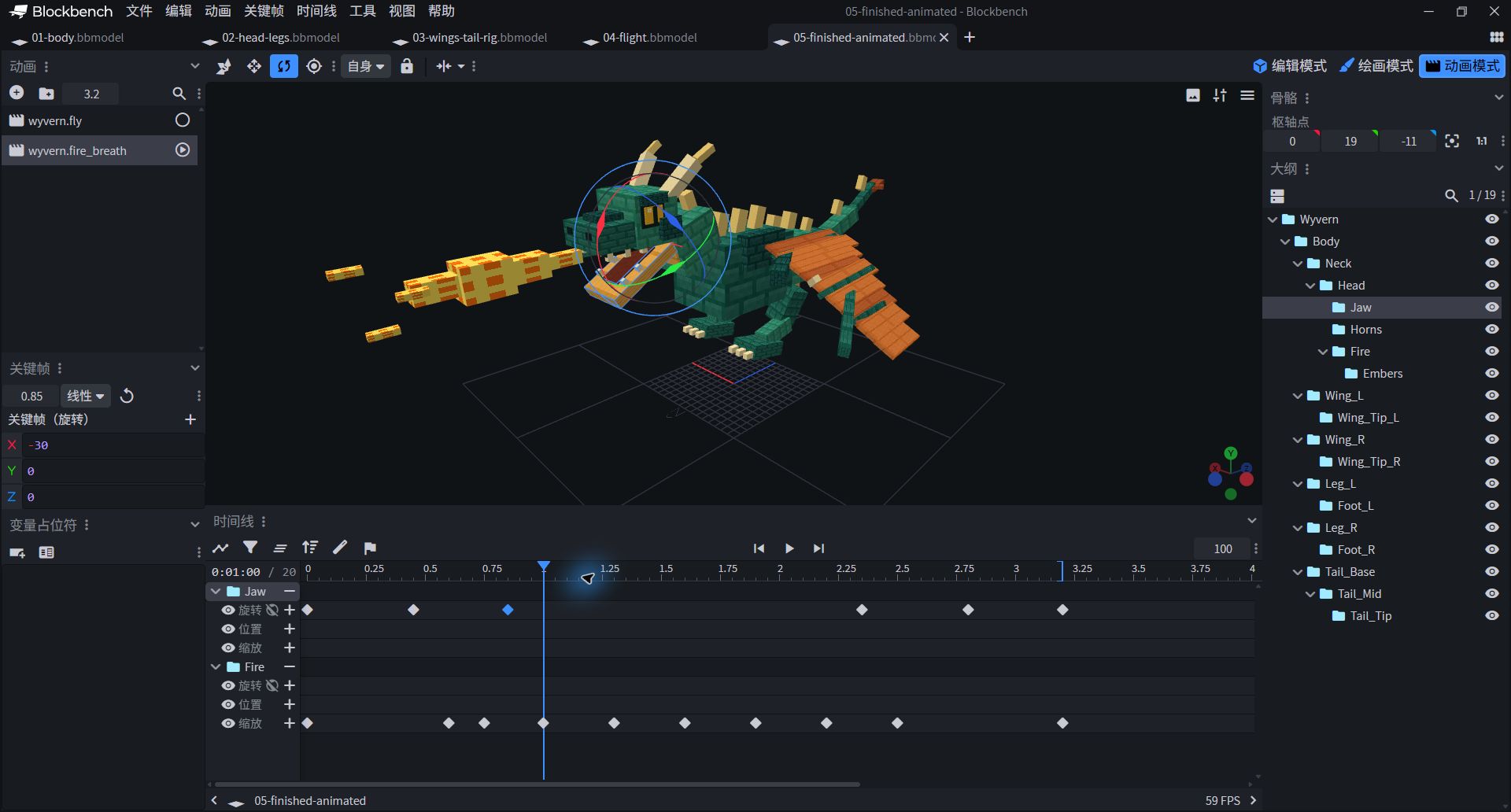
- Bottom shows both Jaw rotation and Fire zoom; playhead at 1 second, selected Jaw frame at 0.85 seconds, X=−30°.
- At this moment, the mouth opens and the flame stretches forward. Switch back to fly and make sure the mouth is closed and the flames are hidden; do not change the preview pose to the default modeling pose.
YOUR DRAGON, YOUR STORY
Now, it's your turn to decide its character.
You have given a group of blocks articulation, a center of gravity, and a rhythm. Keep the finished version first, then change just one variable to see who the dragon turns into.
- Make It Lighter:Reduce body undulation and main wing angle to compare whether it is like gliding or hovering.
- Hesitate:Wait another 0.2 seconds after the mouth opens before releasing the fire, then adjust the ending to preserve a complete loop.
- Change the atmosphere:Save the blue-green texture to make the ice dragon; if the vision changes, the game damage type will not automatically change.
QUICK RESCUE
Which Part of Your Wyvern Is Misbehaving?
The wings move up and down, like a seesaw.
The Z rotation of the left and right main wings should have opposite signs. Looking at the pivots again: Wing_L is 4/17/0 and Wing_R is −4/17/0. Don't judge the group name just by looking at the left and right sides of the screen.
The wing tips or tail tips stayed in place and did not move.
Check the indentation of the outline: Wing_Tip must be under Wing on the same side; Tail_Tip must be under Tail_Mid, and Tail_Mid must be under Tail_Base. Grouping side by side does not equal a parent-child relationship.
The flame sprays downward, or hangs on the mouth while flying.
Fire should be placed directly inside the Head rather than the Jaw; the pivot is 0 / 19.1 / −18.6. The Fire Scale of the flight animation should be set to 0 / 0 / 0 at the beginning and end. The fire breathing clip should also reset to zero after 2.5 seconds.
The position of the oblique bones, legs or horns is incorrect.
First check the Position and Size of the component, and then check the Pivot and Rotation of the component itself. Do not use grouped rotations instead of individual part rotations. Available Phase 03 Compare with your own project.
The model has no texture, or the flames appear as four strips.
Prioritize opening checkpoints for embedded textures. The scale image is 64×64; the flame image is 16×64, but the UVs per frame are 16×16, don’t spread the entire strip onto one surface. The static single-frame version is available for beginners.
The 3D webpage fails to load, can I still learn?
Yes. Screenshots, parameters and downloaded projects are available independently. The real-time model requires WebGL and an Internet connection to load Three.js; you can also open the complete .bbmodel in Blockbench locally to view.
Tool Description and Extended Reading
The part and keyframe values come directly from this lesson's wyvern project, and the screenshots were captured in the actual software. Refer to the official Blockbench documentation for interface tools and export concepts.
Official: Interface, grouping and animation tools ↗Official: Export format ↗Back to Course Contents →