
BEFORE YOU BUILD
It's a class called "Breaking Sports".
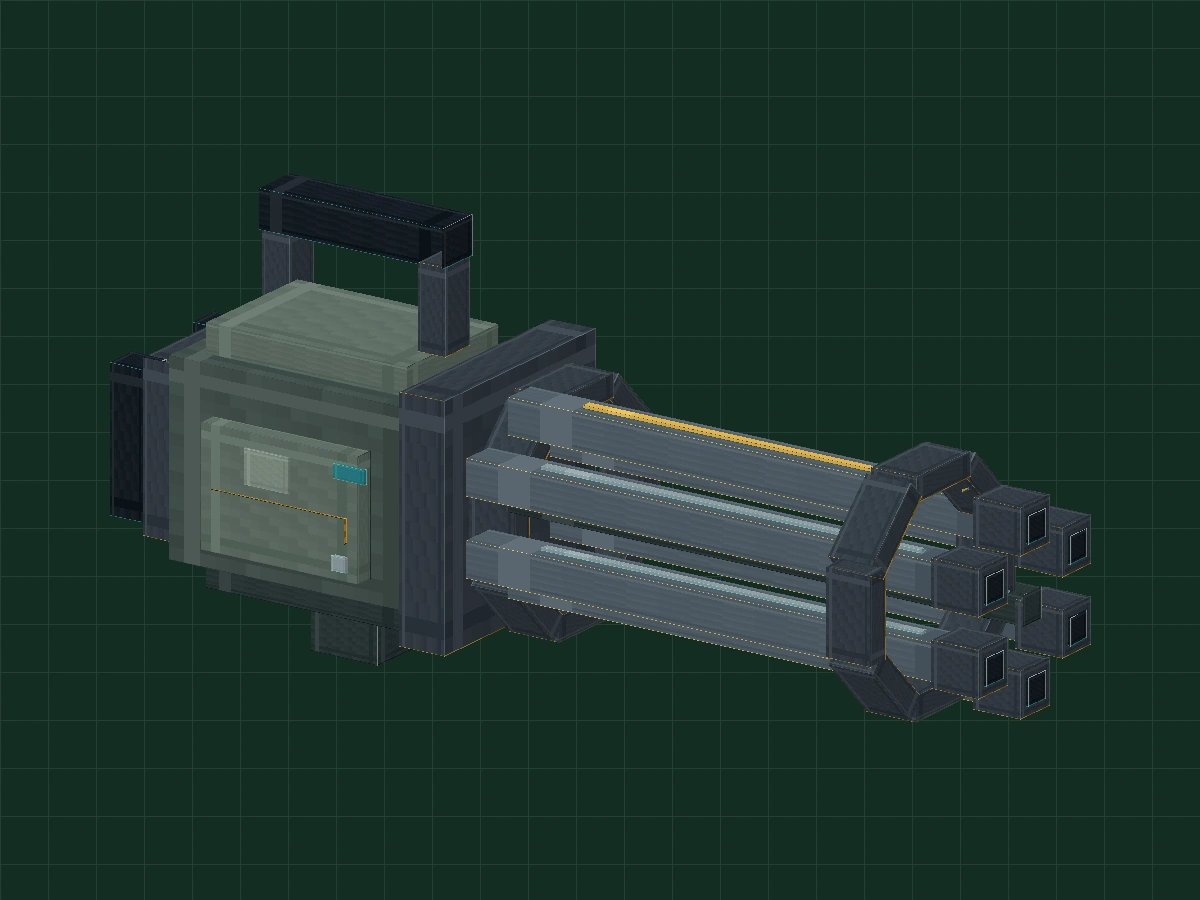
Make a piece with the recognizable outline of modern American six-tube Gatling Minecraft style game appearance model. All parameters are in arbitrary modeling units; do not correspond to real-life dimensions, nor are internal mechanisms modeled. The barrel is made of solid blocks, and the dark end face is just a pixel shape.
Prepare Blockbench 5.x, select Generic Model/general model. For first time use, you can do this firstPumpkin lantern introductory course.
Download 5-stage project · 35 KB ↓01-body-shell.bbmodel13 widgets · 3 groups · 0 animations02-six-barrels.bbmodel54 widgets · 4 groups · 0 animations03-textured-details.bbmodel65 widgets · 5 groups · 0 animations04-rotating-barrels.bbmodel65 parts · 5 groups · 1 animation05-finished-two-speeds.bbmodel65 widgets · 5 groups · 2 animations
Phase project preset textures to facilitate observation. The software screenshot was taken in the Chinese version of this machine, Blockbench, and did not run continuously from the blank project; the structure chart is marked separately. Please save a copy of your practice first.
Create a new project and determine an axis
First decide which side is the front, and then decide where to go around.
- Create a new Generic Model and name it
my_gatling_proptexture set to 64 × 64, use the face-to-face UV to save .bbmodel first. - The front end faces +XY for height, Z for thickness. Create the outermost layer of Display, Pivot as 0 / 10 / 0.
- Under Display, build Body and Handles first. Open stage 01 to compare the main outline: 13 squares in total, 3 groups.
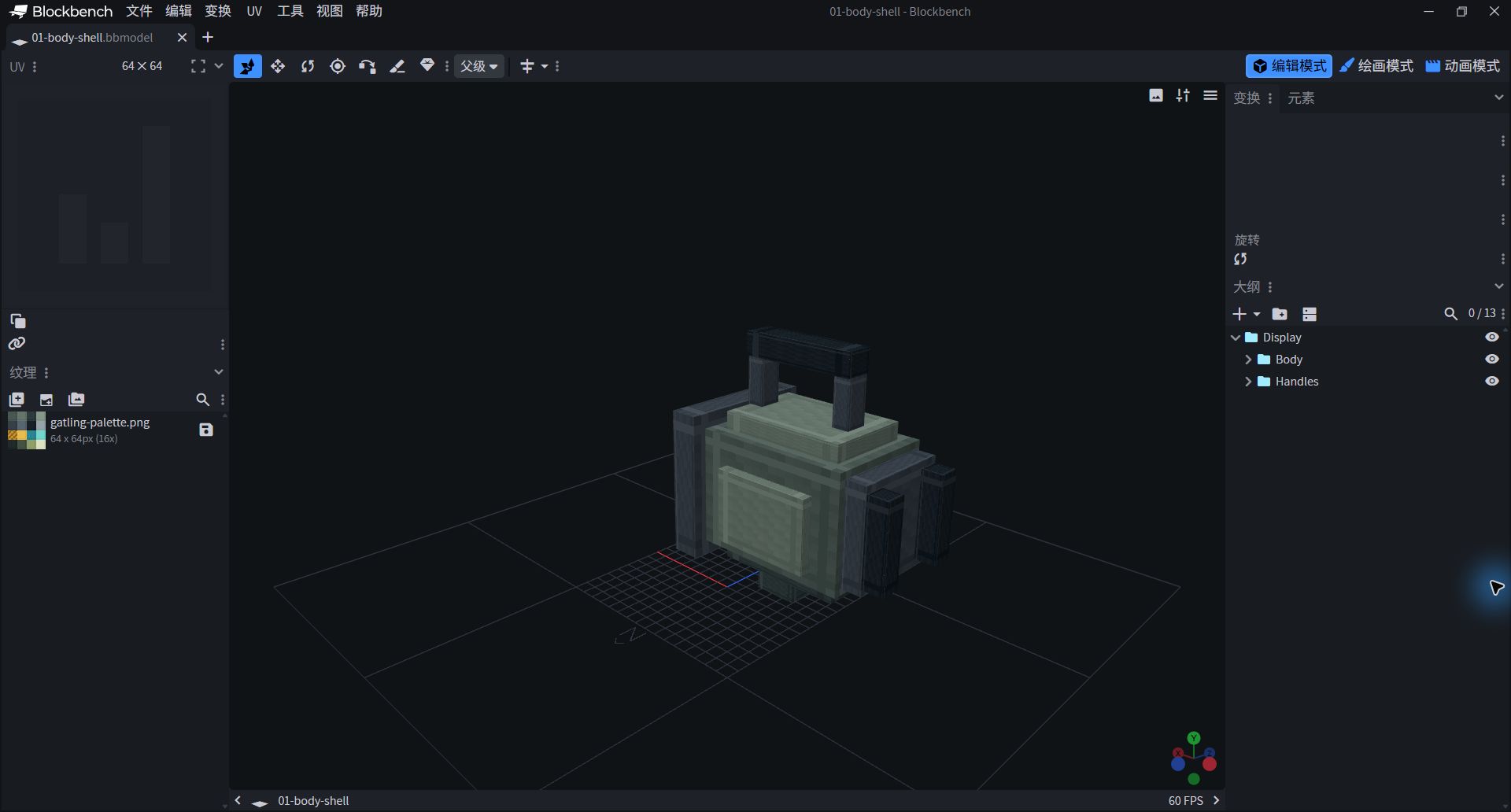
- Centrally look at the contours, right-hand outline of Body and Handles.
- Save your own copy first, and then start adjusting.
The main body that cannot be hit first
First use a large block to explain the volume clearly.
- Create in Body
body_main,Position −13 / 6 / −4,Size 11 / 8 / 8,Rotation is 0/ 0/ 0. - Use the top, bottom, back cover and patches on both sides to separate the layers. Position is the starting point of the block, not the center; the component Pivot is reserved according to the parameter list.
- Add two upper columns, a handle and two rear grip profiles to Handles. They remain stationary with the subject and are not put into the Rotor.
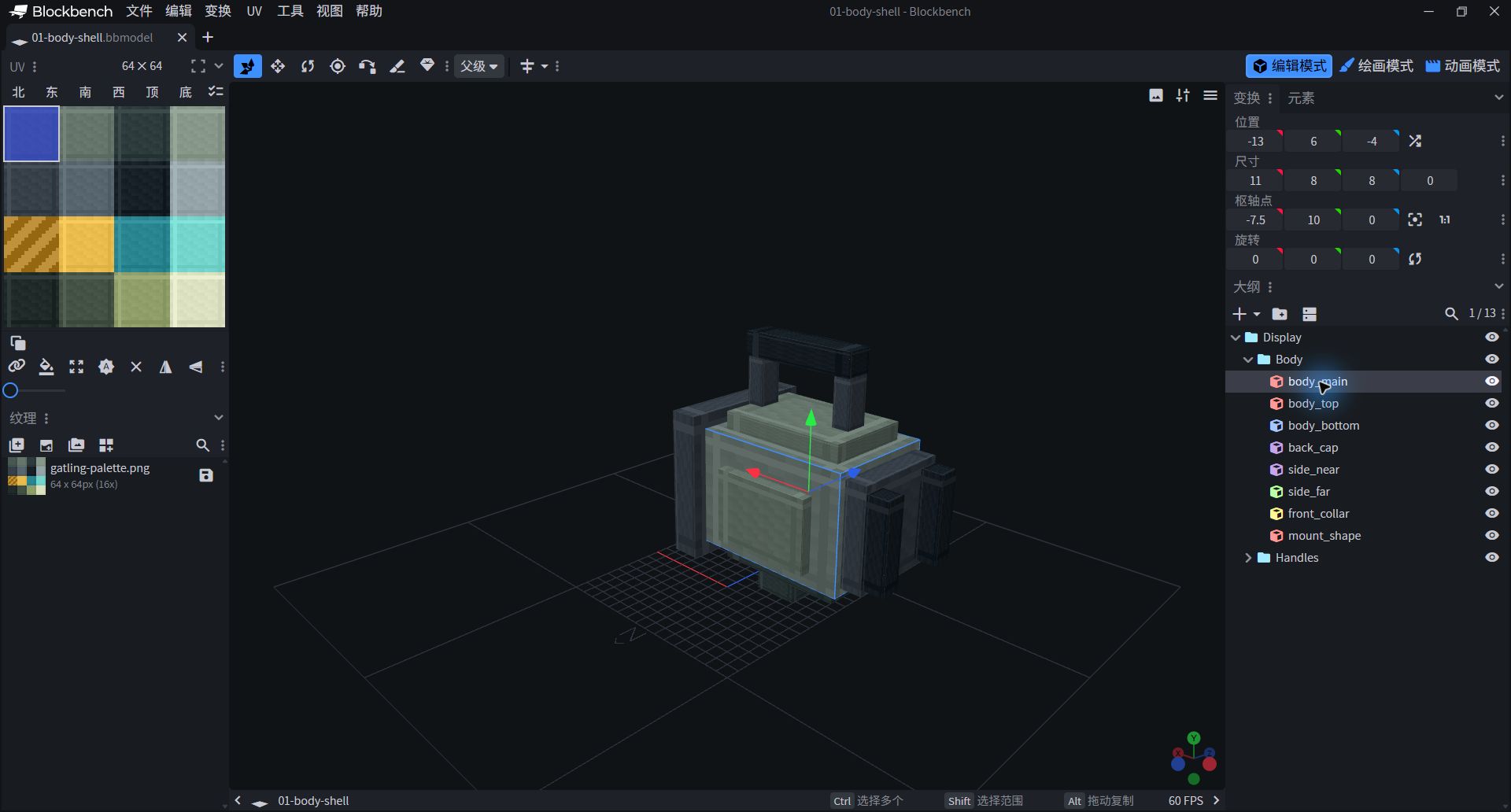
- The right side shows the current block's position, size, and pivot.
- Body and Handles do not add rotation keyframes.

13 main body and handle component parameters
| Part / Group | Position | Size | Rotation ° | Pivot | UV |
|---|---|---|---|---|---|
| body_main Body | -13 / 6 / -4 | 11 / 8 / 8 | 0 / 0 / 0 | -7.5 / 10 / 0 | 0 / 0 / 16 / 16 |
| body_top Body | -12 / 14 / -3 | 9 / 1.2 / 6 | 0 / 0 / 0 | -7.5 / 14.6 / 0 | 16 / 0 / 32 / 16 |
| body_bottom Body | -12 / 4.8 / -3 | 9 / 1.2 / 6 | 0 / 0 / 0 | -7.5 / 5.4 / 0 | 32 / 0 / 48 / 16 |
| back_cap Body | -14.5 / 6.5 / -3.5 | 1.5 / 7 / 7 | 0 / 0 / 0 | -13.75 / 10 / 0 | 0 / 16 / 16 / 32 |
| side_near Body | -11 / 7 / 4 | 7 / 5 / 0.8 | 0 / 0 / 0 | -7.5 / 9.5 / 4.4 | 16 / 0 / 32 / 16 |
| side_far Body | -11 / 7 / -4.8 | 7 / 5 / 0.8 | 0 / 0 / 0 | -7.5 / 9.5 / -4.4 | 16 / 0 / 32 / 16 |
| front_collar Body | -2 / 5 / -5 | 2 / 10 / 10 | 0 / 0 / 0 | -1 / 10 / 0 | 0 / 16 / 16 / 32 |
| mount_shape Body | -8 / 2.8 / -2 | 3 / 2 / 4 | 0 / 0 / 0 | -6.5 / 3.8 / 0 | 32 / 0 / 48 / 16 |
| top_post_back Handles | -11 / 15 / -0.8 | 1.2 / 3.5 / 1.6 | 0 / 0 / 0 | -10.4 / 16.75 / 0 | 0 / 16 / 16 / 32 |
| top_post_front Handles | -4 / 15 / -0.8 | 1.2 / 3.5 / 1.6 | 0 / 0 / 0 | -3.4 / 16.75 / 0 | 0 / 16 / 16 / 32 |
| top_grip Handles | -11 / 18.5 / -1 | 8.2 / 1.6 / 2 | 0 / 0 / 0 | -6.9 / 19.3 / 0 | 32 / 16 / 48 / 32 |
| rear_grip_near Handles | -16 / 7 / 2 | 1.5 / 6 / 1.5 | 0 / 0 / 0 | -15.25 / 10 / 2.75 | 32 / 16 / 48 / 32 |
| rear_grip_far Handles | -16 / 7 / -3.5 | 1.5 / 6 / 1.5 | 0 / 0 / 0 | -15.25 / 10 / -2.75 | 32 / 16 / 48 / 32 |
Six gun barrels, forming a circle
Before copying six times, first find the six positions.
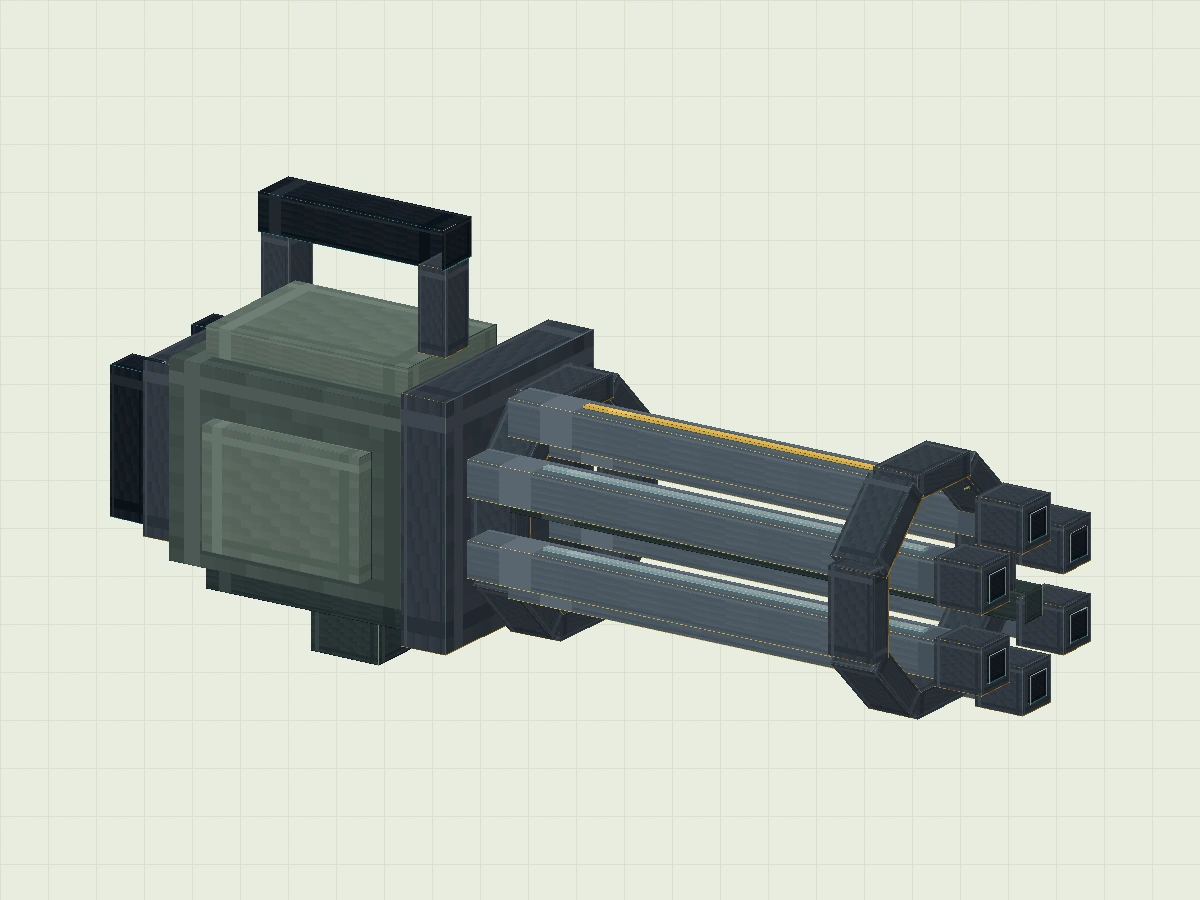
Create under Display Rotor. The lengths of the six cuboids are all along X: Size is 23 / 1.5 / 1.5. They are arranged around Y=10, Z=0 with a center distance of 3.2Virtual Modelling Unit. The table below shows the center; when filling in Position, subtract 0.75 from each of Y and Z, and fill in 0 for X.
| Widgets | Center Y | Center Z |
|---|---|---|
| barrel_1 | 13.2 | 0 |
| barrel_2 | 11.6 | 2.771 |
| barrel_3 | 8.4 | 2.771 |
| barrel_4 | 6.8 | 0 |
| barrel_5 | 8.4 | -2.771 |
| barrel_6 | 11.6 | -2.771 |
For example barrel_1 is
The Z rotation of 0 / 12.45 / −0.75. The small end squares, dark end faces and bright strips are also arranged along the respective barrels. There are 8 pieces in each of the two circles of decorative frames, and the X rotation of the single piece is set at 0°, 45°...315°; this is an appearance decoration, not a real mechanism.

- Phase 02 totals 54 parts, with 41 new Rator components.
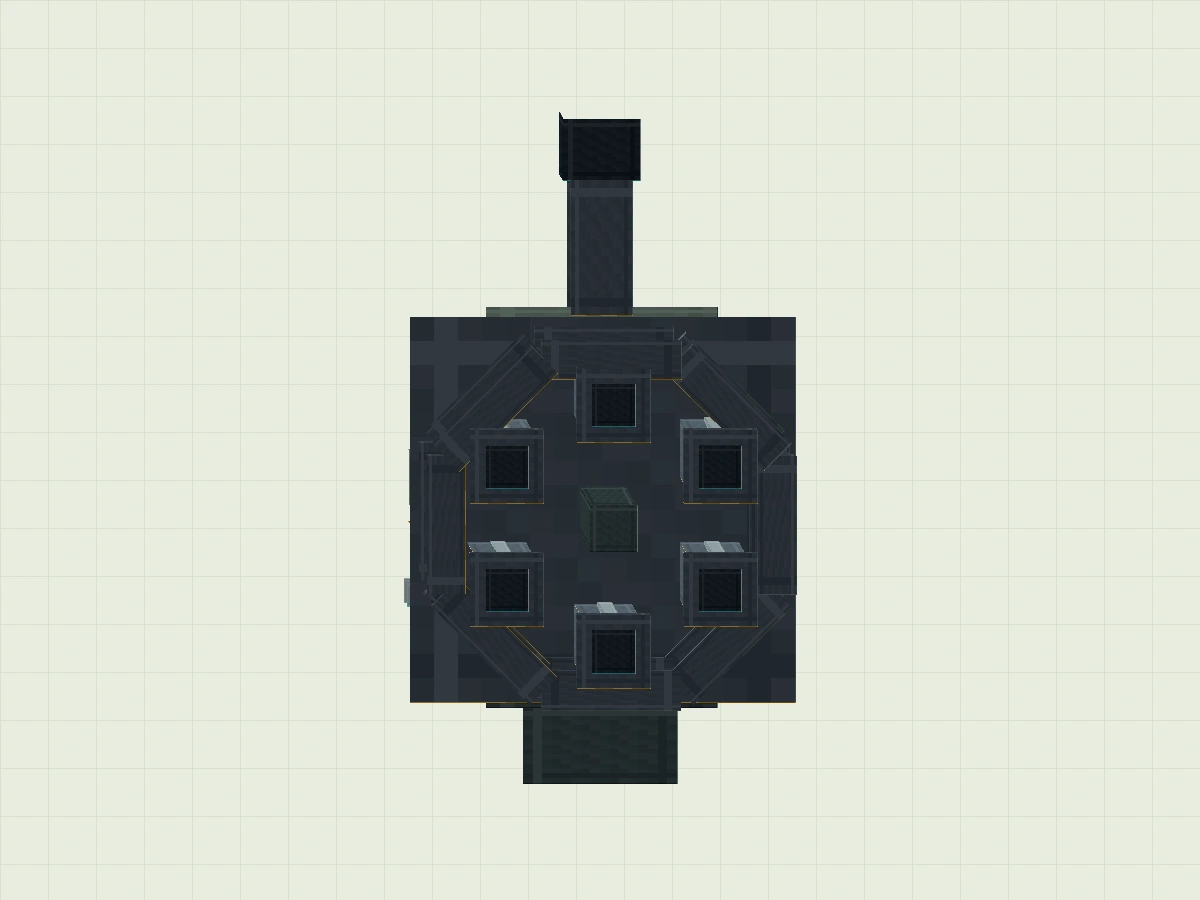
- Looking around the end face, there should be a gap between the six barrels.
Rotor parameters and UVs for all 41 parts
| Part / Group | Position | Size | Rotation ° | Pivot | UV |
|---|---|---|---|---|---|
| rotor_core Rotor | 0 / 9.4 / -0.6 | 23 / 1.2 / 1.2 | 0 / 0 / 0 | 11.5 / 10 / 0 | 32 / 0 / 48 / 16 |
| barrel_1 Rotor | 0 / 12.45 / -0.75 | 23 / 1.5 / 1.5 | 0 / 0 / 0 | 11.5 / 13.2 / 0 | 16 / 16 / 32 / 32 |
| barrel_tip_1 Rotor | 21 / 12.25 / -0.95 | 2.1 / 1.9 / 1.9 | 0 / 0 / 0 | 22.05 / 13.2 / 0 | 0 / 16 / 16 / 32 |
| barrel_cap_1 Rotor | 23.11 / 12.65 / -0.55 | 0.08 / 1.1 / 1.1 | 0 / 0 / 0 | 23.15 / 13.2 / 0 | 32 / 16 / 48 / 32 |
| barrel_marker_1 Rotor | 3 / 13.96 / -0.18 | 17 / 0.1 / 0.36 | 0 / 0 / 0 | 11.5 / 14.01 / 0 | 16 / 32 / 32 / 48 |
| barrel_2 Rotor | 0 / 10.85 / 2.021 | 23 / 1.5 / 1.5 | 0 / 0 / 0 | 11.5 / 11.6 / 2.771 | 16 / 16 / 32 / 32 |
| barrel_tip_2 Rotor | 21 / 10.65 / 1.821 | 2.1 / 1.9 / 1.9 | 0 / 0 / 0 | 22.05 / 11.6 / 2.771 | 0 / 16 / 16 / 32 |
| barrel_cap_2 Rotor | 23.11 / 11.05 / 2.221 | 0.08 / 1.1 / 1.1 | 0 / 0 / 0 | 23.15 / 11.6 / 2.771 | 32 / 16 / 48 / 32 |
| barrel_marker_2 Rotor | 3 / 12.36 / 2.591 | 17 / 0.1 / 0.36 | 0 / 0 / 0 | 11.5 / 12.41 / 2.771 | 48 / 16 / 64 / 32 |
| barrel_3 Rotor | 0 / 7.65 / 2.021 | 23 / 1.5 / 1.5 | 0 / 0 / 0 | 11.5 / 8.4 / 2.771 | 16 / 16 / 32 / 32 |
| barrel_tip_3 Rotor | 21 / 7.45 / 1.821 | 2.1 / 1.9 / 1.9 | 0 / 0 / 0 | 22.05 / 8.4 / 2.771 | 0 / 16 / 16 / 32 |
| barrel_cap_3 Rotor | 23.11 / 7.85 / 2.221 | 0.08 / 1.1 / 1.1 | 0 / 0 / 0 | 23.15 / 8.4 / 2.771 | 32 / 16 / 48 / 32 |
| barrel_marker_3 Rotor | 3 / 9.16 / 2.591 | 17 / 0.1 / 0.36 | 0 / 0 / 0 | 11.5 / 9.21 / 2.771 | 48 / 16 / 64 / 32 |
| barrel_4 Rotor | 0 / 6.05 / -0.75 | 23 / 1.5 / 1.5 | 0 / 0 / 0 | 11.5 / 6.8 / 0 | 16 / 16 / 32 / 32 |
| barrel_tip_4 Rotor | 21 / 5.85 / -0.95 | 2.1 / 1.9 / 1.9 | 0 / 0 / 0 | 22.05 / 6.8 / 0 | 0 / 16 / 16 / 32 |
| barrel_cap_4 Rotor | 23.11 / 6.25 / -0.55 | 0.08 / 1.1 / 1.1 | 0 / 0 / 0 | 23.15 / 6.8 / 0 | 32 / 16 / 48 / 32 |
| barrel_marker_4 Rotor | 3 / 7.56 / -0.18 | 17 / 0.1 / 0.36 | 0 / 0 / 0 | 11.5 / 7.61 / 0 | 48 / 16 / 64 / 32 |
| barrel_5 Rotor | 0 / 7.65 / -3.521 | 23 / 1.5 / 1.5 | 0 / 0 / 0 | 11.5 / 8.4 / -2.771 | 16 / 16 / 32 / 32 |
| barrel_tip_5 Rotor | 21 / 7.45 / -3.721 | 2.1 / 1.9 / 1.9 | 0 / 0 / 0 | 22.05 / 8.4 / -2.771 | 0 / 16 / 16 / 32 |
| barrel_cap_5 Rotor | 23.11 / 7.85 / -3.321 | 0.08 / 1.1 / 1.1 | 0 / 0 / 0 | 23.15 / 8.4 / -2.771 | 32 / 16 / 48 / 32 |
| barrel_marker_5 Rotor | 3 / 9.16 / -2.951 | 17 / 0.1 / 0.36 | 0 / 0 / 0 | 11.5 / 9.21 / -2.771 | 48 / 16 / 64 / 32 |
| barrel_6 Rotor | 0 / 10.85 / -3.521 | 23 / 1.5 / 1.5 | 0 / 0 / 0 | 11.5 / 11.6 / -2.771 | 16 / 16 / 32 / 32 |
| barrel_tip_6 Rotor | 21 / 10.65 / -3.721 | 2.1 / 1.9 / 1.9 | 0 / 0 / 0 | 22.05 / 11.6 / -2.771 | 0 / 16 / 16 / 32 |
| barrel_cap_6 Rotor | 23.11 / 11.05 / -3.321 | 0.08 / 1.1 / 1.1 | 0 / 0 / 0 | 23.15 / 11.6 / -2.771 | 32 / 16 / 48 / 32 |
| barrel_marker_6 Rotor | 3 / 12.36 / -2.951 | 17 / 0.1 / 0.36 | 0 / 0 / 0 | 11.5 / 12.41 / -2.771 | 48 / 16 / 64 / 32 |
| band_rear_1 Rotor | 1 / 13.8 / -1.8 | 2 / 1 / 3.6 | 0 / 0 / 0 | 2 / 14.3 / 0 | 0 / 16 / 16 / 32 |
| band_rear_2 Rotor | 1 / 12.541 / 1.241 | 2 / 1 / 3.6 | 45 / 0 / 0 | 2 / 13.041 / 3.041 | 0 / 16 / 16 / 32 |
| band_rear_3 Rotor | 1 / 9.5 / 2.5 | 2 / 1 / 3.6 | 90 / 0 / 0 | 2 / 10 / 4.3 | 0 / 16 / 16 / 32 |
| band_rear_4 Rotor | 1 / 6.459 / 1.241 | 2 / 1 / 3.6 | 135 / 0 / 0 | 2 / 6.959 / 3.041 | 0 / 16 / 16 / 32 |
| band_rear_5 Rotor | 1 / 5.2 / -1.8 | 2 / 1 / 3.6 | 180 / 0 / 0 | 2 / 5.7 / 0 | 0 / 16 / 16 / 32 |
| band_rear_6 Rotor | 1 / 6.459 / -4.841 | 2 / 1 / 3.6 | 225 / 0 / 0 | 2 / 6.959 / -3.041 | 0 / 16 / 16 / 32 |
| band_rear_7 Rotor | 1 / 9.5 / -6.1 | 2 / 1 / 3.6 | 270 / 0 / 0 | 2 / 10 / -4.3 | 0 / 16 / 16 / 32 |
| band_rear_8 Rotor | 1 / 12.541 / -4.841 | 2 / 1 / 3.6 | 315 / 0 / 0 | 2 / 13.041 / -3.041 | 0 / 16 / 16 / 32 |
| band_front_1 Rotor | 17 / 13.8 / -1.8 | 2 / 1 / 3.6 | 0 / 0 / 0 | 18 / 14.3 / 0 | 0 / 16 / 16 / 32 |
| band_front_2 Rotor | 17 / 12.541 / 1.241 | 2 / 1 / 3.6 | 45 / 0 / 0 | 18 / 13.041 / 3.041 | 0 / 16 / 16 / 32 |
| band_front_3 Rotor | 17 / 9.5 / 2.5 | 2 / 1 / 3.6 | 90 / 0 / 0 | 18 / 10 / 4.3 | 0 / 16 / 16 / 32 |
| band_front_4 Rotor | 17 / 6.459 / 1.241 | 2 / 1 / 3.6 | 135 / 0 / 0 | 18 / 6.959 / 3.041 | 0 / 16 / 16 / 32 |
| band_front_5 Rotor | 17 / 5.2 / -1.8 | 2 / 1 / 3.6 | 180 / 0 / 0 | 18 / 5.7 / 0 | 0 / 16 / 16 / 32 |
| band_front_6 Rotor | 17 / 6.459 / -4.841 | 2 / 1 / 3.6 | 225 / 0 / 0 | 18 / 6.959 / -3.041 | 0 / 16 / 16 / 32 |
| band_front_7 Rotor | 17 / 9.5 / -6.1 | 2 / 1 / 3.6 | 270 / 0 / 0 | 18 / 10 / -4.3 | 0 / 16 / 16 / 32 |
| band_front_8 Rotor | 17 / 12.541 / -4.841 | 2 / 1 / 3.6 | 315 / 0 / 0 | 18 / 13.041 / -3.041 | 0 / 16 / 16 / 32 |
Put the rotating parts together
The pivot is like an invisible thread that strings together actions.
Add 11 pixel decorations of Details to get 65 blocks, 5 groups. Select Rotor and set the group Pivot to 0 / 10 / 0. The basic rotation of the group remains 0 / 0 / 0, and actions are added to the timeline later.
Display
├─ Body       静止外壳
├─ Handles    静止提把
├─ Details    静止装饰
└─ Rotor      41 个部件一起绕 X 旋转
   ├─ 六根枪管、端面和亮条
   ├─ 两圈装饰框
   └─ 中央造型块
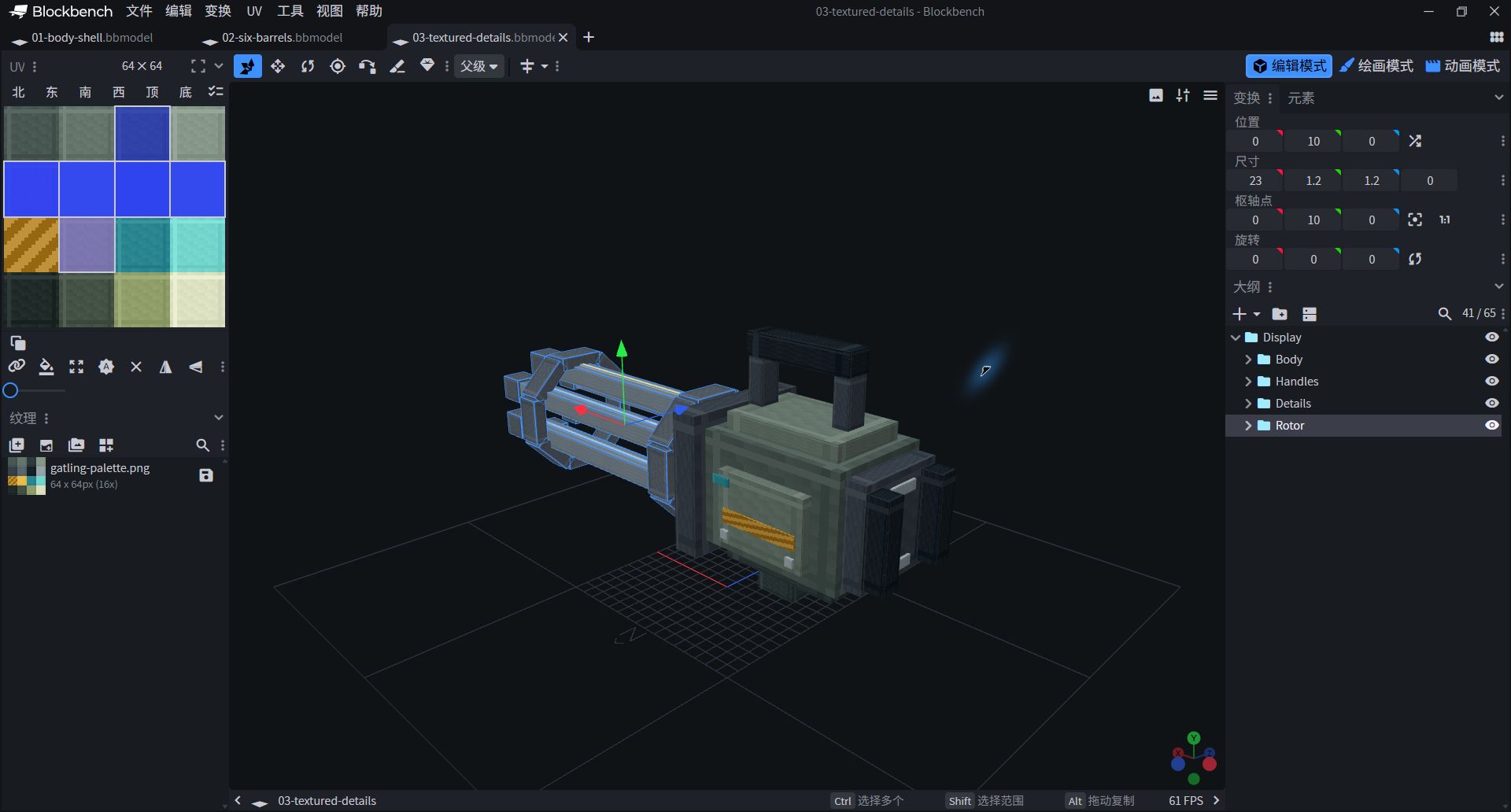
- Rotor's Pivot is 0/10/0.
- The outer shell, handles, and side trim do not belong to the Rotor.
11 shell pixel decoration parameters
| Part / Group | Position | Size | Rotation ° | Pivot | UV |
|---|---|---|---|---|---|
| stripe_near Details | -10.5 / 8.5 / 4.81 | 6 / 1 / 0.12 | 0 / 0 / 0 | -7.5 / 9 / 4.87 | 0 / 32 / 16 / 48 |
| stripe_far Details | -10.5 / 8.5 / -4.93 | 6 / 1 / 0.12 | 0 / 0 / 0 | -7.5 / 9 / -4.87 | 0 / 32 / 16 / 48 |
| status_near Details | -5 / 11 / 4.81 | 1.4 / 0.6 / 0.13 | 0 / 0 / 0 | -4.3 / 11.3 / 4.875 | 32 / 32 / 48 / 48 |
| status_far Details | -5 / 11 / -4.94 | 1.4 / 0.6 / 0.13 | 0 / 0 / 0 | -4.3 / 11.3 / -4.875 | 32 / 32 / 48 / 48 |
| pixel_bolt_near_1 Details | -10.5 / 7.4 / 4.82 | 0.6 / 0.6 / 0.22 | 0 / 0 / 0 | -10.2 / 7.7 / 4.93 | 48 / 16 / 64 / 32 |
| pixel_bolt_near_2 Details | -5 / 7.4 / 4.82 | 0.6 / 0.6 / 0.22 | 0 / 0 / 0 | -4.7 / 7.7 / 4.93 | 48 / 16 / 64 / 32 |
| pixel_bolt_far_1 Details | -10.5 / 7.4 / -5.04 | 0.6 / 0.6 / 0.22 | 0 / 0 / 0 | -10.2 / 7.7 / -4.93 | 48 / 16 / 64 / 32 |
| pixel_bolt_far_2 Details | -5 / 7.4 / -5.04 | 0.6 / 0.6 / 0.22 | 0 / 0 / 0 | -4.7 / 7.7 / -4.93 | 48 / 16 / 64 / 32 |
| back_pixel_top Details | -14.7 / 12 / -1.2 | 0.2 / 0.7 / 2.4 | 0 / 0 / 0 | -14.6 / 12.35 / 0 | 48 / 16 / 64 / 32 |
| back_pixel_bottom Details | -14.7 / 7 / -1.2 | 0.2 / 0.7 / 2.4 | 0 / 0 / 0 | -14.6 / 7.35 / 0 | 48 / 16 / 64 / 32 |
| side_badge Details | -9 / 10 / 4.83 | 2 / 1.4 / 0.12 | 0 / 0 / 0 | -8 / 10.7 / 4.89 | 48 / 0 / 64 / 16 |
Leave observation marks with bright colors
A repeat shape requires an easy-to-identify mark.
- Import
textures/gatling-palette.png, give the gray green to the shell, blue gray to six tubes and darkest to the side. - Enter painting mode and observe the 64x64 atlas. Use 1 pixel light edge to distinguish turns, without having to paint every piece very brightly.
barrel_marker_1Use yellow, and the remaining five bright strips use light gray. It's hard to see the rotation when all six are exactly the same, and the only yellow mark helps you follow a full circle.

The first row of shells; the second row of metal and end faces; the third row of yellow marks and cyan embellishments; the fourth row of spare creative colors.
This lesson shares 16×16 color blocks, and the pixel density is not a strict original expansion standard.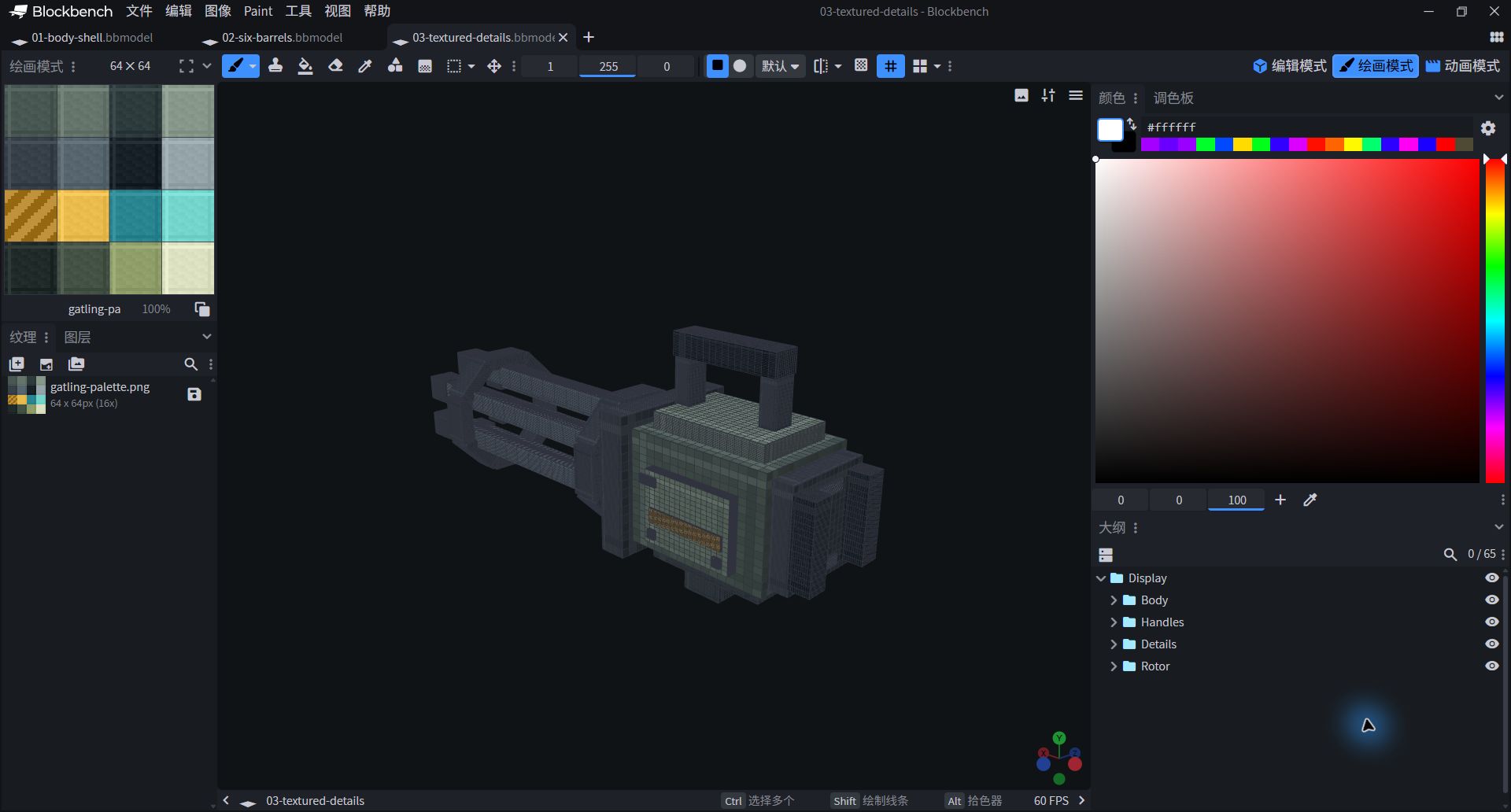
- The yellow light strip follows Rotor and the side stripes are still.
- Modifying a shared color block will affect all faces that reference it.
Check UV and front profile
It's worth a different angle.
Return to edit mode, select body_mainLeft UV corresponds 0 / 0 / 16 / 16.barrel_1 Use 16 / 16 / 32 / 32Yellow tag. 16 / 32 / 32 / 48. These are the four boundary values of U1 / V1 / U2 / V2, not the position plus width and height.
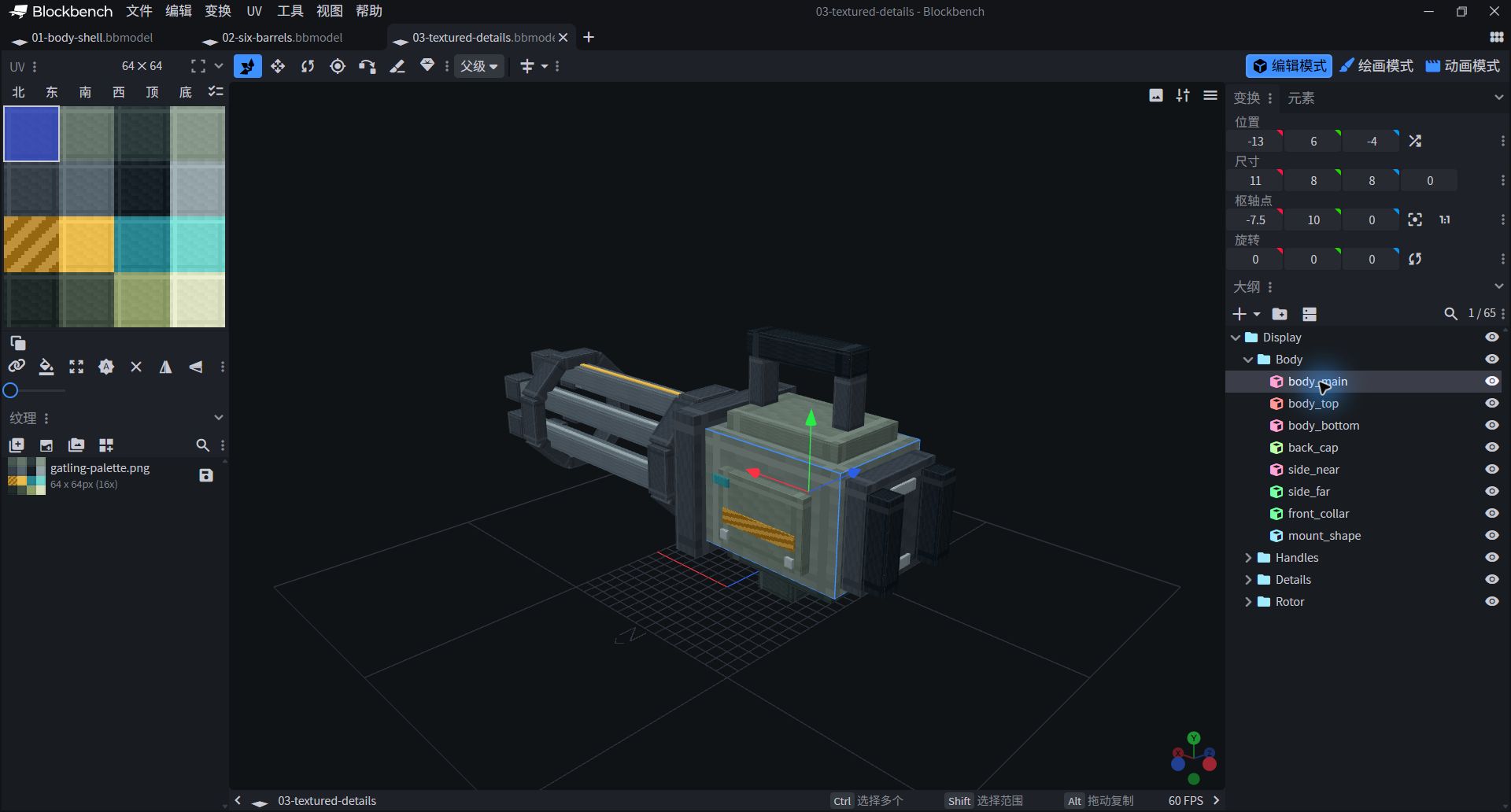
- Select the body_main, the first color block on the first row of the left is highlighted.
- In this lesson, the same color blocks are used on the six sides of each square.
Go from 0° to 360°
The last frame is not to go back, but to complete the circle.
- Switch animation mode, create new
gatling.spin, duration 2 seconds, loop the Loop. - Select Rotor to add a key frame only in the Rotation orbit. 0, 90, 180, 270, 360Y and Z have been zero. Time in order is 0, 0.5, 1, 1.5, 2 seconds.
- All interpolations are set to Linear / linear, and then play it. The body and the lift don't move. Only the barrel is spinning continuously.
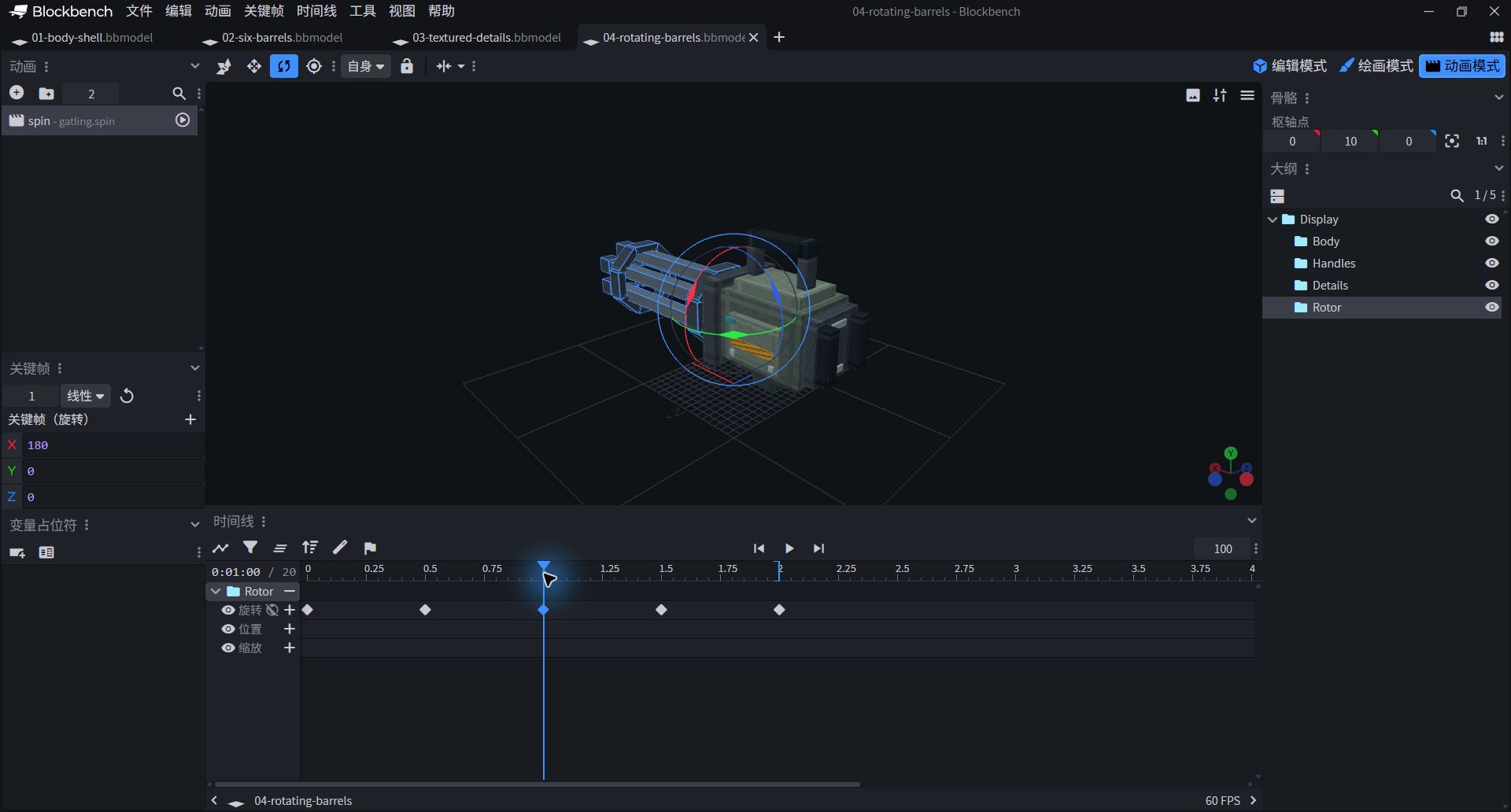
- Select animation first, then select Rotor to view the track.
- One revolution in 2 seconds is just the speed observed on web pages and tutorials, not a physical parameter.
Writing 360° in the last frame will continue forward from 270°; writing back 0° will make the last segment rotate backwards. The two postures of the loop boundary are the same, so they can be connected into continuous motion.
2 seconds rotation · all 5 keyframes
| Grouping | Track | time/second | X / Y / Z |
|---|---|---|---|
| Rotor | rotation | 0 | 0 / 0 / 0 |
| Rotor | rotation | 0.5 | 90 / 0 / 0 |
| Rotor | rotation | 1 | 180 / 0 / 0 |
| Rotor | rotation | 1.5 | 270 / 0 / 0 |
| Rotor | rotation | 2 | 360 / 0 / 0 |
Add a slow speed and check the cycle
Only by slowing down can you see clearly where adjustments are needed.
- Copy animation as
gatling.spin_slow, the length should read 4 seconds. The five keyframes are moved to 0, 1, 2, 3, 4 seconds; the X angle is still 0, 90, 180, 270, 360. - Switch between the two animations and observe the yellow mark: normal display is 2 seconds for one cycle, and slow display is 4 seconds for one cycle. Don't overlay two clips.
- Save your copy, reopen it, and make sure the texture, Rotor pivot, and two animations are still there. Turning off "auto-rotate viewing angle" on the web page will make it easier to verify that the gun body is really not moving.
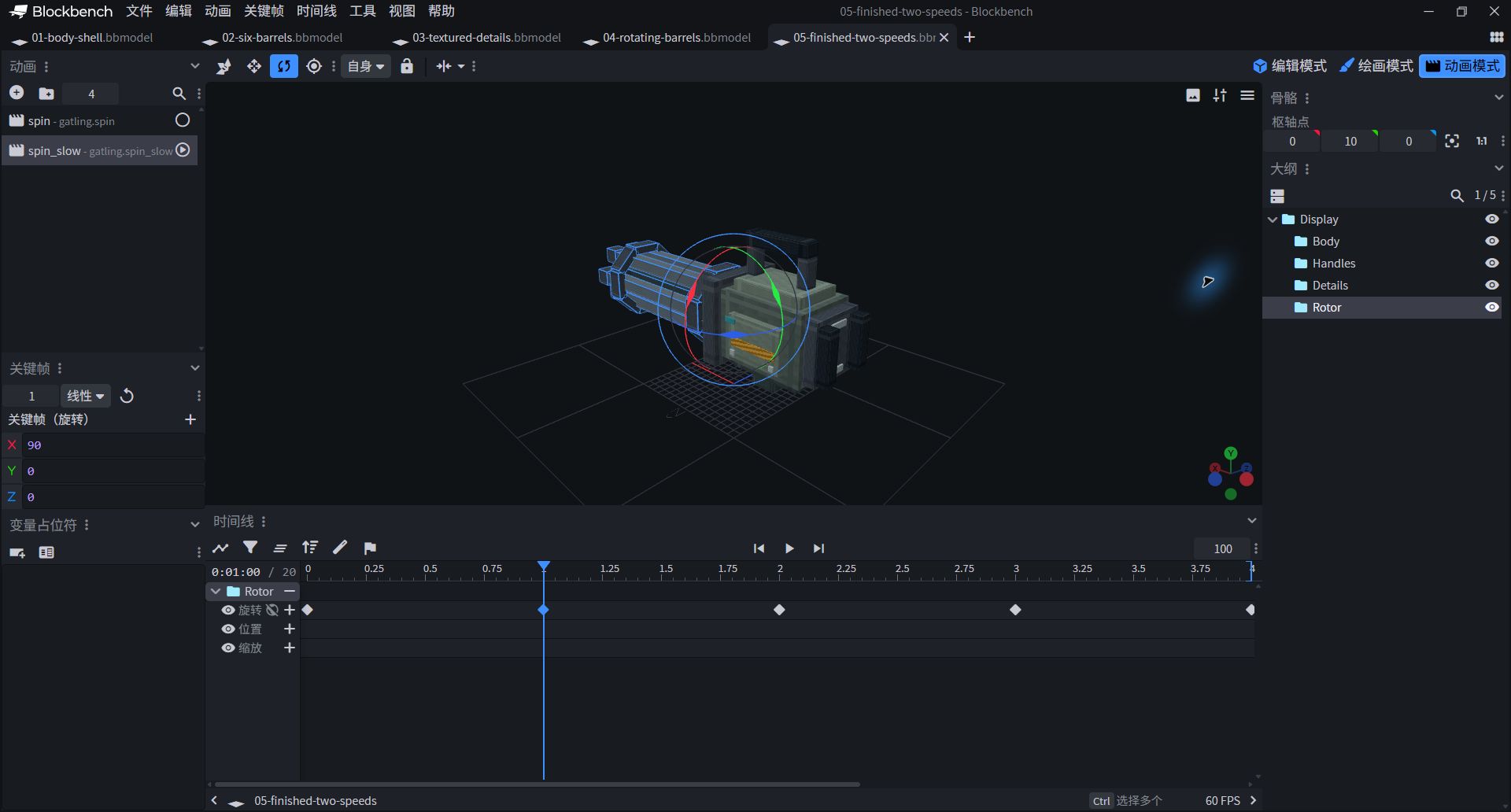
- Keep gatling.spin and gatling.spin_slow on the left.
- Pausing the animation is to pause the gun barrel; turning off the automatic rotation is to fix the viewing angle.
4 seconds slow view · all 5 keyframes
| Grouping | Track | time/second | X / Y / Z |
|---|---|---|---|
| Rotor | rotation | 0 | 0 / 0 / 0 |
| Rotor | rotation | 1 | 90 / 0 / 0 |
| Rotor | rotation | 2 | 180 / 0 / 0 |
| Rotor | rotation | 3 | 270 / 0 / 0 |
| Rotor | rotation | 4 | 360 / 0 / 0 |
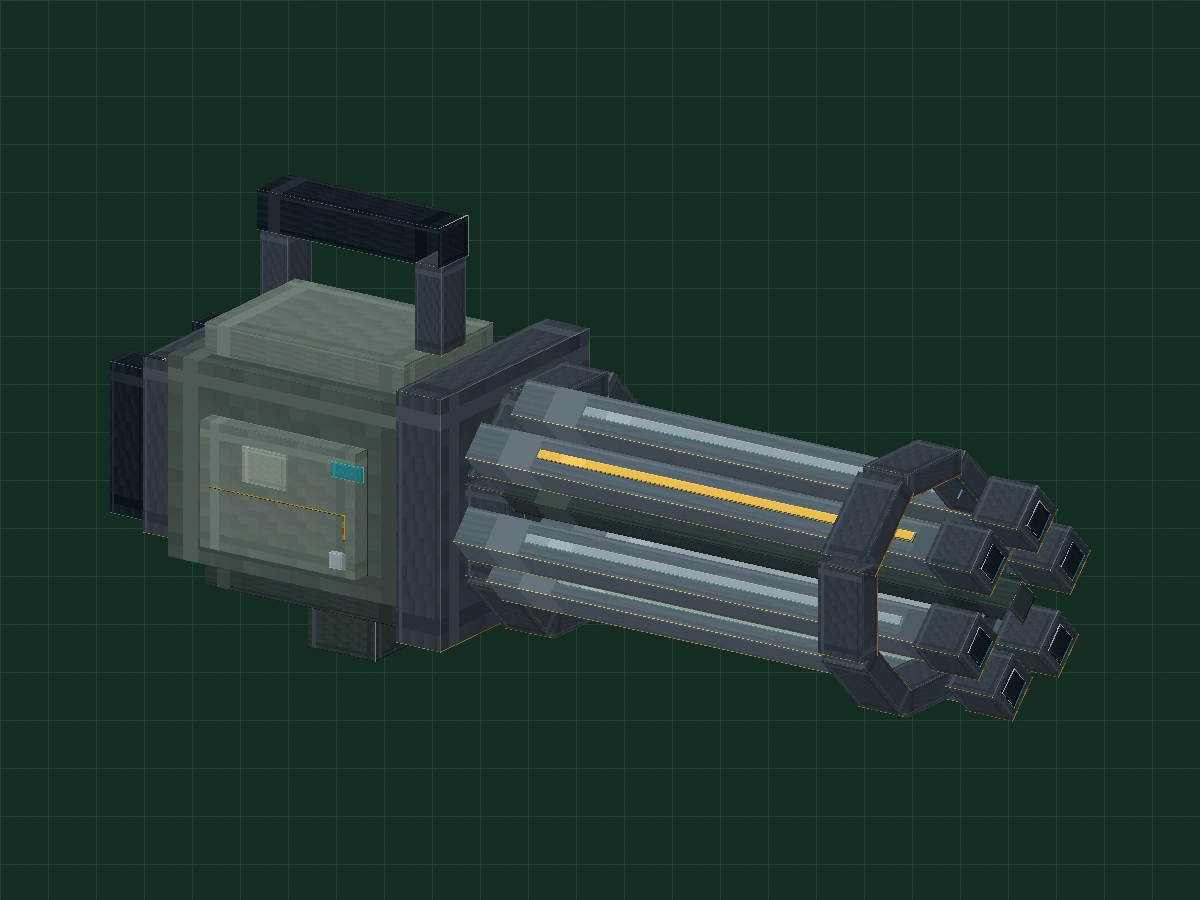
Change to a bright color and observe a full circle.
Change the yellow observation mark to cyan and the shell to low saturation sand color. Only change the material, leave the pivots and keyframes untouched, and practice so that "design changes" and "animation structure" do not interfere with each other.
IF SOMETHING LOOKS ODD
It's not right. Look around.
Why is the entire model turned together?
The automatic rotation of the web page controls the viewing angle, turn it off first. If the gun body also rotates in Blockbench, check whether the key frames are added to the Display; this lesson only adds animation to the Rotor.
Why is the barrel thrown out like a windmill?
The pivot or axis of rotation is incorrect. Rotor Pivot is 0 / 10 / 0, the animation only changes X, Y/Z remains at 0; do not use Y rotation instead of major axis rotation.
Why is the last paragraph suddenly reversed?
Confirm that the last frame The first and last values can be different, but the posture must be the same.
Can you use it directly as a Minecraft weapon?
.bbmodel cannot be installed as MOD. This lesson only has general appearance models and display animations, and no shooting, loading, damage or item registration logic; in-game use requires matching versions, export formats and loading plans.
KEEP LEARNING
Continue practicing.
- Blockbench Official Quick Start
- Lesson 04: Shaping Props with Repeating Blocks and Warm and Cool Colors
- Lesson 02: Set independent pivots for the wings of the flying dragon
Independently created game art teaching is not a replica of the physical structure. It can be used for personal study, classroom and non-commercial creation; please do not resell it as it is or pass it off as original.