
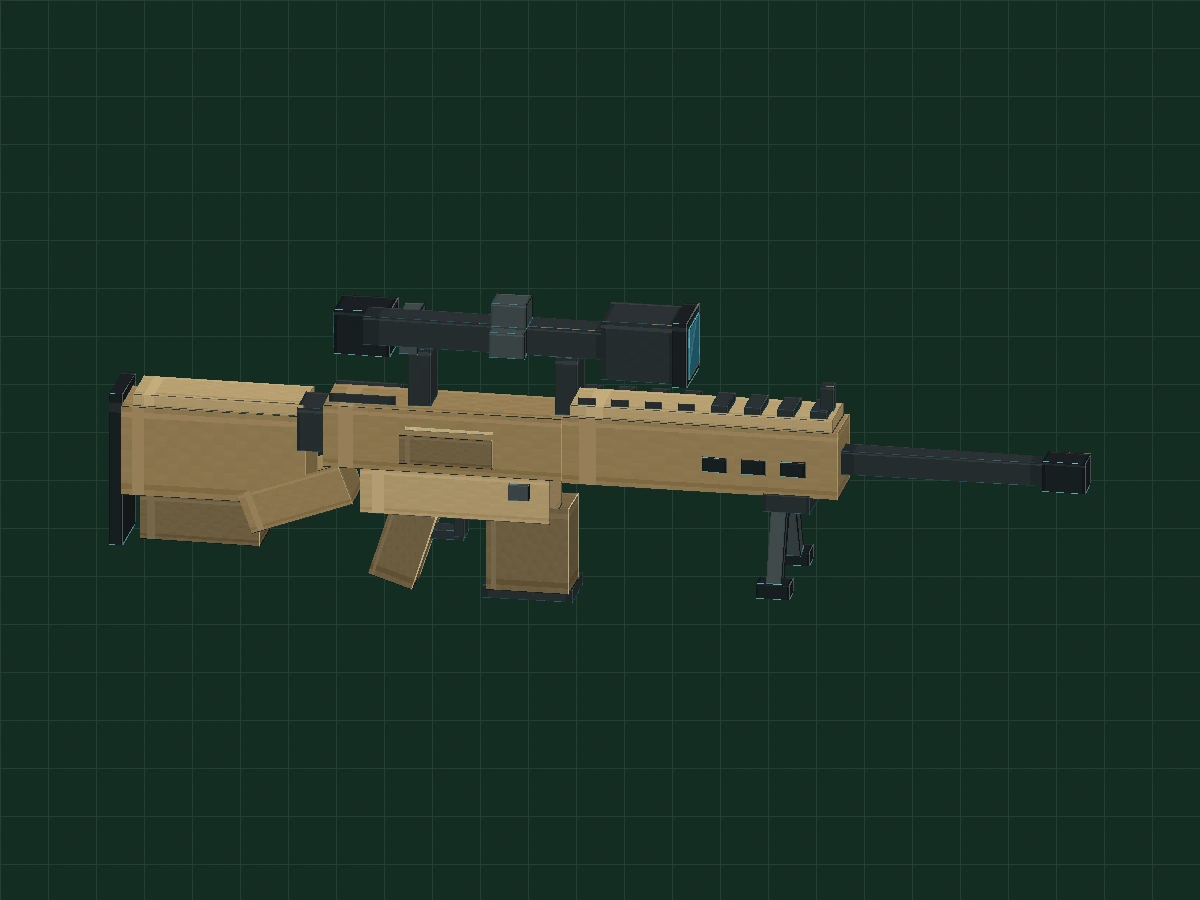
BEFORE YOU BUILD
What I practiced today was modeling, not mechanics.
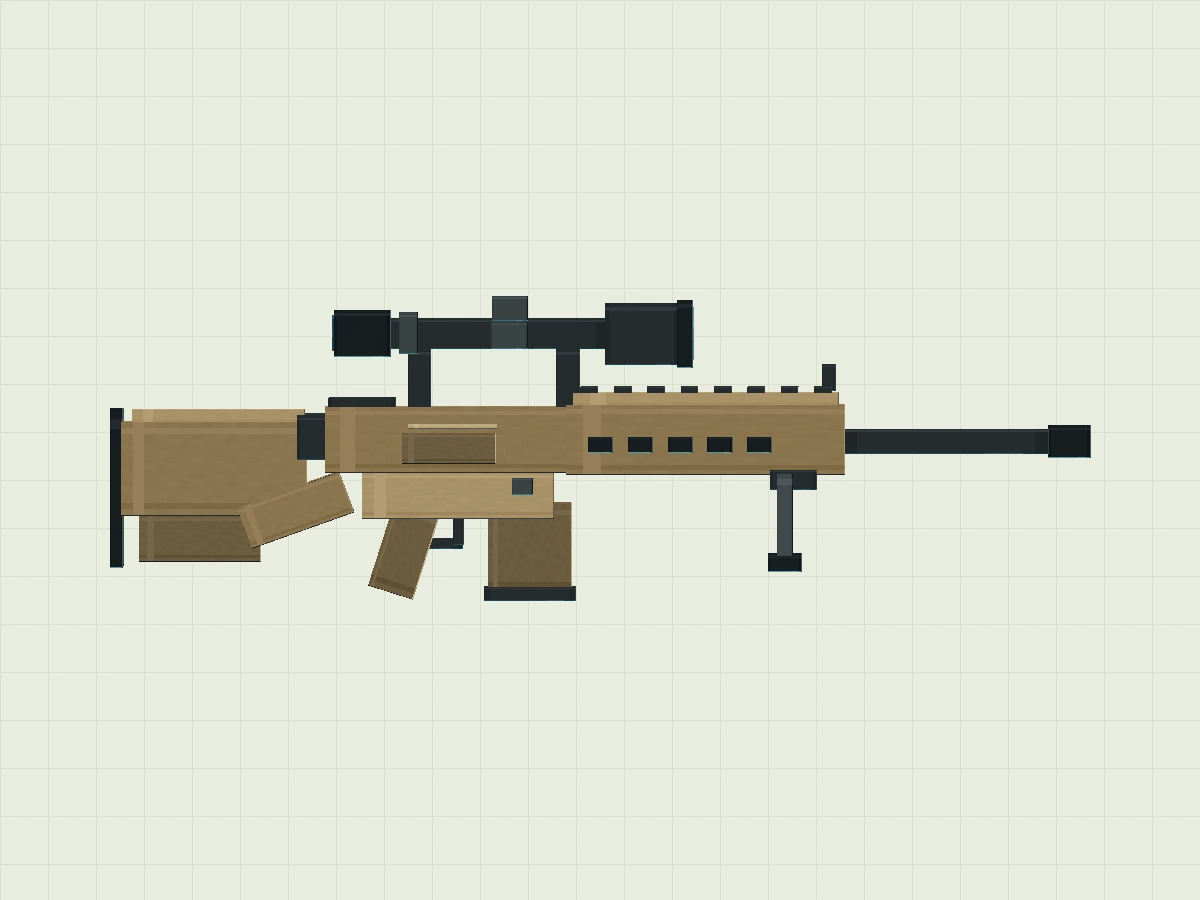
This lesson is Minecraft style game art practice. The M110 prototype is a semi-automatic model, please refer to the nameU.S. Army official equipment introduction. Here its appearance is summarized in exaggerated proportions,All parameters are virtual modeling units, not actual dimensions or manufacturing drawings.
Prepare Blockbench 5.x, use Generic Model, do not need to run Minecraft. First use can be made firstPumpkin lantern introductory course.
Download 5 Phase Project · 33 KB ↓01-sand-silhouette.bbmodel11 widgets · 3 groups · 0 animations02-forearm-pattern.bbmodel35 widgets · 4 groups · 0 animations03-scope-details.bbmodel59 widgets · 7 groups · 0 animations04-idle-animation.bbmodel59 parts · 7 groups · 1 animation05-finished-animated.bbmodel59 parts · 7 groups · 2 animations
Phases are pre-positioned with textures to facilitate observation. The software screenshot was taken in the Chinese version of this machine, Blockbench, and did not follow from the blank project; the structure chart is marked separately. Please save your own exercise first.
For new projects, first look at the big outline
First have a clear map, and then start building blocks.
- New Generic Model/general model, Name
my_m110_proptexture set to 64 × 64, use face to face UV. - Save first
my-m110-prop.bbmodel. Create outermost groupDisplay, Pivot set 0 / 8 / 0. - Create Stock and Body under Display, and install the rear and central outlines respectively. If you want to see the effect first, you can open stage 01 and save your own copy.
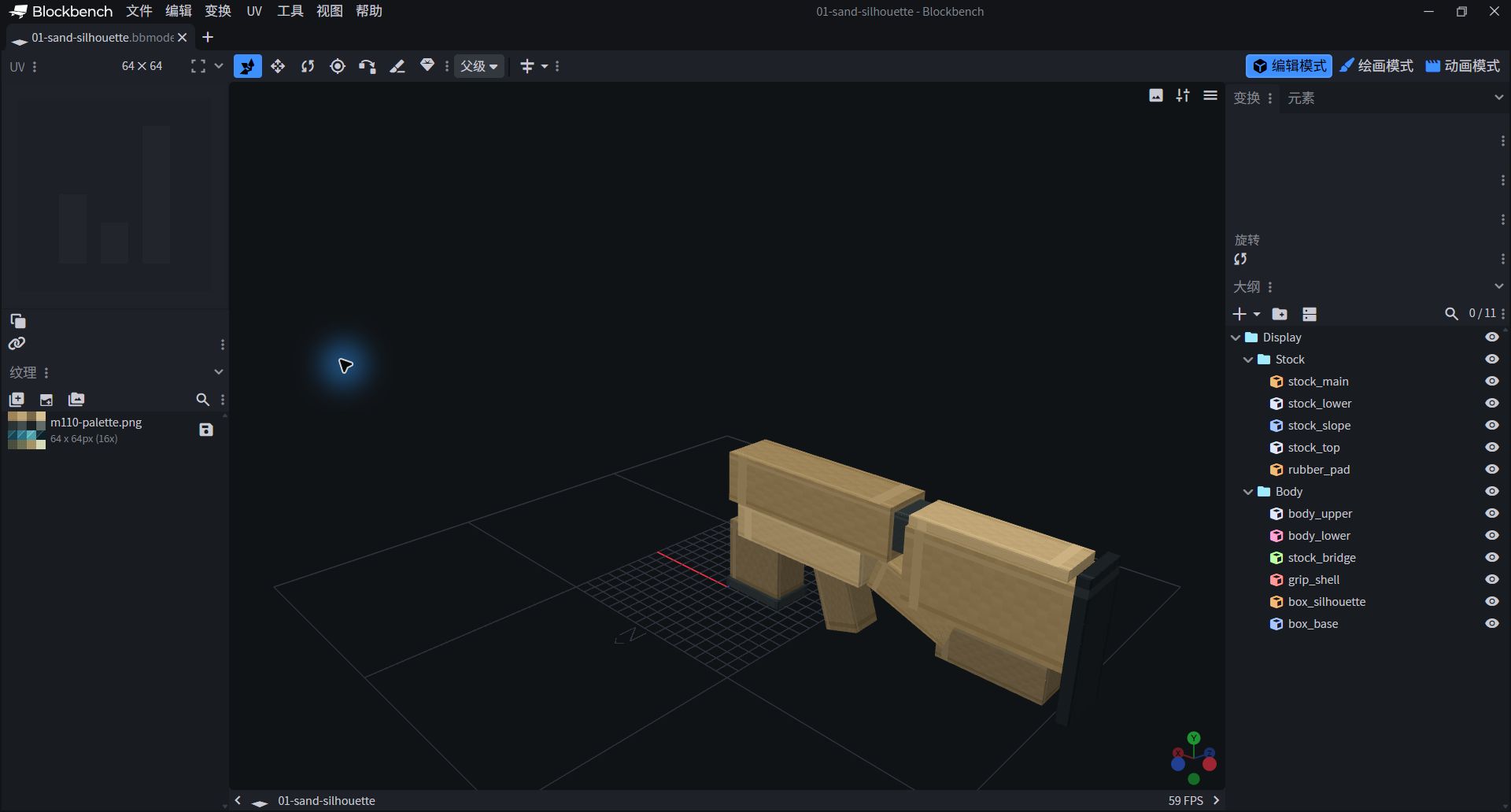
- There are 11 blocks and 3 groups in the reference project.
- The left side is the texture and the right side is the outline; the central preview can be dragged and observed.
Create sand-colored main body and stepped shape
Large blocks determine recognition, while small blocks are only responsible for completing one sentence.
- Pick Stock, add
stock_main:Position −26 / 6 / −1.7,Size 10 / 5 / 3.4. Position is the starting point of the box, not the center. - Use stock_lower to make the lower ladder, and then add
stock_slope. The Z rotation of the ramp block is 20°, Pivot −16.6 / 6.25 / 0. - Add a central shell, sloping grip outline and lower box silhouette to the Body. Complete a total of 11 parts according to the table and compare
01-sand-silhouette.bbmodel.
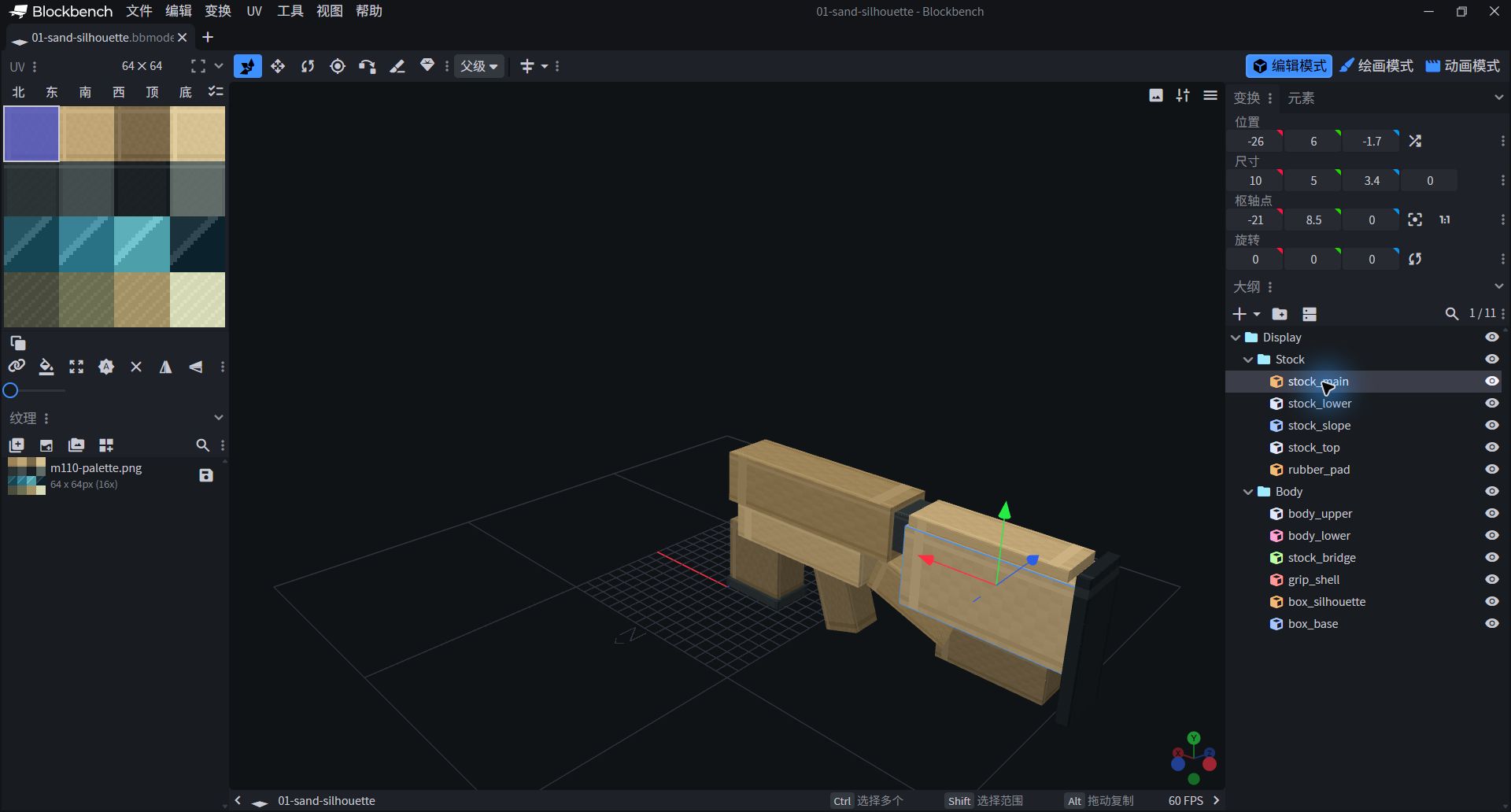
- The parameters on the right only correspond to the currently selected block.
- For the inclined block, Rotation and Pivot must be checked at the same time, do not just enter the size.

Virtual modeling parameters of 11 main components
| Block/Group | Position | Size | Rotation ° | Pivot | UV |
|---|---|---|---|---|---|
| stock_main Stock | -26 / 6 / -1.7 | 10 / 5 / 3.4 | 0 / 0 / 0 | -21 / 8.5 / 0 | 0 / 0 / 16 / 16 |
| stock_lower Stock | -25 / 3.5 / -1.5 | 6.5 / 2.5 / 3 | 0 / 0 / 0 | -21.75 / 4.75 / 0 | 32 / 0 / 48 / 16 |
| stock_slope Stock | -19.5 / 5.1 / -1.5 | 5.8 / 2.3 / 3 | 0 / 0 / 20 | -16.6 / 6.25 / 0 | 0 / 0 / 16 / 16 |
| stock_top Stock | -25.4 / 11 / -1.55 | 9.3 / 0.65 / 3.1 | 0 / 0 / 0 | -20.75 / 11.325 / 0 | 16 / 0 / 32 / 16 |
| rubber_pad Stock | -26.6 / 3.2 / -1.85 | 0.7 / 8.5 / 3.7 | 0 / 0 / 0 | -26.25 / 7.45 / 0 | 32 / 16 / 48 / 32 |
| body_upper Body | -15 / 8.3 / -1.8 | 13 / 3.5 / 3.6 | 0 / 0 / 0 | -8.5 / 10.05 / 0 | 0 / 0 / 16 / 16 |
| body_lower Body | -13 / 5.8 / -1.65 | 10.3 / 2.5 / 3.3 | 0 / 0 / 0 | -7.85 / 7.05 / 0 | 16 / 0 / 32 / 16 |
| stock_bridge Body | -16.5 / 9 / -1.35 | 2.5 / 2.4 / 2.7 | 0 / 0 / 0 | -15.25 / 10.2 / 0 | 0 / 16 / 16 / 32 |
| grip_shell Body | -12 / 1.7 / -1.1 | 2.5 / 4.8 / 2.2 | 0 / 0 / -18 | -10.75 / 4.1 / 0 | 32 / 0 / 48 / 16 |
| box_silhouette Body | -6.2 / 1.8 / -1.4 | 4.5 / 4.8 / 2.8 | 0 / 0 / 0 | -3.95 / 4.2 / 0 | 32 / 0 / 48 / 16 |
| box_base Body | -6.4 / 1.4 / -1.55 | 4.9 / 0.7 / 3.1 | 0 / 0 / 0 | -3.95 / 1.75 / 0 | 0 / 16 / 16 / 32 |
Let the duplicate cubes out of rhythm
The same small square, arranged neatly, has a rhythm.
- Create Handguard under Display. add
forearm_shell:Position −2 / 8.2 / −1.75,Size 15 / 3.7 / 3.5, plus top and long front-end shape. - The dark patches on the side areDecorative pixels on the outside. Do it first
vent_near_1Copy to 6 with each X increase 2.15; the other side uses a different Z by table. - Do eight of the top little prixes, each with an X increase 1.8. Unify the spacing first, and then check whether the first and last pieces cross the boundary. Completed with 35 parts in total.
vent_near_1 → Position −0.8 / 9.4 / 1.76; Size 1.3 / 0.8 / 0.16. In the second block, just change X to 1.35. Small patches of color are attached to the outer surface, not actual dug holes.
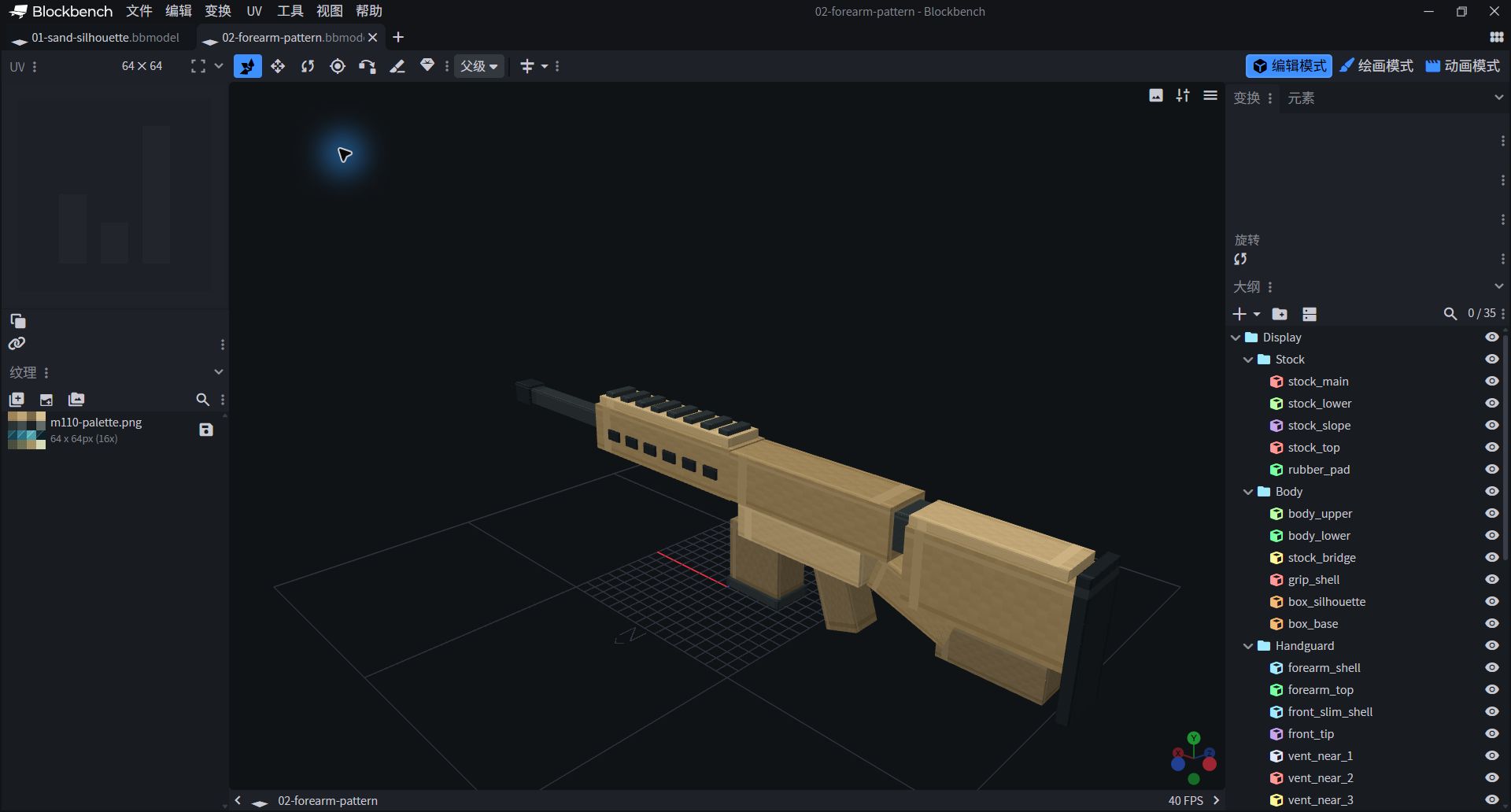
- Stage 02 has 35 components, which still do not contain the top-scan contour.
- Check that small dark-colored pieces are not buried in the body or hanging out.
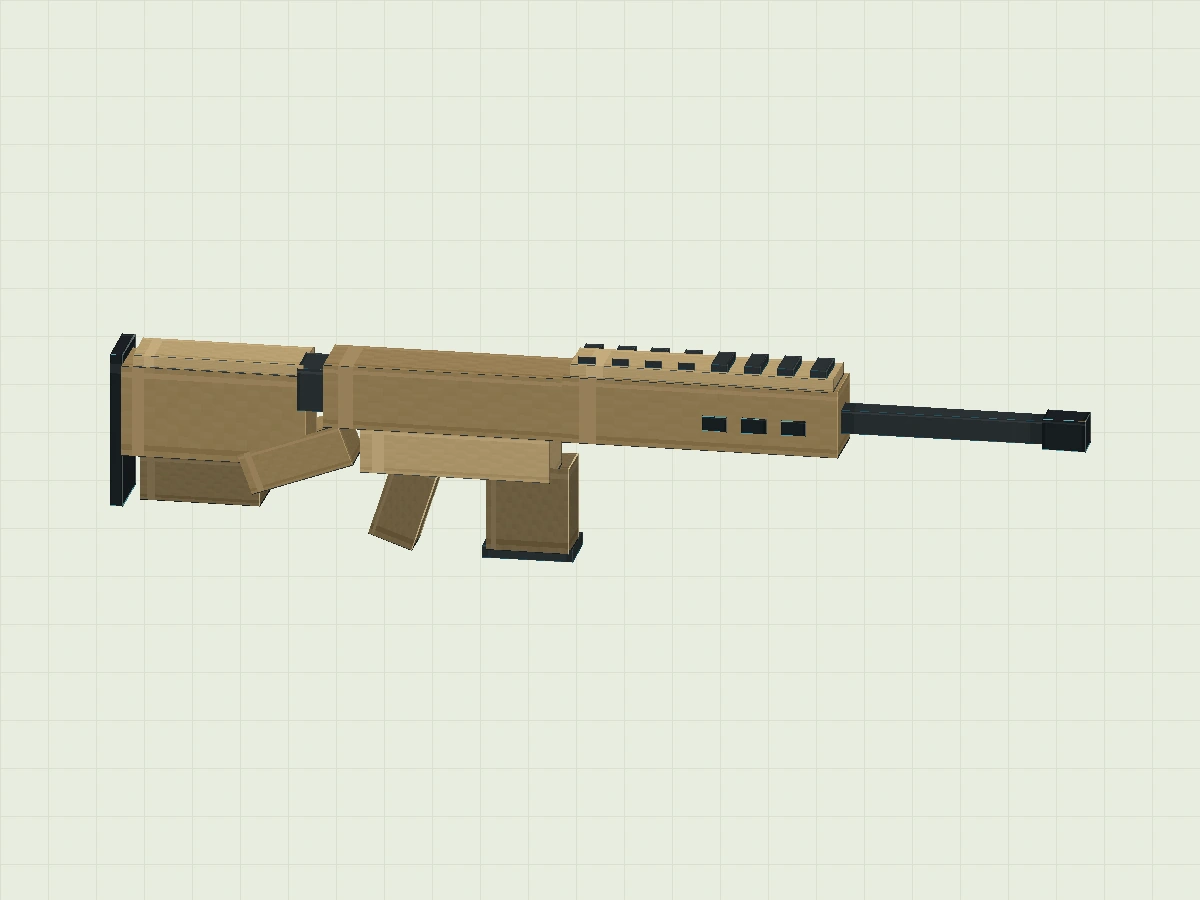
24 front and repeat trim part parameters
| Block/Group | Position | Size | Rotation ° | Pivot | UV |
|---|---|---|---|---|---|
| forearm_shell Handguard | -2 / 8.2 / -1.75 | 15 / 3.7 / 3.5 | 0 / 0 / 0 | 5.5 / 10.05 / 0 | 0 / 0 / 16 / 16 |
| forearm_top Handguard | -1.6 / 11.9 / -1.5 | 14.3 / 0.65 / 3 | 0 / 0 / 0 | 5.55 / 12.225 / 0 | 16 / 0 / 32 / 16 |
| front_slim_shell Handguard | 13 / 9.3 / -0.65 | 11 / 1.3 / 1.3 | 0 / 0 / 0 | 18.5 / 9.95 / 0 | 0 / 16 / 16 / 32 |
| front_tip Handguard | 24 / 9.1 / -0.85 | 2.3 / 1.7 / 1.7 | 0 / 0 / 0 | 25.15 / 9.95 / 0 | 32 / 16 / 48 / 32 |
| vent_near_1 Handguard | -0.8 / 9.4 / 1.76 | 1.3 / 0.8 / 0.16 | 0 / 0 / 0 | -0.15 / 9.8 / 1.84 | 32 / 16 / 48 / 32 |
| vent_near_2 Handguard | 1.35 / 9.4 / 1.76 | 1.3 / 0.8 / 0.16 | 0 / 0 / 0 | 2 / 9.8 / 1.84 | 32 / 16 / 48 / 32 |
| vent_near_3 Handguard | 3.5 / 9.4 / 1.76 | 1.3 / 0.8 / 0.16 | 0 / 0 / 0 | 4.15 / 9.8 / 1.84 | 32 / 16 / 48 / 32 |
| vent_near_4 Handguard | 5.65 / 9.4 / 1.76 | 1.3 / 0.8 / 0.16 | 0 / 0 / 0 | 6.3 / 9.8 / 1.84 | 32 / 16 / 48 / 32 |
| vent_near_5 Handguard | 7.8 / 9.4 / 1.76 | 1.3 / 0.8 / 0.16 | 0 / 0 / 0 | 8.45 / 9.8 / 1.84 | 32 / 16 / 48 / 32 |
| vent_near_6 Handguard | 9.95 / 9.4 / 1.76 | 1.3 / 0.8 / 0.16 | 0 / 0 / 0 | 10.6 / 9.8 / 1.84 | 32 / 16 / 48 / 32 |
| vent_far_1 Handguard | -0.8 / 9.4 / -1.92 | 1.3 / 0.8 / 0.16 | 0 / 0 / 0 | -0.15 / 9.8 / -1.84 | 32 / 16 / 48 / 32 |
| vent_far_2 Handguard | 1.35 / 9.4 / -1.92 | 1.3 / 0.8 / 0.16 | 0 / 0 / 0 | 2 / 9.8 / -1.84 | 32 / 16 / 48 / 32 |
| vent_far_3 Handguard | 3.5 / 9.4 / -1.92 | 1.3 / 0.8 / 0.16 | 0 / 0 / 0 | 4.15 / 9.8 / -1.84 | 32 / 16 / 48 / 32 |
| vent_far_4 Handguard | 5.65 / 9.4 / -1.92 | 1.3 / 0.8 / 0.16 | 0 / 0 / 0 | 6.3 / 9.8 / -1.84 | 32 / 16 / 48 / 32 |
| vent_far_5 Handguard | 7.8 / 9.4 / -1.92 | 1.3 / 0.8 / 0.16 | 0 / 0 / 0 | 8.45 / 9.8 / -1.84 | 32 / 16 / 48 / 32 |
| vent_far_6 Handguard | 9.95 / 9.4 / -1.92 | 1.3 / 0.8 / 0.16 | 0 / 0 / 0 | 10.6 / 9.8 / -1.84 | 32 / 16 / 48 / 32 |
| top_ridge_1 Handguard | -1.2 / 12.5 / -1.15 | 0.9 / 0.4 / 2.3 | 0 / 0 / 0 | -0.75 / 12.7 / 0 | 0 / 16 / 16 / 32 |
| top_ridge_2 Handguard | 0.6 / 12.5 / -1.15 | 0.9 / 0.4 / 2.3 | 0 / 0 / 0 | 1.05 / 12.7 / 0 | 0 / 16 / 16 / 32 |
| top_ridge_3 Handguard | 2.4 / 12.5 / -1.15 | 0.9 / 0.4 / 2.3 | 0 / 0 / 0 | 2.85 / 12.7 / 0 | 0 / 16 / 16 / 32 |
| top_ridge_4 Handguard | 4.2 / 12.5 / -1.15 | 0.9 / 0.4 / 2.3 | 0 / 0 / 0 | 4.65 / 12.7 / 0 | 0 / 16 / 16 / 32 |
| top_ridge_5 Handguard | 6 / 12.5 / -1.15 | 0.9 / 0.4 / 2.3 | 0 / 0 / 0 | 6.45 / 12.7 / 0 | 0 / 16 / 16 / 32 |
| top_ridge_6 Handguard | 7.8 / 12.5 / -1.15 | 0.9 / 0.4 / 2.3 | 0 / 0 / 0 | 8.25 / 12.7 / 0 | 0 / 16 / 16 / 32 |
| top_ridge_7 Handguard | 9.6 / 12.5 / -1.15 | 0.9 / 0.4 / 2.3 | 0 / 0 / 0 | 10.05 / 12.7 / 0 | 0 / 16 / 16 / 32 |
| top_ridge_8 Handguard | 11.4 / 12.5 / -1.15 | 0.9 / 0.4 / 2.3 | 0 / 0 / 0 | 11.85 / 12.7 / 0 | 0 / 16 / 16 / 32 |
Add scope outline and organize the groups
Use height and density to give the silhouette an extra layer.
Create a new Scope, and use a cuboid and a stepped block to summarize the outline of the scope; two columns connect it with the main body.glass_front Is blue-greenOpaque pixel surface, show only appearance. Add the Decorations in Details and Bipod, finish 59 parts, 7 groups.
Display(整件作品的展示动画)
├─ Stock      后部轮廓
├─ Body       中央外形
├─ Handguard  前部与重复像素
├─ Scope      瞄镜剪影与色片
├─ Details    小型装饰
└─ Bipod      下方支架造型
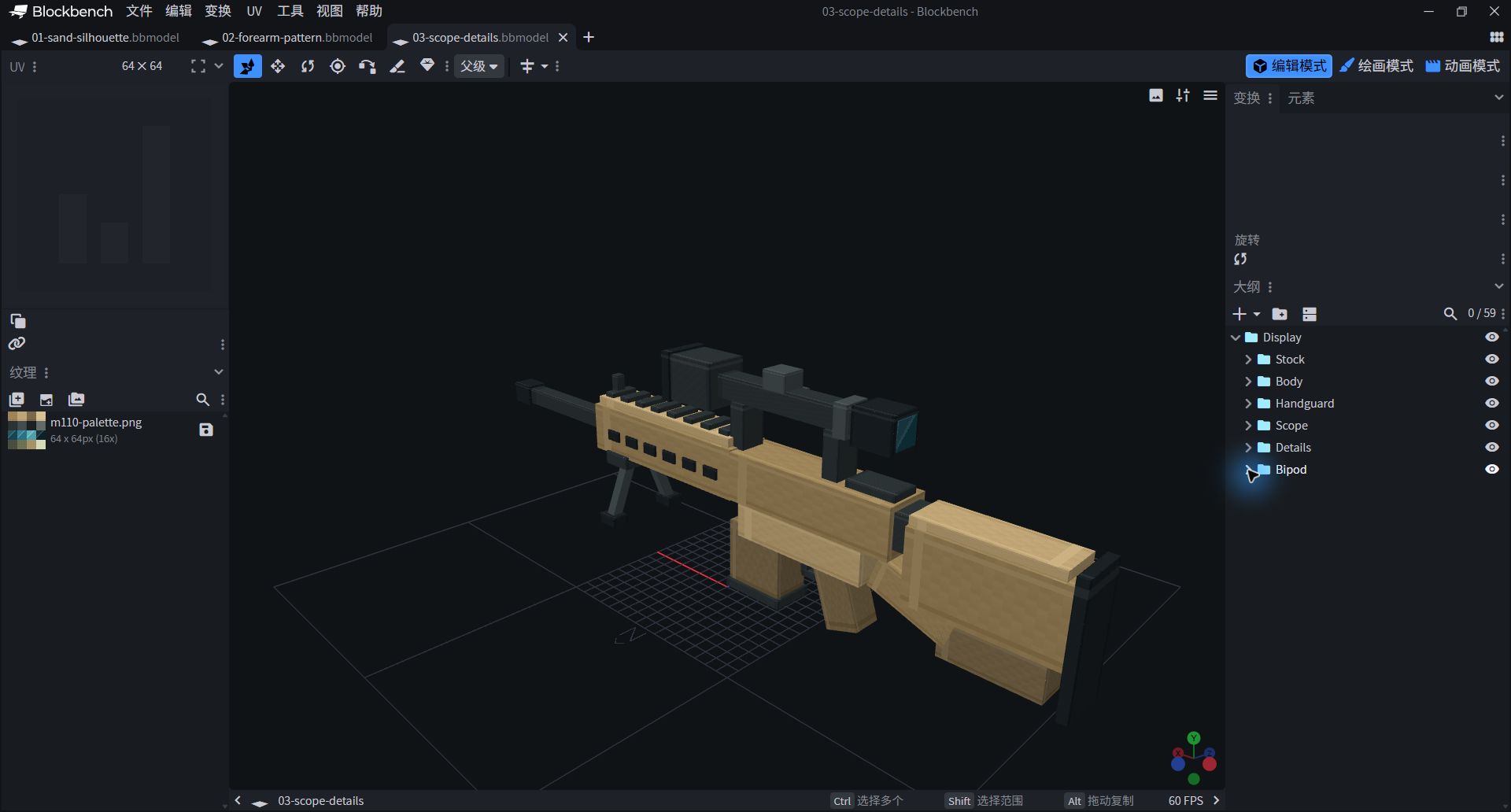
- All six subgroups belong to Display.
- Just do the display animation on Display, and the whole work will move together.
24 component parameters of scope silhouette, decoration and bracket
| Block/Group | Position | Size | Rotation ° | Pivot | UV |
|---|---|---|---|---|---|
| scope_tube Scope | -13 / 15 / -0.8 | 13.5 / 1.6 / 1.6 | 0 / 0 / 0 | -6.25 / 15.8 / 0 | 0 / 16 / 16 / 32 |
| scope_rear Scope | -14.5 / 14.55 / -1.25 | 3 / 2.5 / 2.5 | 0 / 0 / 0 | -13 / 15.8 / 0 | 32 / 16 / 48 / 32 |
| scope_front Scope | 0.1 / 14.15 / -1.65 | 4 / 3.3 / 3.3 | 0 / 0 / 0 | 2.1 / 15.8 / 0 | 0 / 16 / 16 / 32 |
| scope_front_rim Scope | 4 / 14 / -1.8 | 0.8 / 3.6 / 3.6 | 0 / 0 / 0 | 4.4 / 15.8 / 0 | 32 / 16 / 48 / 32 |
| glass_front Scope | 4.81 / 14.4 / -1.4 | 0.08 / 2.8 / 2.8 | 0 / 0 / 0 | 4.85 / 15.8 / 0 | 16 / 32 / 32 / 48 |
| glass_rear Scope | -14.6 / 14.85 / -0.95 | 0.08 / 1.9 / 1.9 | 0 / 0 / 0 | -14.56 / 15.8 / 0 | 0 / 32 / 16 / 48 |
| scope_dial_top Scope | -6 / 16.5 / -0.9 | 1.9 / 1.3 / 1.8 | 0 / 0 / 0 | -5.05 / 17.15 / 0 | 16 / 16 / 32 / 32 |
| scope_dial_side Scope | -6 / 15 / 0.8 | 1.9 / 1.4 / 0.8 | 0 / 0 / 0 | -5.05 / 15.7 / 1.2 | 16 / 16 / 32 / 32 |
| scope_ring Scope | -11 / 14.7 / -1.05 | 1 / 2.2 / 2.1 | 0 / 0 / 0 | -10.5 / 15.8 / 0 | 16 / 16 / 32 / 32 |
| scope_stand_1 Scope | -10.5 / 11.8 / -1 | 1.2 / 3.2 / 2 | 0 / 0 / 0 | -9.9 / 13.4 / 0 | 0 / 16 / 16 / 32 |
| scope_stand_2 Scope | -2.5 / 11.8 / -1 | 1.2 / 3.2 / 2 | 0 / 0 / 0 | -1.9 / 13.4 / 0 | 0 / 16 / 16 / 32 |
| lower_trim_front Details | -8.1 / 4.4 / -0.6 | 0.55 / 1.5 / 1.2 | 0 / 0 / 0 | -7.825 / 5.15 / 0 | 0 / 16 / 16 / 32 |
| lower_trim_base Details | -11.4 / 4.2 / -0.6 | 3.8 / 0.5 / 1.2 | 0 / 0 / 0 | -9.5 / 4.45 / 0 | 0 / 16 / 16 / 32 |
| side_plate Details | -10.8 / 8.8 / 1.81 | 5 / 1.6 / 0.16 | 0 / 0 / 0 | -8.3 / 9.6 / 1.89 | 32 / 0 / 48 / 16 |
| side_highlight Details | -10.5 / 10.7 / 1.82 | 4.8 / 0.2 / 0.12 | 0 / 0 / 0 | -8.1 / 10.8 / 1.88 | 48 / 0 / 64 / 16 |
| side_square Details | -4.9 / 7.1 / 1.68 | 1.1 / 0.9 / 0.25 | 0 / 0 / 0 | -4.35 / 7.55 / 1.805 | 16 / 16 / 32 / 32 |
| back_rail Details | -14.8 / 11.8 / -1.1 | 3.6 / 0.5 / 2.2 | 0 / 0 / 0 | -13 / 12.05 / 0 | 0 / 16 / 16 / 32 |
| front_pixel Details | 11.8 / 12.7 / -0.35 | 0.7 / 1.4 / 0.7 | 0 / 0 / 0 | 12.15 / 13.4 / 0 | 0 / 16 / 16 / 32 |
| stock_accent Details | -24 / 6.5 / 1.71 | 4 / 1.1 / 0.12 | 0 / 0 / 0 | -22 / 7.05 / 1.77 | 16 / 0 / 32 / 16 |
| support_bridge Bipod | 9 / 7.4 / -2 | 2.5 / 1 / 4 | 0 / 0 / 0 | 10.25 / 7.9 / 0 | 0 / 16 / 16 / 32 |
| support_near Bipod | 9.4 / 3.4 / 1.5 | 0.8 / 4.8 / 0.8 | -22 / 0 / 0 | 9.8 / 5.8 / 1.9 | 16 / 16 / 32 / 32 |
| support_far Bipod | 9.4 / 3.4 / -2.3 | 0.8 / 4.8 / 0.8 | 22 / 0 / 0 | 9.8 / 5.8 / -1.9 | 16 / 16 / 32 / 32 |
| foot_near Bipod | 8.9 / 3 / 2.2 | 1.8 / 0.8 / 1.3 | 0 / 0 / 0 | 9.8 / 3.4 / 2.85 | 32 / 16 / 48 / 32 |
| foot_far Bipod | 8.9 / 3 / -3.5 | 1.8 / 0.8 / 1.3 | 0 / 0 / 0 | 9.8 / 3.4 / -2.85 | 32 / 16 / 48 / 32 |
Sand color, dark gray, and a touch of cool color
It doesn't have to be a lot of color, and it has to be clear.
- Import
textures/m110-palette.png. The 64×64 atlas contains 16 16×16 color blocks, first distinguishing three rows of sand, dark gray and teal. - The sand color occupies a large area, and a small difference in light and shade is used to express the matte coating; dark gray outlines the edges and the silhouette of the scope. The lens only uses a small piece of blue-green and draws a diagonal bright line.
- Switch to painting mode and try changing a color block with a 1-pixel brush. Turn the model every few strokes to avoid bright lines taking away attention from the entire outline.

First row: sand colored coating. Second row: dark gray and rubber. Third row: Lens cold reflection. Fourth row: spare embellishments.
The mirror reflection has been painted in pixels, not the real refraction environment.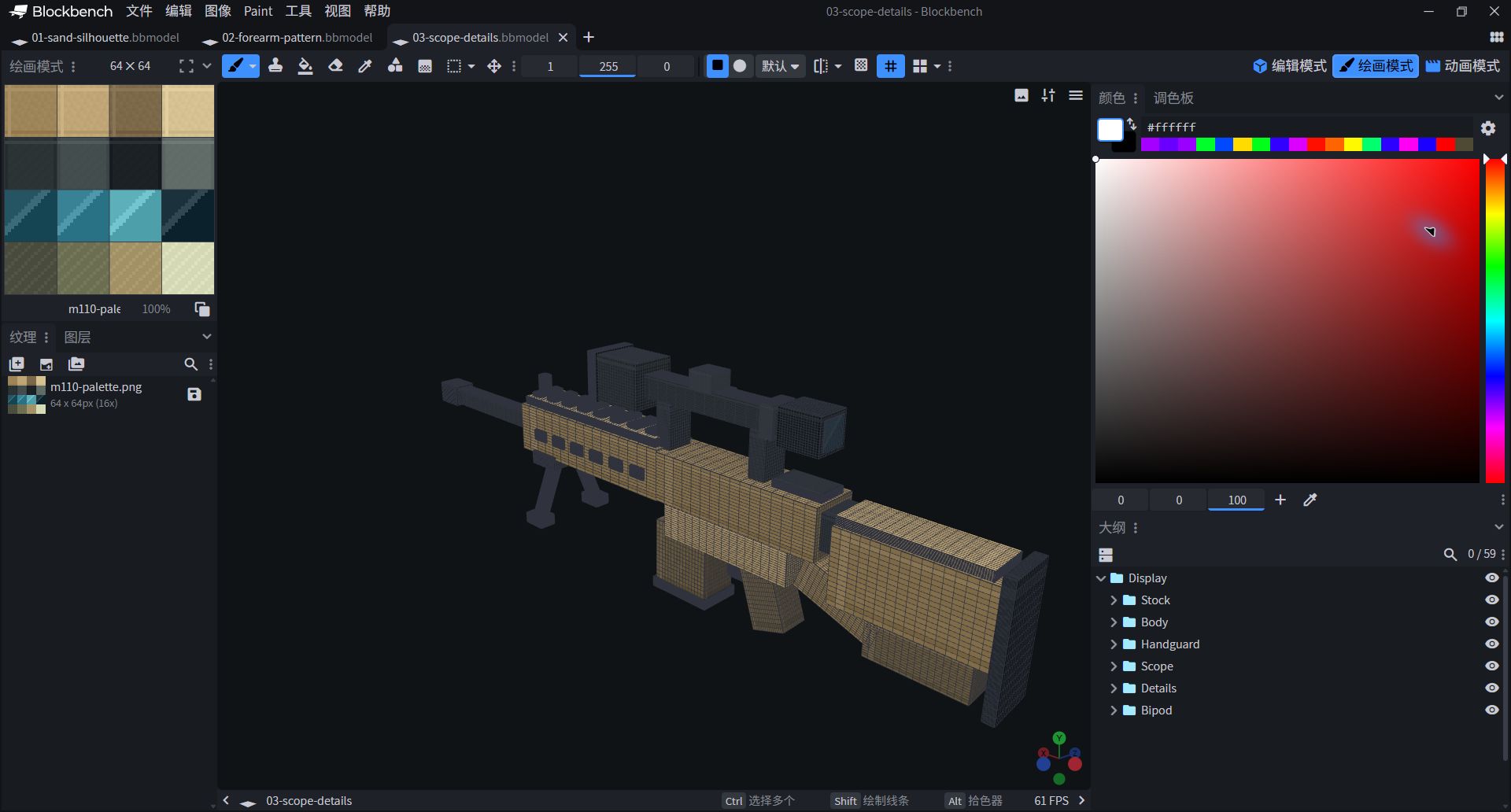
- On the left side, you can see sand color, dark gray and lens color patches.
- Modifying a shared color block will affect all faces that reference it; save a copy first.
Arrange UV for lenses and housings
The same shape looks like itself only when attached to the right color.
Return to edit mode, select the square, and then select the face in the UV panel. In this lesson, the six sides of each square are of the same color.UV is the four boundary values of U1 / V1 / U2 / V2, not the position plus width and height.First use the following three components to check the corresponding relationship.
stock_main → 0 / 0 / 16 / 16;scope_tube → 0 / 16 / 16 / 32;glass_front → 16/32/32/48.
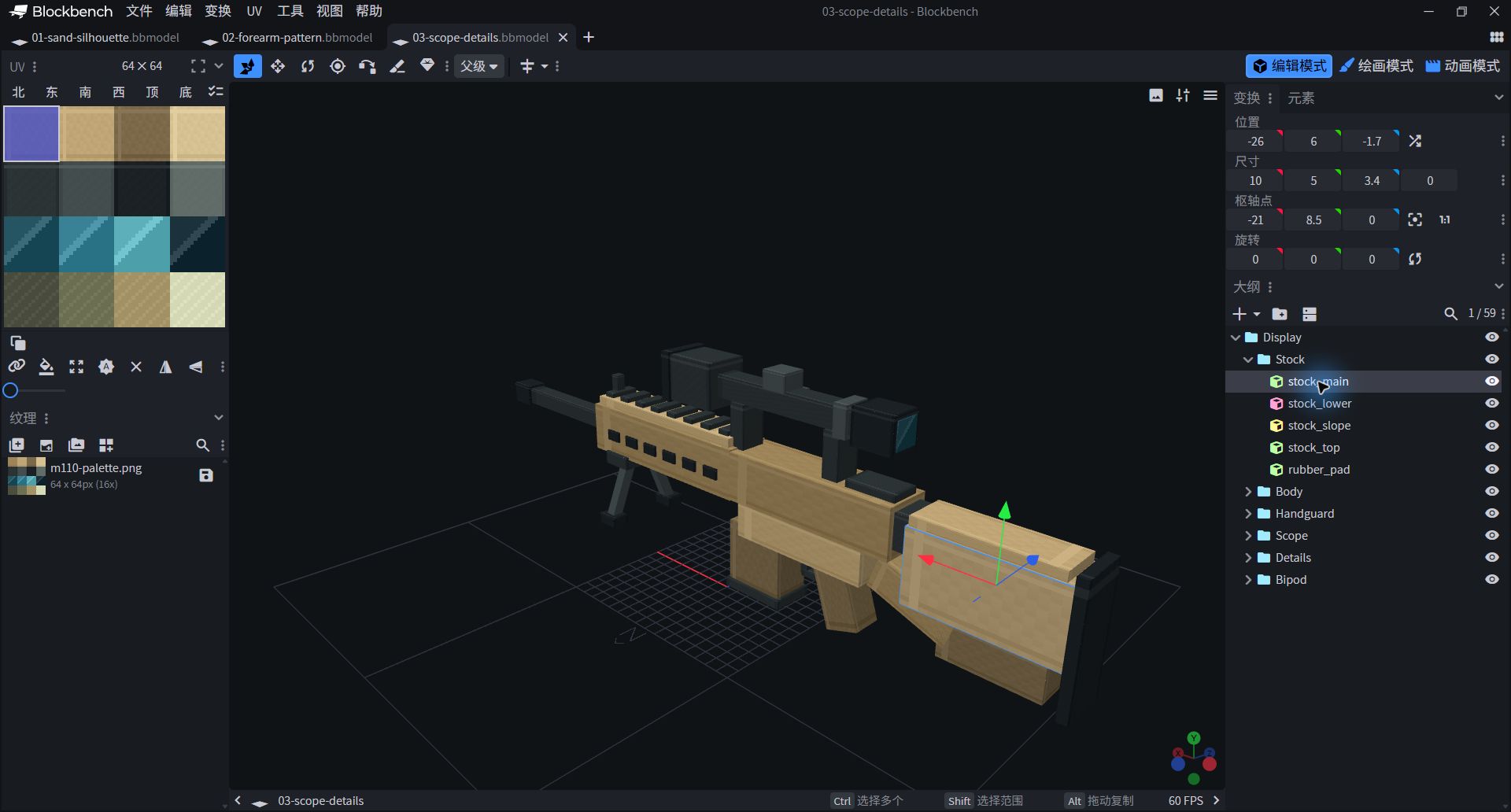
- Select the stock_main, with the first color block in the first row on the left.
- The UVs of the remaining components are checked in the last column of the parameter table.
Let the complete props float gently.
The action does not need to be big, the closed loop should be able to catch up.
- OpenAnimationmode, new
m110.idle, duration 3 seconds, loop set to Loop. - Select the outermost layer
Display. On the Position and Rotation tracks, add keyframes as shown below and select Linear for interpolation. - Position Y only moves up and down 0.25 modeling units; rotation only changes Z, up to 1°. The first frame and the last frame are the same to avoid jumping when looping.
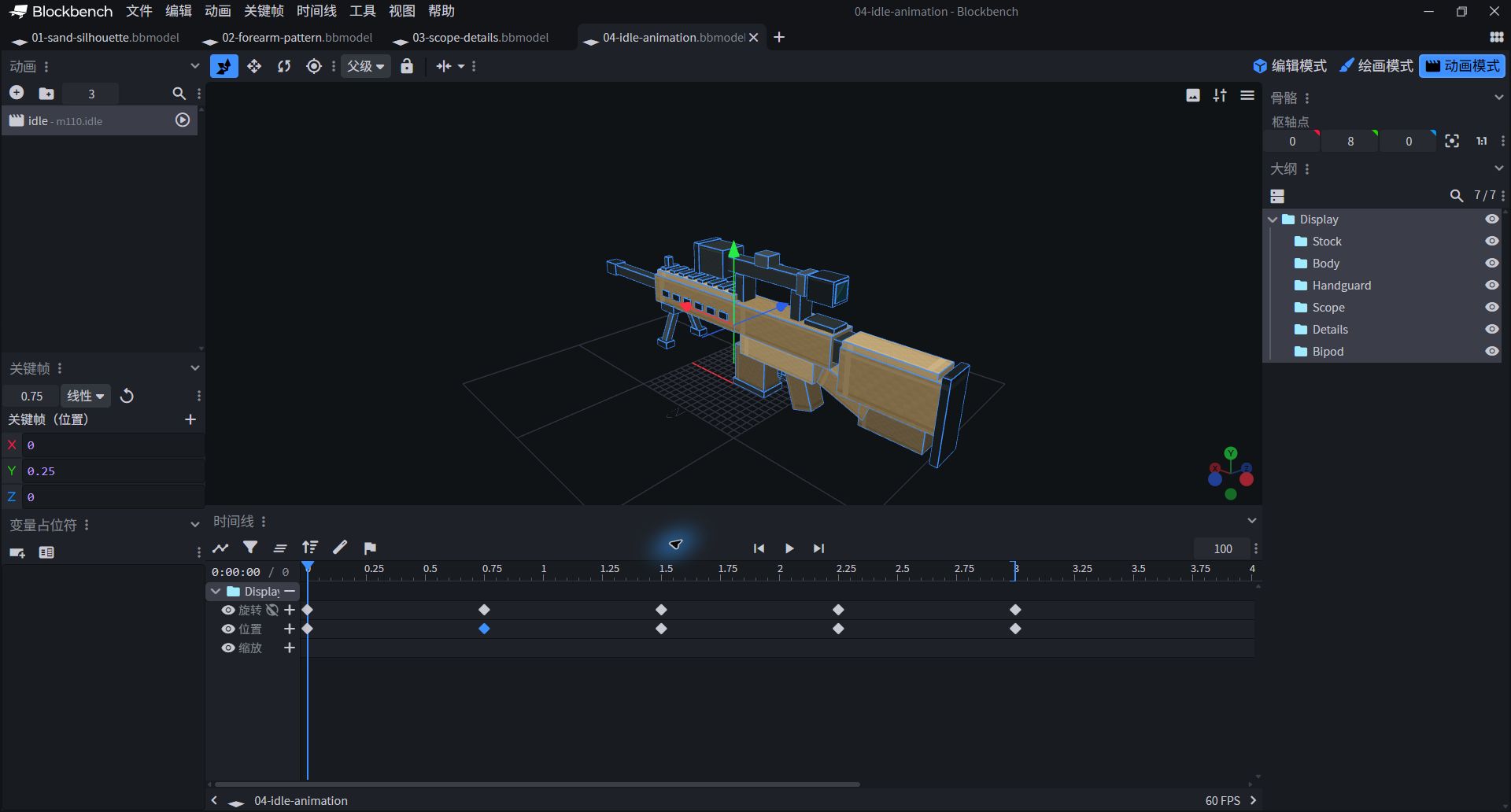
- Select m110.idle on the left, and then select Display to view the position and rotation track.
- This paragraph is light and does not have operational details; it is small in size to allow for observation of material.
3 second sway animation · all 10 keyframes
| Grouping | Track | time/second | X / Y / Z |
|---|---|---|---|
| Display | position | 0 | 0 / 0 / 0 |
| Display | position | 0.75 | 0 / 0.25 / 0 |
| Display | position | 1.5 | 0 / 0 / 0 |
| Display | position | 2.25 | 0 / -0.25 / 0 |
| Display | position | 3 | 0 / 0 / 0 |
| Display | rotation | 0 | 0 / 0 / 0 |
| Display | rotation | 0.75 | 0 / 0 / 1 |
| Display | rotation | 1.5 | 0 / 0 / 0 |
| Display | rotation | 2.25 | 0 / 0 / -1 |
| Display | rotation | 3 | 0 / 0 / 0 |
Display left and right, save your own version
The second action is to change the way of observing the work.
- New
m110.showcase, duration 5 seconds, Loop. Still select Display, but this time only use the Rotation track. - Return to normal in 0 seconds; rotate to normal in 1.25 seconds 0 / 24 / 6;2.5 seconds return; 3.75 seconds rotate to 0 / −24 / −6; 5 seconds back. Connect with Linear plug-in.
- Toggle two animations back and forth, make sure there is no forward migration left. Save .bbmodel, close and reopenYour own copyChecking texture and animations are still there.
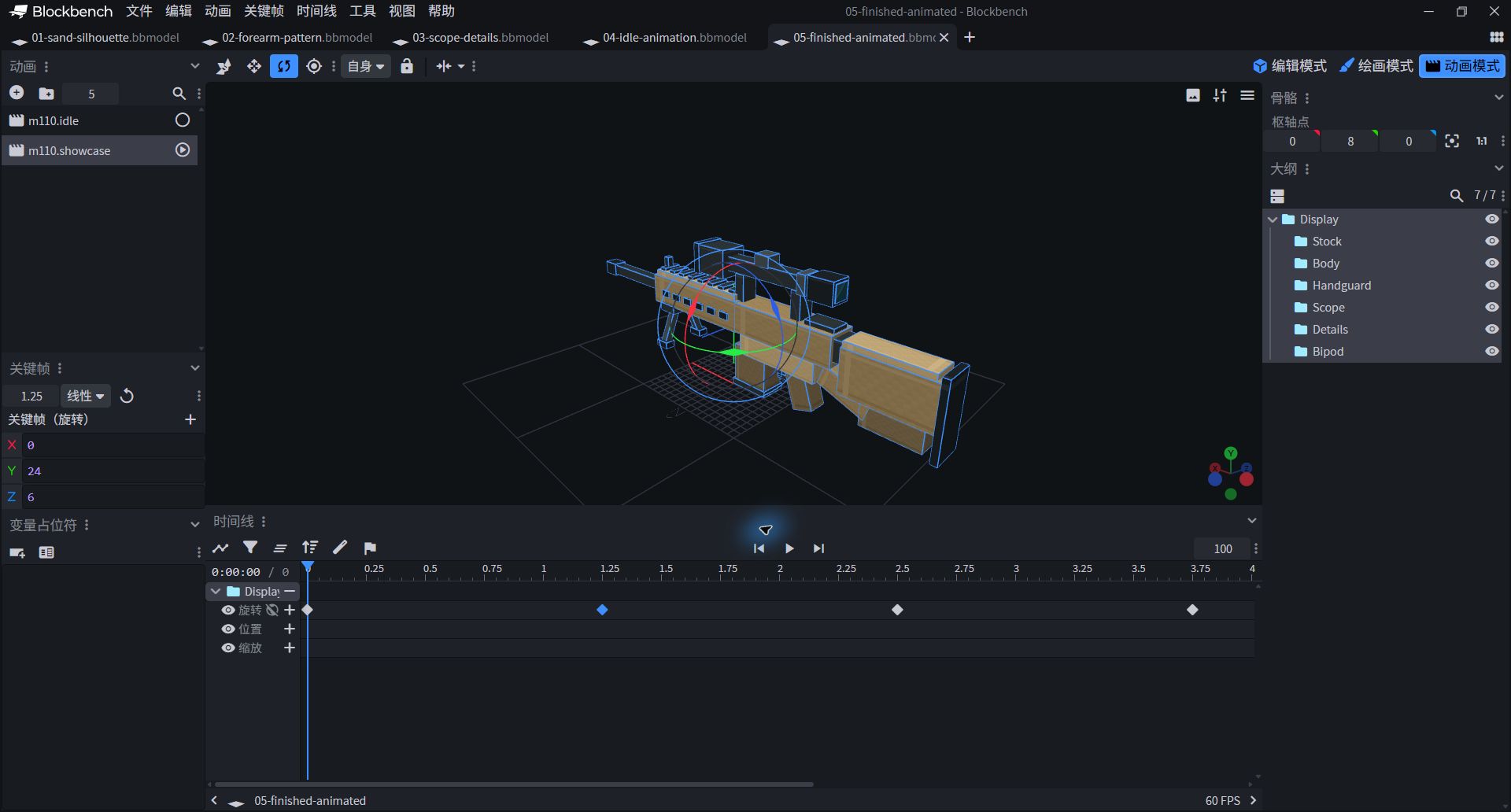
- The animation list on the left retains two sections: m110.idle and m110.showcase.
- The upper web page viewer can also switch and pause the animation; the automatic rotation button controls the viewing angle.
Approximately 5 seconds to display · All 5 keyframes
| Grouping | Track | time/second | X / Y / Z |
|---|---|---|---|
| Display | rotation | 0 | 0 / 0 / 0 |
| Display | rotation | 1.25 | 0 / 24 / 6 |
| Display | rotation | 2.5 | 0 / 0 / 0 |
| Display | rotation | 3.75 | 0 / -24 / -6 |
| Display | rotation | 5 | 0 / 0 / 0 |

This time, try to change the material.
Retain the outline, replace the sand-colored coating with low-saturated olive green, and the lens still retains a small patch of cool color. The clearer the restrictions, the easier it is to see the effect of a change. Save when finished my-m110-variant.bbmodel.
IF SOMETHING LOOKS ODD
Stuck, look at these four places first.
Why can't animation mode be found?
Confirm that the project is a Generic Model/general model, not a Java Block/Item. Keep the original file first, and then choose a project format suitable for animation.
Why is there only one small square moving?
Part instead of Display is selected in animation. Put the other six groups into Display, and then set keyframes on Display.
Why is the bracket hanging in the air and the inclined block deviating?
Check Rotation and Pivot, don't just enter Position and Size. Three decimal places in the parameter table are enough for observation, and the stage project retains complete accuracy; also check whether the basic rotation of the group has been mistakenly changed.
Can you just put it in Minecraft?
.bbmodel cannot be installed as MOD. This lesson saves general models and display animations; for in-game use, you need to select a different target version, export format, and loading plan. It does not contain game logic such as item registration, attack, damage, etc.
KEEP LEARNING
Continue to check.
- Blockbench Official Quick Start: Select Project Format
- Official Minecraft Style Guide: Shapes and Pixel Materials
- Lesson 03: Comparison of wood grain and material of M1
This course is an independently created game art teaching, not a precise reproduction of historical objects. The graphics, text, and projects are for personal study, classroom, and non-commercial creation. Please do not resell them as they are or pass them off as original.