
Mission 01 · What can you do after learning?
It's not about "beating it and finishing it", but establishing a development map that can continue to grow.
Many beginner tutorials copy dozens of lines of registration code as soon as they start. Although students see that there are many things in the game, they do not know what JDK, Gradle, Fabric Loader and Fabric API are responsible for. Once the version is different, the package name is changed, or the dependency download fails, you have no idea where to check. In this lesson, you first build a model and then complete a small but complete work. You'll know why each file exists, which level each command is run on, and which line to start reading error messages from.
Independently build environment
Confirm the Java version, set IntelliJ's Project SDK and Gradle JVM, and determine whether "System Java" and "Project Java" are consistent.
Tell me four components.
Distinguish between JDK, Gradle/Loom, Fabric Loader and Fabric API, and understand how they send ordinary Java code into the game.
Make visible functions
Sign up /hello_fabric command, let the server send a message to the player and add an emerald, instead of just outputting a log.
Export installable JAR
Use Gradle to build the module, find the correct JAR, install it into a normal Fabric client, and understand that the versions must match in sets.
/hello_fabricYou can see the Chinese, get the emeralds and be there. build/libs Find the build product.Version strategy · Fix the version first
The biggest fear in module development is not the difficulty of coding, but putting together tutorials from different eras.
Fabric, Minecraft, Java, Loader, Loom, and the Fabric API all have their own versions. The class names and resource formats may be different between 1.20.1, 1.21.1, 1.21.11 and 26.x on the network. Upgrading everything when you see the "latest version" often makes an otherwise correct example unable to compile. In order to allow students to reproduce stably, this lesson focuses on Minecraft Java 1.21.1 and JDK 21, and uses the dependency combination currently provided by the Fabric official example project for the 1.21.1 branch.
| Components | This lesson version | In charge of what? | Check position |
|---|---|---|---|
| Minecraft Java | 1.21.1 | Target game version | gradle.properties |
| JDK | 21 | Compiling and running Java | java -version |
| Fabric Loader | 0.19.3 | Discover and load modules | loader_version |
| Fabric API | 0.116.15+1.21.1 | Event, command and other development interfaces | fabric_api_version |
| Fabric Loom | Given by template | Gradle development, mapping, running and packaging plug-ins | loom_version |
| IntelliJ IDEA | Community 2025.x | Editing, Navigation, Gradle and Debugging | Help → About |
Please prepare before starting
- A Windows computer that can run Minecraft Java Edition, and a legitimate game account that you have access to.
- At least 8 GB memory; the first Gradle sync depends on a network download, and speed depends on the network.
- JDK 21. Note that JRE can only "run", JDK only contains
javacand other development tools. - IntelliJ IDEA Community Edition. It is sufficient for Fabric Java development without the need to purchase Ultimate.
- A pure English, no spaces, non-OneDrive project path, for example
C:\Projects\teacherma-fabric-intro.
Mental model · What exactly is Fabric?
It is not a "make a mod button", but a composable Java tool chain.
Fabric Loader Is the loader: reads each module when starting the game fabric.mod.jsonCheck ID, dependency and entrance classes and call your code.Fabric API It is a collection of commonly used development interfaces: providing more stable access points for command registration, events, item groups, network communications, etc.Fabric Loom It is a Gradle plug-in: helps you download games and mappings, generate run configurations, start development clients, remap and build JARs.IntelliJ IDEA It is your workbench for writing code and debugging.
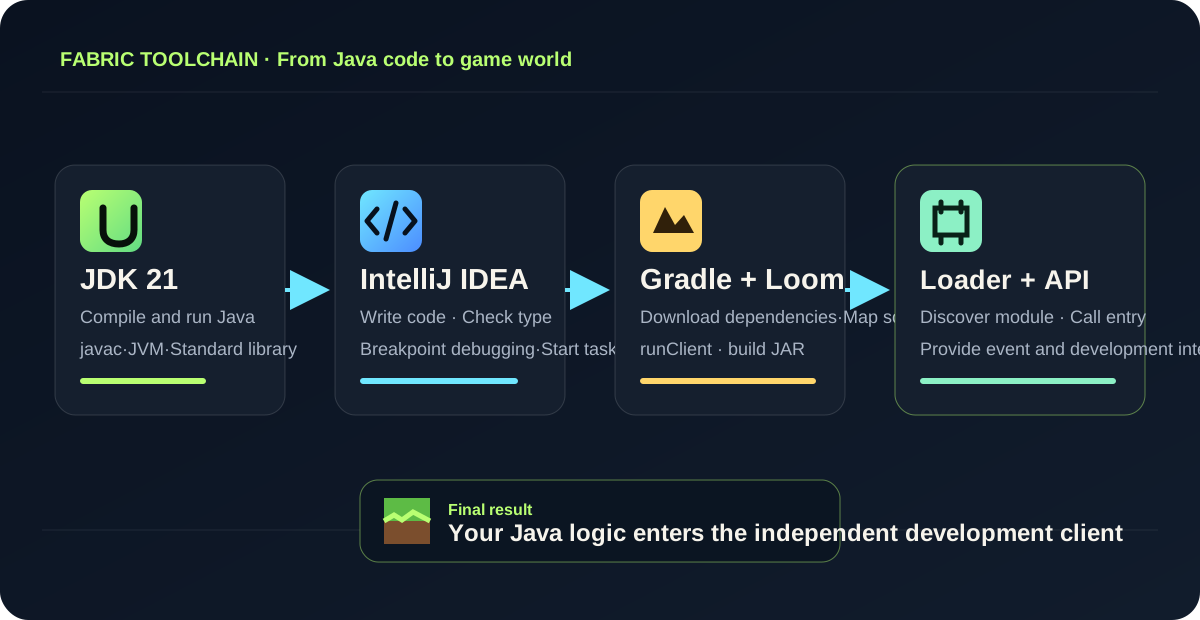
The module does not modify the original JAR
Modern developers don't just stuff files into Minecraft's original JAR. Your module is an independent product, discovered and loaded by Loader during the startup phase, making upgrades, removals, and positioning conflicts clearer.
Registration is "giving the object to the game"
Writing a Java object does not mean the game recognizes it. Items, blocks, entities, commands, etc. all need to be registered at the correct stage for the game to find them by unique ID.
The client and the server are two sets of responsibilities
Rendering, buttons and pictures belong to the client; world rules, item distribution and entity status should be determined by the logical server. Even for single-player games, there is a client and integrated server inside.
Gradle is a reproducible build specification
It records dependencies and tasks, allowing teachers and students to perform the same tasks on different computers. runClient and buildInstead of manually copying a bunch of unidentified JARs.
Setup · Installation and creation project
Verify the tool before generating a template; do not write Gradle configurations by memory in an empty folder.
Confirm JDK 21, not just "Java installed"
Open PowerShell and run the following two commands respectively. The first checks the running environment, and the second checks the compiler. Both should display 21. if javac does not exist, usually it means that only JRE is installed, or the system PATH does not point to JDK.
java -version
javac -versionUse JDK 21 for Project SDK and Gradle JVM of IntelliJ
Open File → Project Structure → Project, set SDK to 21; re-entry Settings → Build, Execution, Deployment → Build Tools → Gradle, also set the Gradle JVM as the same JDK 21. In one place only, there may still be "editor looks normal but construction fails."
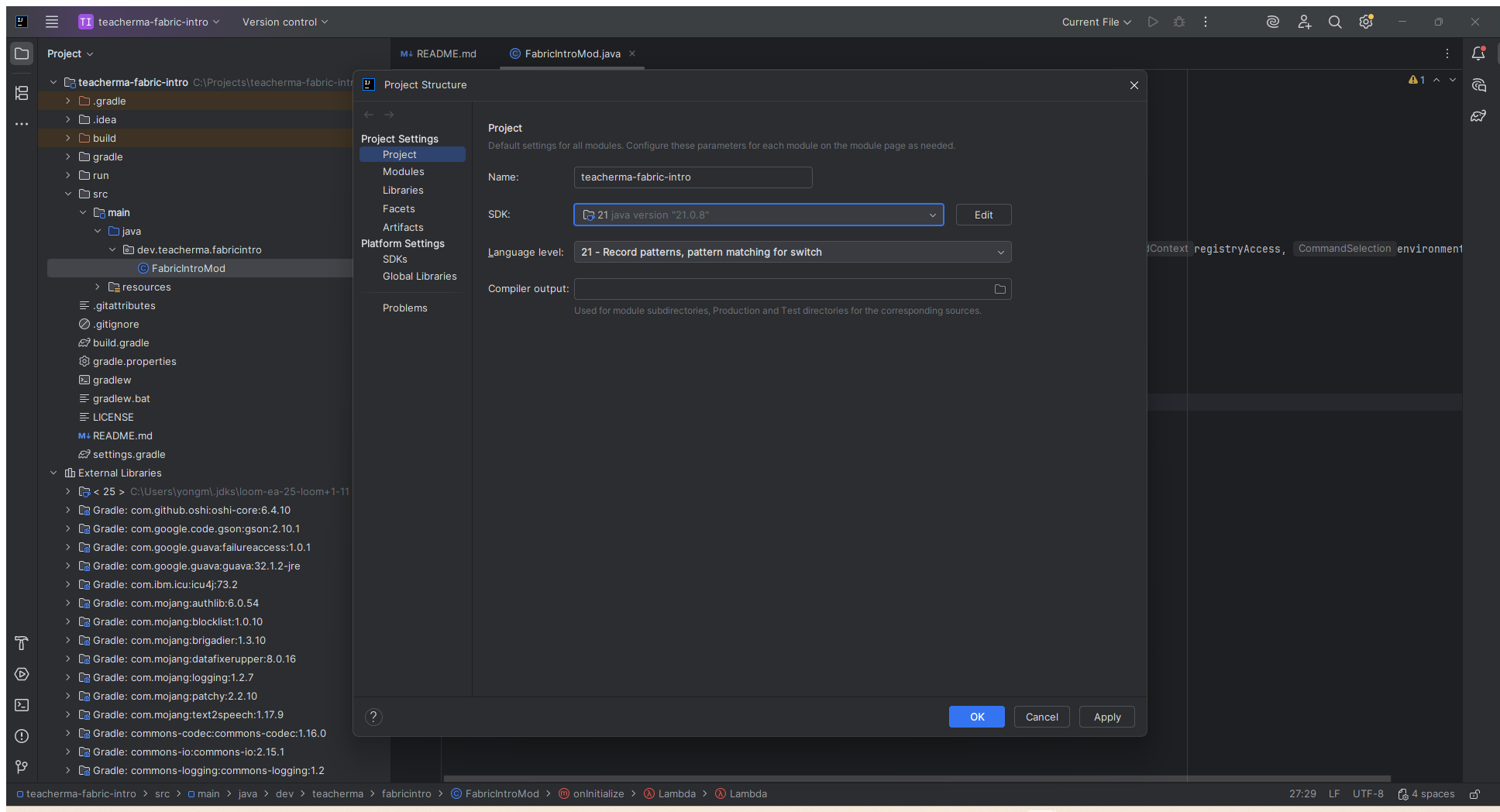
21The Language level also maintains 21.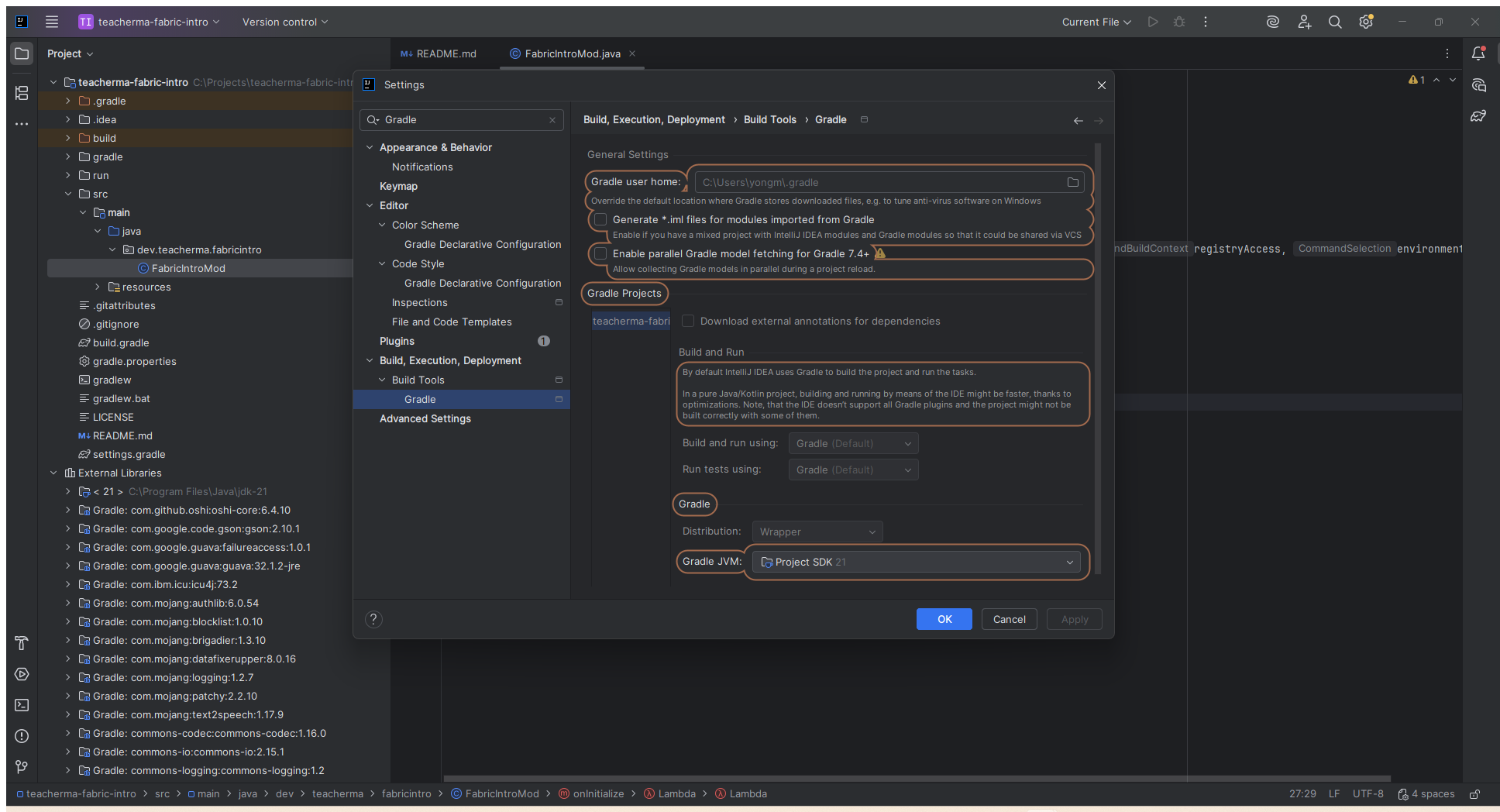
Project SDK 21.Generate project from Fabric Template Mod Generator
Open the official generator and fill in: Mod Name is TeacherMa Fabric Intro, Mod ID is teacherma_fabric_intro, PackageName dev.teacherma.fabricintro,MinecraftVersion Selection 1.21.1, language maintains Java. The lesson proposes to keep " split client and main source " , which will detect early errors in writing the client class into the service code.
Unlock to a simple path and open the Project Root Directory in IntelliJ
The recommended path is C:\Projects\teacherma-fabric-intro. choose File → Open should be opened containing build.gradle,gradlew.bat and src layer of folders, don’t just open src. Select Import when prompted by the Gradle build script, and wait for the index and dependencies to download to complete.

src,build.gradle,gradlew.bat and settings.gradle; display JDK 21 in External Librarias.Quick comparison using course Starter project
If you want to run through it first and then compare it item by item, you can download the projects that have been verified in this lesson. It retains the official Gradle Wrapper and version combinations, and adds the final command code. Open it in a separate folder and don't overwrite your own practice project.
TeacherMa Fabric Intro Starter
Contains complete source code, Gradle Wrapper, version configuration and Chinese README. The download interface is protected by course permissions.
Project map · Understand the project structure
The responsibility for these documents can be described as truly “opening the project”.

teacherma-fabric-intro/
├─ gradle/                         # Gradle Wrapper 运行文件
├─ src/
│  ├─ main/
│  │  ├─ java/
│  │  │  └─ dev/teacherma/fabricintro/
│  │  │     └─ FabricIntroMod.java # 通用/服务端入口逻辑
│  │  └─ resources/
│  │     └─ fabric.mod.json         # 模组说明书
│  └─ client/                       # 仅客户端代码与资源
├─ build.gradle                     # 插件、依赖与构建规则
├─ gradle.properties                # Minecraft/Fabric 版本
├─ settings.gradle                  # 工程名称与插件仓库
└─ gradlew.bat # Windows 下执行 Gradlefabric.mod.json: Loger first read module instructions
Here. id is the namespace of the entire module and must use safe characters such as lowercase letters, numbers, and underscores; it will also appear in item IDs, resource paths, and logs.entrypoints.main It must be completely consistent with the complete package name of the Java class. Any inconsistency in any letter will result in the entry class not being found.depends then declare the minimum Loader version, target Minecraft, Java and Fabric API.
{
  "schemaVersion": 1,
  "id": "teacherma_fabric_intro",
  "name": "TeacherMa Fabric Intro",
  "environment": "*",
  "entrypoints": {
    "main": ["dev.teacherma.fabricintro.FabricIntroMod"]
  },
  "depends": {
    "fabricloader": ">=0.19.3",
    "minecraft": "~1.21.1",
    "java": ">=21",
    "fabric-api": "*"
  }
}gradle.properties: Version to appear
The newer the versions, the better, but they must be compatible with each other. The Minecraft version determines which set of game code you face; Loader is responsible for loading; Fabric API must have a suffix that adapts to the target game. The Loom version is given by the same template generator. When upgrading, don’t just minecraft_version Change to the new number and expect all dependencies to be automatically compatible.
Code · Write the first visible function
Register a command to let the Java code actually change the player state on the server side.
We choose command as the first function because it simultaneously displays the entry life cycle, Fabric API events, command tree, execution context, server player object and game item object, and does not require processing of textures, models and language files first. input /hello_fabric Finally, the command is executed on the logical server, adds an emerald to the current player's inventory, and sends a success message.
package dev.teacherma.fabricintro;

import net.fabricmc.api.ModInitializer;
import net.fabricmc.fabric.api.command.v2.CommandRegistrationCallback;
import net.minecraft.commands.Commands;
import net.minecraft.network.chat.Component;
import net.minecraft.world.item.ItemStack;
import net.minecraft.world.item.Items;
import org.slf4j.Logger;
import org.slf4j.LoggerFactory;

public class FabricIntroMod implements ModInitializer {
    public static final String MOD_ID = "teacherma_fabric_intro";
    public static final Logger LOGGER = LoggerFactory.getLogger(MOD_ID);

    @Override
    public void onInitialize() {
        CommandRegistrationCallback.EVENT.register((dispatcher, registryAccess, environment) ->
                dispatcher.register(Commands.literal("hello_fabric")
                        .executes(context -> {
                            var player = context.getSource().getPlayerOrException();
                            player.addItem(new ItemStack(Items.EMERALD));
                            context.getSource().sendSuccess(
                                    () -> Component.literal("Hello Fabric! Java 已经改变了游戏世界。"),
                                    false
                            );
                            return 1;
                        }))
        );

        LOGGER.info("TeacherMa Fabric Intro loaded successfully.");
    }
}
1. implements ModInitializer
This interface indicates that the class is a common entry point. Loader will be called when the module is ready for initialization. onInitialize(). This is a good place to register commands, items, blocks, and events.
2. Register callback instead of executing immediately
CommandRegistrationCallback.EVENT.register means "When the command system is ready to register, please call this logic." Emeralds will not be given to the player immediately when the page loads.
3. context Provide execution site
Commands may be executed by the player, the server console, or a command block.getPlayerOrException() It is clearly required that the executor this time must be a player, and then the server player object is obtained.
4. Return value 1 Signal of success
The Minecraft command system uses integer results to represent execution status. Returns 1 here so that command blocks, functions, and subsequent automation can determine that the command has been successfully completed.
net.minecraft.commands.Commands and Component. When using Yarn mapping, the old tutorial might be written as CommandManager and Text. The concepts are the same, but class names cannot be mixed.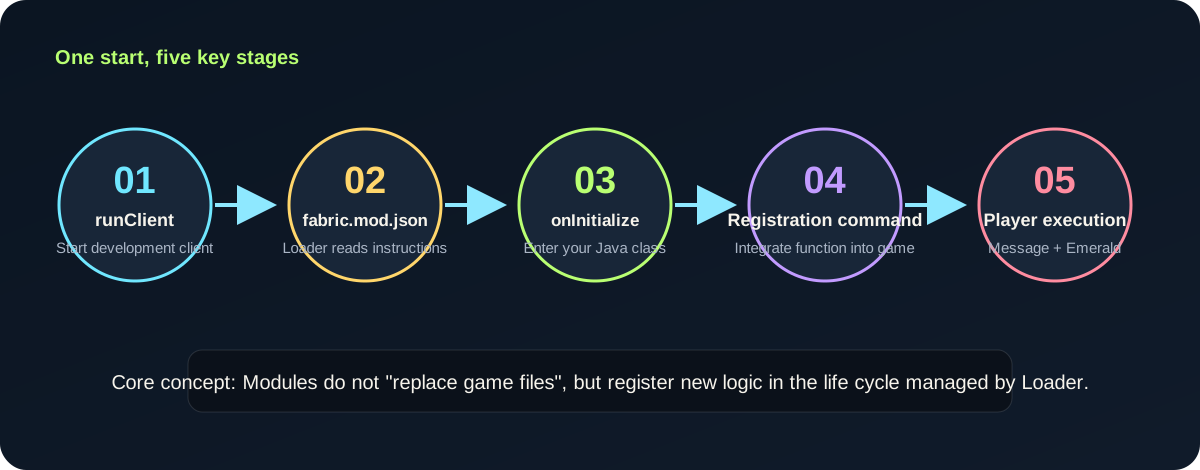
Run & verify·Run and acceptance
It is normal to start slowly for the first time; after "being able to enter the game", four verifications need to be done.
Open the Gradle tool window on the right side of IntelliJ, find the Fabric related running tasks and execute them runClient. You can also open PowerShell in the project root directory and use Wrapper to start it. Wrapper will ensure that the project uses the specified Gradle version and does not require students to install Gradle globally.
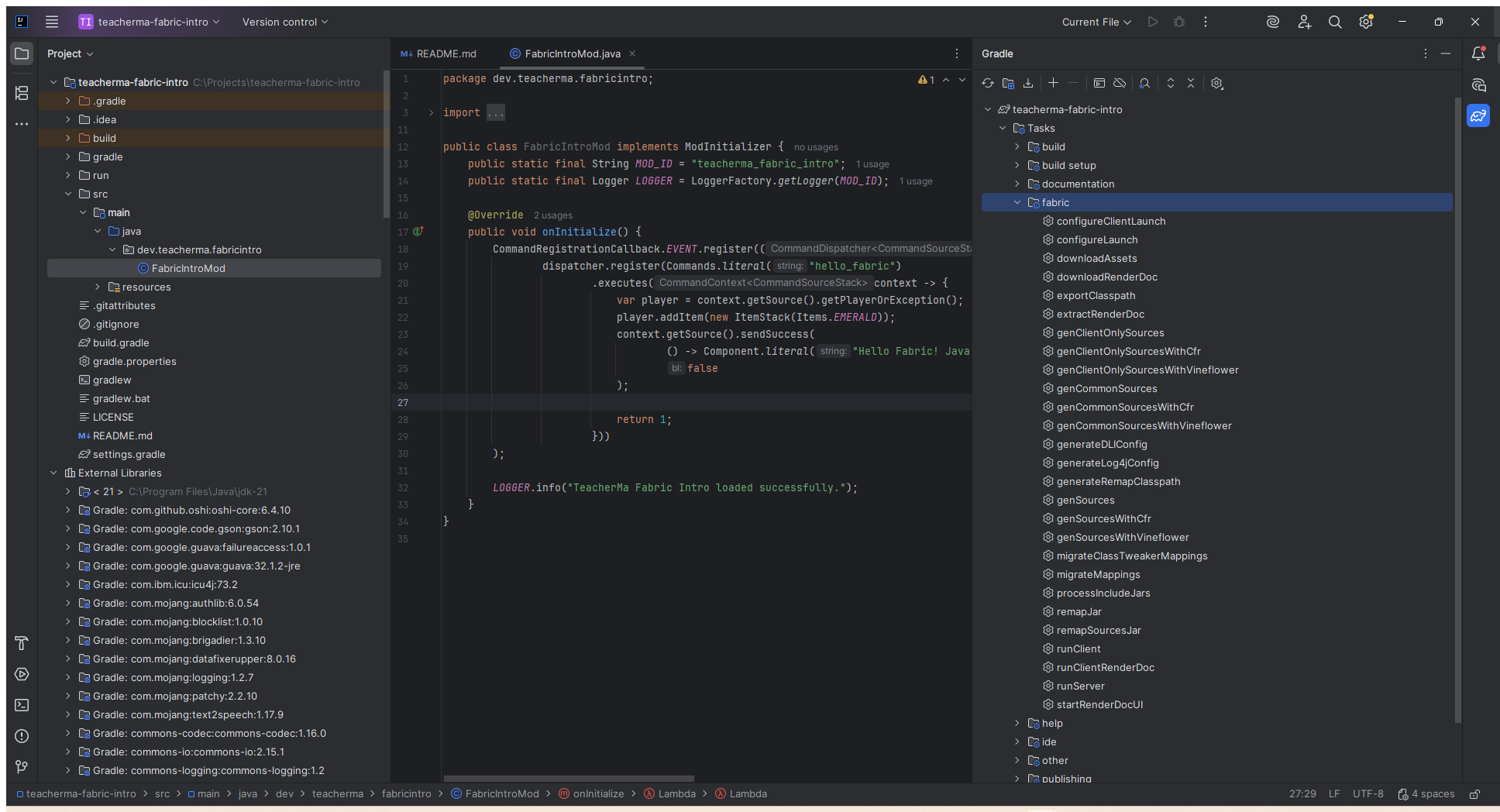
teacherma-fabric-intro → Tasks → fabricDouble click. runClient. The first startup requires downloading and preparing game resources, and just wait for the console to complete../gradlew.bat runClientCheck 1: Log
Search in console TeacherMa Fabric Intro loaded successfully. Its appearance indicates that the Loader has found the entry and performed initialization.
Check 2: Mods List
After the development client is started, confirm that the module name and version exist. If it cannot be found at all, check first fabric.mod.json 's ID and entrypoint.
Check 3: Command Recommendations
Enter the world, enter in chat box /hello. Autocomplete should appear /hello_fabric, which means the order has entered the schedule tree.
Check 4: Game Results
Execute the command, see the Chinese message, and confirm that an emerald is added to the inventory. If you do this a few more times, you should add one more each time.
Check 5: Only change one place
Change emerald to Items.DIAMOND, restart and verify. Change one variable at a time to create the correspondence between code and result.
Check 6: First error in reading log
If it fails, the first entry in the log contains ERROR or Caused by , don’t just take a screenshot of the last screen and repeat the stack.
runClient Using the development run directory under the project will not automatically install the module into your usual launcher. .minecraft. This way the test is safer and does not contaminate the common world.Debug clinic · Common errors
First determine which layer the error occurs, and then decide whether to change settings, dependencies or Java.
Error: Unsupported
Reason:Gradle JVM, Project SDK, or System Java are not project-required JDK 21.Processing:Rerun java -version and javac -version, recheck Project SDK and Gradle JVM of IntelliJ. Reload the Gradle project when modified.
Error: Could not resolve / Read timed out/ download dependent failed
Reason:The first build requires access to Fabric Maven, Maven Central and the game dependency server. Network interruption or proxy settings may cause failure.Processing:First confirm that the browser can access the Fabric official website; do not delete the source code repeatedly. After the network is restored, reload in the Gradle tool window, or execute ./gradlew.bat --refresh-dependencies build.
Error: Could not find or load main class/ enterpoint
Reason:fabric.mod.json with the full class name at the top of the Java file
Official screenshot in package Inconsistent.Processing:Check dev.teacherma.fabricintro.FabricIntroMod and confirm that the file is located in the corresponding directory. Package names use all lowercase, and class names keep uppercase and lowercase.
Error: Mod response encounted an incompatible mode set
Reason:Minecraft, Loader, Fabric API or Java version does not satisfy depends.Processing:Reads the " requires " included in the error and the current version. Do not just delete the relying statement. Return to the generator to recreate the same Minecraft version, which is usually more reliable than a guessback version.
Can enter the game, but there is no /hello_fabric
First find the entry success information in the log. If not, check fabric.mod.json; if yes, confirm that the code is saved and Gradle redacted. Also make sure you started this project. runClient, not ordinary Minecraft Launcher on the desktop.
The class name in the code is different from the online tutorial
This is usually not a " Fabric broken " , but a different map system or game version. The old Yarn curriculum and the current Mojang official map give different names to the same concept. Select a template that is consistent with the document, and do not copy half from multiple versions.
Use IntelliJ breakpoints to observe command execution
Click var player = ... Add a red breakpoint to the line number on the left, and then start the client in Debug mode. When entering the world to execute a command, the program will pause. View it in the Variables window at this time context,player With player inventory. Press F8 to step through and you will see for yourself the sequence of "get player → add item → send message → return 1". This is a better way to model program execution than memorizing an API.

var player = ... This line starts with the top Debug button; the program will not be suspended until it is actually executed here.Build & install · Build and install
It can run in the development environment, and finally it will become a JAR that can be loaded by the ordinary launcher.
Close the development client and execute the build in the project root directory. Gradle compiles Java, processes resources, remaps names, and generates publishable files. Open after successful build build/libs, select the shortest filename and do not contain sources JAR;sources The package is for developers to read the source code, not for ordinary players to install the package.
./gradlew.bat clean build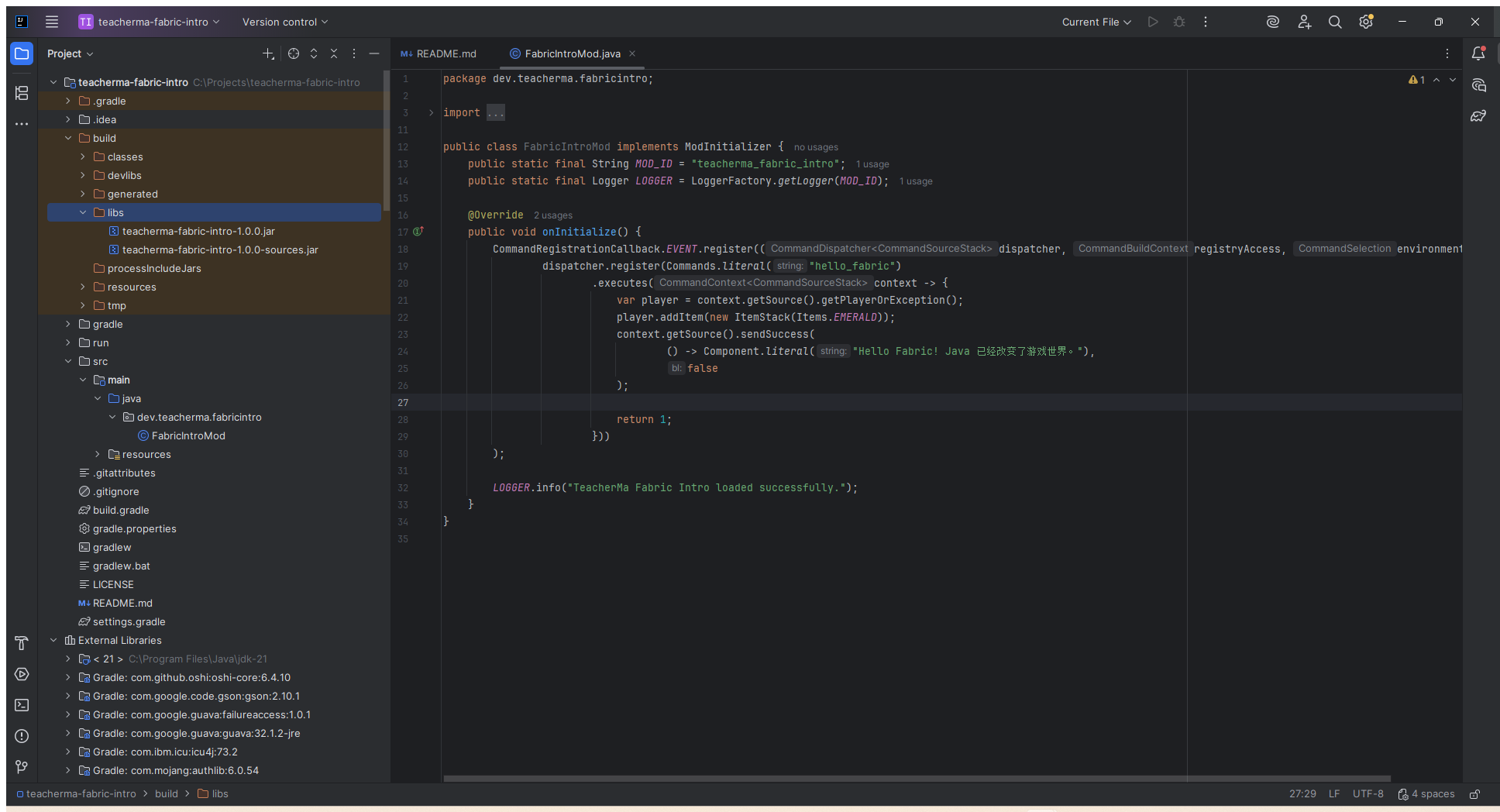
build → libs. Installation teacherma-fabric-intro-1.0.0.jarbeams -sources files are only used for reading source code.Backup World
Back up important worlds before installing any new mods. Development version modules may write entities, items or archive data, and may not be recoverable after removal.
Install matching version of Fabric Loader
Download the tool from the Fabric official Installer page, select Minecraft 1.21.1, the corresponding Loader and the correct game directory, and create a Fabric startup configuration. Do not use unknown installers reprinted by third parties.
Preparation mods Folder
The Windows default directory is usually %appdata%\.minecraft\mods. Put the 1.21.1 JAR of the Fabric API along with the module JAR you built; only one version of the same module will be kept.
Start from Fabric configuration
Select the newly created Fabric 1.21.1 configuration in the official launcher. After entering the game, check the Mods information and logs, and then use the test world to execute the command. Do not do the first verification directly on the only living main world.
Practice·Practice and Self-Assessment
Turn "understand" into "can change independently": complete three small tasks with increasing difficulty.
Exchange rewards
Put Items.EMERALD Change to Items.DIAMOND, change the message to your own course slogan. Predict the results and then run.
Increase quantity
Research new ItemStack(Items.EMERALD, 3) gives one command to three emeralds and explains the constructor parameters.
The answer to
Add a second command
Copy the registration structure and create /fabric_level, send only "I have completed first lesson", but do not distribute items. Avoid embedding two commands together.
Five-minute self-test
1. What is the difference between Fabric Loader and Fabric API?
Loader is responsible for discovering modules, checking dependencies and calling entrances; Fabric API is a collection of interfaces that modules can optionally or must depend on, providing functions such as events, commands, and registration assistance. With only API but no Loader, the module will not be loaded normally.
2. Why does this lesson check Project SDK and Gradle JVM at the same time?
Editor analysis code uses the Project SDK, while Gradle builds may use a different set of JVMs. When the two are inconsistent, the editor will have no red line and the build will report a Java version error.
3. fabric.mod.json is written incorrectly?
Loader can read the module description, but cannot find and instantiate the specified entry class.onInitialize() will not be executed and the command will not be registered. The logs will usually clearly state that the portal failed to load.
4. Why should the code for issuing items be executed on the logical server?
Inventory and world state are provided by the server as the authoritative source. Modifying only on the client side will cause temporary changes in the picture, which will be later corrected by the server, or even cause desynchronization. There is also an integrated server within the single player game.
5. How to find the correct release JAR?
Execute build View later build/libs, usually select the shortest file name without sources 's JAR. Before installation, also make sure that the target Minecraft, Loader, Fabric API and Java versions match.
Terminology card
| Terminology | One sentence explanation |
|---|---|
| Mod ID | The module's unique namespace in code and resources, such as teacherma_fabric_intro. |
| Entrypoint | Loader A Java class that is called during a specified life cycle stage. |
| Registry | The game saves a registration system that identifies the correspondence between identifiable objects and unique IDs. |
| Mapping | Map the confused game members into a naming system that developers can read class names and method names. |
| Dependency | External components that the current project depends on for compilation or operation, such as Fabric API. |
| Logical Server | The one-man game also exists on the side that is responsible for world rules and authority. |
Official references·Official information
The course content is based on official templates and documents.
Fabric is developing rapidly. The course explains clearly the principle of stability; the specific version number and class name should be rechecked when upgrading. It is recommended to collect the following official entrances:
- Fabric Template Mod Generator: Generates a project that matches the target version.
- Creating a Project: package name, project path and IntelliJ import description.
- Project Structure: portals, resource directories and
fabric.mod.json. - Building a Mod: Gradle build with JAR selection.
- Fabric Example Mod 1.21.1Source of CC0 official template for this lesson Starter.
Lesson complete
You have taken the most critical step: getting your own Java logic into the game.
The next stage is to start learning to register your first custom item: establishing a unique ID, item class, creative mode grouping, language text, model JSON and 16×16 texture. Please save the runnable version of this lesson project first, and then copy a new branch for experiments; a baseline that can always be run is part of professional development habits.