
Mission · Let’s see the final effect first
This is not a picture of a magic stick, it's about letting a player operate to really change the game world.
Imagine: you walk to the grass, holding a small orange-red wand in your hand, aim at the square at your feet and click the left button. The code first confirms "whether it is a magic wand" like a gatekeeper, and then checks whether the player has the permission to modify it. Only when all are passed, the server will replace the target block with flames and let nearby players hear the sound of fire bombs. This small effect also connects the four most important lines in the Fabric module: registry, player events, client and server, and resource files.
I know an object.
Sign up maik:magic_wand, lets the game, command, object column and resource system use the same unique identity.
Hear player actions
Use AttackBlockCallback Listen for the "Attack Block" and understand why this lesson uses left click instead of right click to use items.
Safely modify the world
First determine the spectator mode and modify permissions, and then only place flames, synchronization blocks and broadcast sounds on the server side.
Make it look like a magic stick.
Use translated JSON, handheld model JSON and transparent PNG to turn a piece of registration code into a prop that players can see and afford.
./gradlew.bat build Display BUILD SUCCESSFUL;development clients available /give @s maik:magic_wand Obtaining " magic rods " ; when holding squares with which the left key can be modified, the cube becomes a flame and plays sound; ordinary objects still maintain the original attack or digging logic.Version truth·Subject to template
Read the project's version statement first, and then decide which JDK to install; don't guess based on "1.20 should be...".
This tutorial is checked line by line C:\TeacherMa\Mod\maik-template-1.20. Its target game is Minecraft 1.20, using Yarn 1.20+build.1, Fabric Loader 0.18.4, Fabric API 0.83.0+1.20 and Loom 1.14.10. More notably, the template is build.gradle Set explicitly in release = 21, and fabric.mod.json Requirements java >= 21So this class uses JDK 21.
| Components | Value in template | Confirm in which file | Effect |
|---|---|---|---|
| Minecraft | 1.20 | gradle.properties | Determine game class, resource format and available APIs |
| Yarn mappings | 1.20+build.1 | gradle.properties | Provide readable names for obfuscated Minecraft classes and methods |
| Fabric Loader | 0.18.4 | gradle.properties | Discover and load module entry |
| Fabric API | 0.83.0+1.20 | gradle.properties | Provide common APIs such as item groups and player interaction events |
| Fabric Loom | 1.14.10 | gradle.properties | Configure development environment, map, run and remap JAR |
| Gradle Wrapper | 9.2.1 | gradle/wrapper/gradle-wrapper.properties | Make sure each computer is using the same Gradle version |
| JDK | 21 | build.gradle with fabric.mod.json | Compile and run this template |
After opening IntelliJ, set the Project SDK to JDK 21 in Project Structure; in Settings → Build Tools → Gradle, point the Gradle JVM to the same set of JDK 21, and keep Distribution using Wrapper. Then execute in the project root directory:
java -version
javac -version
./gradlew.bat build
This template has actually been cleanly built, all 10 Gradle tasks have been completed, and the final display BUILD SUCCESSFUL. Let the original project succeed first, and then start changing the code. This is the most time-saving debugging method.
Flow · Understand the casting chain at a glance
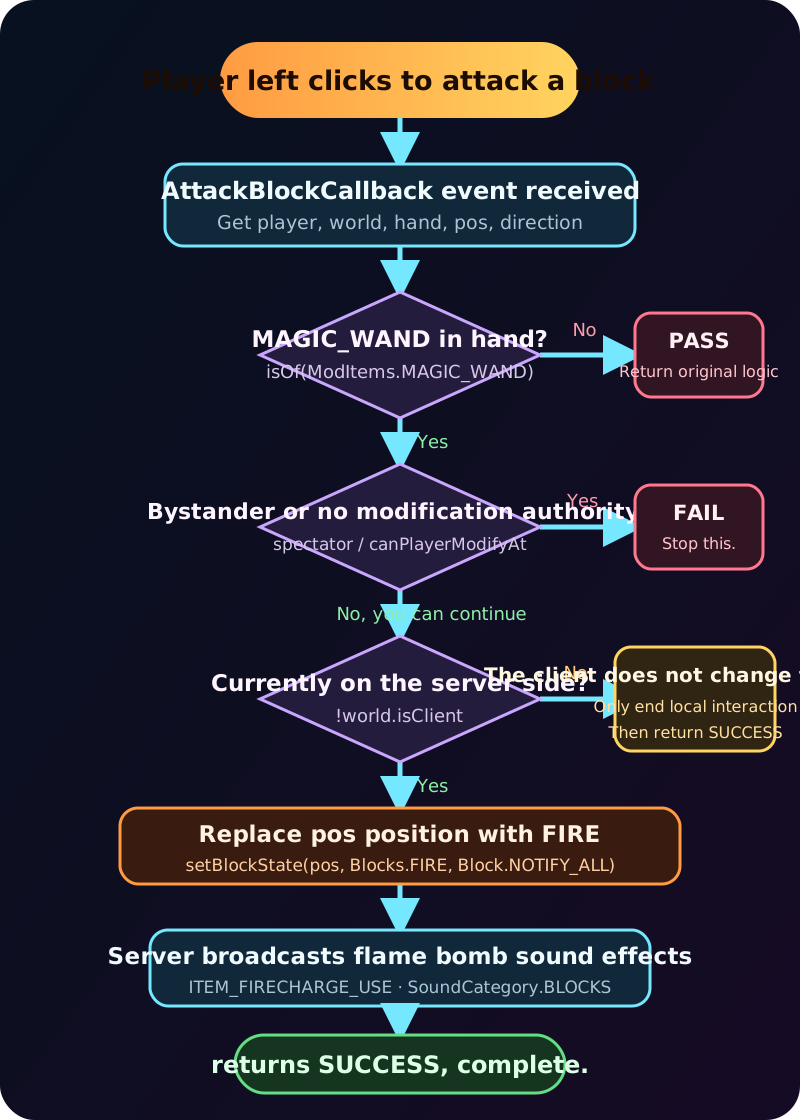
The fire will not start immediately after left-clicking. The code has to go through three "levels".
Every exit in the flow chart has meaning. Ordinary items go PASS, which is equivalent to telling Fabric: "This is not my business. Please continue with the logic of Minecraft." Bystander or player without permission to change it. FAIL, indicating that the action was categorically rejected. The world is really changed only when you have a magic stick, permission to do so, and come to the server end. Such a layer would prevent the wand from taking all of its things away from the left key, as well as preventing the client from creating an instant “false flame”.
File map · Know the way first and then write the code
The project is small, but Java has its own room for each of the resources and game data.
src/main/java Put the operation logic;assets/maik Put name, model and texture;data/maik Put the synthetic formula. Here's maik is the Mod ID, which is also the resource namespace. As long as the path is accidentally written as magic,Maik or another name, the code may still compile, but the game will not be able to find the corresponding resource.
maik-template-1.20/
├─ build.gradle
├─ gradle.properties
├─ gradlew.bat
└─ src/main/
   ├─ java/com/malaoshi/maik/
   │  ├─ Maik.java
   │  ├─ item/
   │  │  └─ ModItems.java
   │  └─ event/
   │     └─ MagicWandEvents.java
   └─ resources/
      ├─ fabric.mod.json
      ├─ assets/maik/
      │  ├─ lang/
      │  │  ├─ zh_cn.json
      │  │  └─ en_us.json
      │  ├─ models/item/magic_wand.json
      │  └─ textures/item/magic_wand.png
      └─ data/maik/recipes/magic_wand.json
Java determines behavior
Maik Start registration,ModItems Create items,MagicWandEvents Handle player left click.
assets Deciding "What It Looks Like"
The name, handheld display, and pixel art are all here. The purple-black error texture is usually a disconnection of this layer.
data Determine gameplay data
The formula does not need to be written into Java. When JSON is correct, the package system will read automatically.
The namespace is responsible for the connection
maik:magic_wand Like the complete address of an item, all files will eventually return to this address.
Entrypoint · Main switch
Maik.java It is not responsible for casting spells, it is responsible for connecting the two systems to power.
fabric.mod.json Put com.malaoshi.maik.Maik Declared as the main entrance. Fabric Loader is called when creating a module onInitialize(). Here, the items and inventory are registered first, and then the attack block event is registered. Think of the entrance class as the stage manager of a theater: it doesn't play the magician himself, but it does make sure the actors, lighting, and sound effects are in place.
package com.malaoshi.maik;

import com.malaoshi.maik.event.MagicWandEvents;
import com.malaoshi.maik.item.ModItems;
import net.fabricmc.api.ModInitializer;
import org.slf4j.Logger;
import org.slf4j.LoggerFactory;

public class Maik implements ModInitializer {
    public static final String MOD_ID = "maik";
    public static final Logger LOGGER = LoggerFactory.getLogger(MOD_ID);

    @Override
    public void onInitialize() {
        ModItems.register();
        MagicWandEvents.register();
        LOGGER.info("Maik mod initialized");
    }
}
MOD_ID Define only once, other classes pass Maik.MOD_ID Using it, spelling forks caused by handwritten strings can be reduced. Logs also use the same ID; read in the future run/logs/latest.log , it is easy to see which row comes from your module.
ModItems.MAGIC_WAND. Complete the item registration first, and then install the event listener, which is more consistent with the dependency order in reading. The real event will only be triggered when the player enters the world and attacks the block, and will not set fire directly during the initialization phase.Registry · Issue "ID card" to the magic wand
ModItems.java Do two things: register the item, and put it into the creative mode category.
package com.malaoshi.maik.item;

import com.malaoshi.maik.Maik;
import net.fabricmc.fabric.api.itemgroup.v1.ItemGroupEvents;
import net.minecraft.item.Item;
import net.minecraft.item.ItemGroups;
import net.minecraft.registry.Registries;
import net.minecraft.registry.Registry;
import net.minecraft.util.Identifier;

public final class ModItems {
    public static final Item MAGIC_WAND = Registry.register(
            Registries.ITEM,
            new Identifier(Maik.MOD_ID, "magic_wand"),
            new Item(new Item.Settings().maxCount(1))
    );

    private ModItems() {
    }

    public static void register() {
        ItemGroupEvents.modifyEntriesEvent(ItemGroups.TOOLS)
                .register(entries -> entries.add(MAGIC_WAND));
    }
}Select an item register
Registries.ITEM Blocks, entities, and voices have their own registration forms and cannot be mixed.
Combined unique ID
new Identifier("maik", "magic_wand") Get complete ID maik:magic_wand. Commands, translations, models and recipes all work around it.
Set up a maximum of one stack
maxCount(1) Let the magic rod take a stand like a tool. It's not long enough for it to be used without loss.
Add tool classification
ItemGroups.TOOLS Let the creative model player find it in a catalogue of tools and practical items. It only affects the display, not the registration itself.
If the item group code is missing,/give @s maik:magic_wand Still possible to succeed; if missed Registry.register, so that the translation, model and formula are beautiful and no object can be connected. It is important to distinguish between "if there's this item in the game" and "if there's a show of it in the creation bar" when you're wrong.
Spell logic · Where the magic happens
The real mantra is not a sentence setBlockState, but a complete security check.
package com.malaoshi.maik.event;

import com.malaoshi.maik.item.ModItems;
import net.fabricmc.fabric.api.event.player.AttackBlockCallback;
import net.minecraft.block.Block;
import net.minecraft.block.Blocks;
import net.minecraft.sound.SoundCategory;
import net.minecraft.sound.SoundEvents;
import net.minecraft.util.ActionResult;

public final class MagicWandEvents {
    private MagicWandEvents() {
    }

    public static void register() {
        AttackBlockCallback.EVENT.register((player, world, hand, pos, direction) -> {
            if (!player.getStackInHand(hand).isOf(ModItems.MAGIC_WAND)) {
                return ActionResult.PASS;
            }

            if (player.isSpectator() || !world.canPlayerModifyAt(player, pos)) {
                return ActionResult.FAIL;
            }

            if (!world.isClient) {
                world.setBlockState(pos, Blocks.FIRE.getDefaultState(), Block.NOTIFY_ALL);
                world.playSound(
                        null,
                        pos,
                        SoundEvents.ITEM_FIRECHARGE_USE,
                        SoundCategory.BLOCKS,
                        1.0F,
                        1.0F
                );
            }

            return ActionResult.SUCCESS;
        });
    }
}
The first step: what is monitored is the "attack block", so the operation is the left button
AttackBlockCallback Fires when the player attempts to attack a block. The callback hands us five pieces of on-site information:player Who is operating,world Which world is it?hand Which hand is it?pos is the position of the targeted block,direction is the surface clicked on. The current template is not in use direction, because it directly replaces the blocks that are clicked on instead of generating a fire next to them.
The second step: If it is not a magic wand, then immediately PASS
player.getStackInHand(hand) Obtain the handheld stack that triggered this action,isOf(ModItems.MAGIC_WAND) Determine whether it is the registered magic wand. An exclamation point before a condition means "isn't". Return PASS After that, Fabric will allow other listeners or the original game to continue processing, and players who use pickaxes to mine or play blocks with bare hands will not be hijacked by magic logic.
The third step: bystanders and unauthorized positions cannot cast spells
player.isSpectator() Preventing bystanders from changing the world;world.canPlayerModifyAt(player, pos) Whether the player can modify the target will be determined based on game rules and location permissions. Return if any condition is not met FAIL. This is not a redundant courtesy check: server spawn protection, adventure play, or other permission systems may rely on it.
The fourth step: world modification is only performed on the server side
There are also clients and logical servers inside the single-player world of Minecraft. The client is responsible for the graphics and input, and the server has the authoritative world state.if (!world.isClient) means that only the server side performs block replacement and sound broadcasting. If both sides are changed, repeated actions may occur; if only the client is changed, the player will see the fire first, and then suddenly recover after the server synchronizes, like a failed illusion.
Step 5: Replace the target block itself with flames
world.setBlockState(pos, Blocks.FIRE.getDefaultState(), Block.NOTIFY_ALL) What is used is exactly pos, so the original square would be replaced instead of putting an extra fire on the surface.Block.NOTIFY_ALL Requires that the blocks be updated and synchronized to the client. Whether the flame will persist depends on the surrounding squares and the original fire rules; if the target position is not suitable, the fire may quickly go out.
The sixth step: the sound is broadcast by the server
playSound is null, which means there are no players that need to be excluded. A nearby player can hear you. BLOCKSThe volume and the tone. 1.0F. The picture and sound appear at the same time, and the feedback from the magic wand will have a more "magical feeling" than quietly changing blocks.
pos Replace with flame. Please use it in a new test world first, and do not test on important buildings. An extension later in the tutorial will demonstrate how to instead set fire next to the click surface, thereby preserving the original block.Texture pipeline · From ID to pixel
Java only tells the game "there is a magic wand"; what it looks like is completed by a three-layer resource relay.

Original texture·Original engineering map
32×32 transparent PNG, small pixels but complete information
The original image is only 32×32 pixels, and the file name is magic_wand.png. The orange-red wand unfolds diagonally, with a bright highlight at the tip, and a transparent area that allows it to naturally stack in the inventory and in the player's hand. The preview area uses nearest neighbor enlargement, so each pixel remains a clear square instead of being wiped out by the browser into a blurry block of color.
When making your own version, keep the transparent background, use PNG, and avoid saving the file as hidden magic_wand.png.png. Minecraft supports larger textures, but sizes like 16×16, 32×32, and 64×64 make it easier to maintain the original pixel style.
maik:magic_wandmodels/item/magic_wand.jsonmaik:item/magic_wandtextures/item/magic_wand.pngModel: Tell the game to draw in "handheld tool" mode
{
  "parent": "minecraft:item/handheld",
  "textures": {
    "layer0": "maik:item/magic_wand"
  }
}
minecraft:item/handheld A tool suitable for a sword, axe, wand and so on.layer0 is not written
The value of assets, do not write textures, nor write .png;resource systems will maik:item/magic_wand Automatic Translation assets/maik/textures/item/magic_wand.png.
Translation: Let the registration ID become a name that readers can understand
{
  "item.maik.magic_wand": "魔法棒"
}{
"item.maik.magic_wand": "Magic Wand"
}The format of the item translation key is item.命名空间.路径. If the game shows original keys item.maik.magic_wand, which indicates that the item registration has been successful. The problem is only the path to the language file, the filename, the JSON syntax or the current game language. Do not change Java 's registration code backwards.
Recipe · Give players a route to obtain
A portion of flame powder, two wooden sticks, and a staff with a flame core placed vertically.
B wooden stick
S wooden stick
S
maik:magic_wand{
"type": "minecraft:crafting_shaped",
"pattern": [
" B ",
" S ",
" S "
],
"key": {
"B": { "item": "minecraft:blaze_powder" },
"S": { "item": "minecraft:stick" }
},
"result": {
"item": "maik:magic_wand"
}
}pattern are also counted as grids, so the three-line string must maintain three characters.
First person and third person perspective inB and S It is just the internal code of the formula, letters can be changed, but it must be consistent with key Correspond. The result uses the full registration ID. This recipe belongs to data, because the server needs to know what the player puts in the material and what it produces; the sticker belongs to assetsBecause it's responsible for showing.
Run & verify · Hierarchical acceptance
Don't just look at "the game is on"; use four pieces of evidence to confirm that each layer is really connected.
Compile first
Execute in the project root directory ./gradlew.bat build. This step compiles Java, processes JSON and resources, and generates the remapped JAR. see BUILD SUCCESSFUL Just enter the game test.
Start development client
Run in the Gradle tool window of IntelliJ Tasks → fabric → runClient, or execute ./gradlew.bat runClient. Dependencies will be prepared when starting for the first time. The console temporarily stops downloading information, which does not mean it is stuck.
Get items
Enter the test world allowed for cheating, enter /give @s maik:magic_wand. The name in Chinese language should be "Magic Wand", and the orange-red pixel map will be displayed in the inventory.
Authentication
Hold the magic wand in your hand, aim at a test block that allows modification and has support below and press the left button. Watch the target turn into flames and hear the sound of fire bombs. Please stay away from cabins, woods and important buildings.
./gradlew.bat build
./gradlew.bat runClient

/give @s maik:magic_wand
Real operation effect: the magic wand has ignited the blocks in the game
The following is not a conceptual diagram, nor is it a later-synthesized rendering. We use this lesson maik-template-1.20 The project started the real Fabric 1.20 development client, entered the creative mode test world, and maik:magic_wand Place it in the first space of the shortcut bar, and then press the left button on the nether rock block in the center. After the event callback passes the handheld object and permission check, the server replaces the target block with flames; the screenshot is taken by pressing the game directly while the effect is still running. F2 key to save.
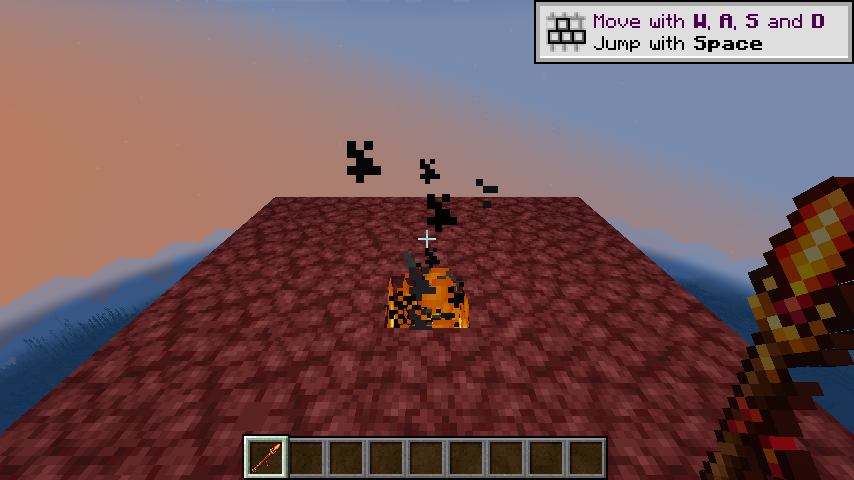
F2. The original PNG will be saved in the project run/screenshots Directory; this is cleaner than a system screenshot because it does not capture IntelliJ, window borders, or other desktop content.Evidence A: Automatic completion of orders
Enter maik: can be seen later magic_wand, which indicates that the item does exist in the registration form.
Evidence B: The name is not the original key
Display "magic wand", explain zh_cn.json has been read and the key name is correct.
Evidence C: Images are not purple black.
The staff is displayed in the hand and in the inventory, indicating that the model JSON and PNG paths are successfully connected.
Evidence D: Unlawful use of ordinary articles
If you switch to a wooden stick and left-click the block, it should not trigger arson, proving that PASS The branch is working fine.
Evidence E: Flame Synchronization Stable
The block changes are consistent for the server and the client, and will not flash and then recover, indicating that the modification occurs on the server side.
Evidence F: I can hear voices
The nearby players heard the sound of flameballs, indicating that a service-end sound broadcast had been carried out.
Debug clinic · Find levels by symptoms
Only pursue the first root cause at a time; do not change Java, JSON, version and directory at the same time.
Gradle reports Java version or release 21 Error
Execute java -version and javac -version, check Project SDK and Gradle JVM for IntelliJ. This template build.gradle and fabric.mod.json All are required to change the editor's language level to 21, but allowing Gradle to continue using JDK 17 does not solve the construction problem.
I right click on the square and nothing happens.
This is the expected behavior. AttackBlockCallback, corresponding attack blocks, the left key. Right button is used UseBlockCallback Or customized Item#use Waiting for another set of entrances, you cannot just understand the three words "left click" in the tutorial as right click.
/give Not found maik:magic_wand
Look first fabric.mod.json Whether the main entry still points to com.malaoshi.maik.MaikLook again. onInitialize() Whether to call ModItems.register(). Check if the console has Maik mod initialized. If the entrance is not loaded, don’t check the map yet.
There is an item, but it is a purple-black wrong map
Java registration has passed. Check in order assets/maik/models/item/magic_wand.json, wherein maik:item/magic_wand, and assets/maik/textures/item/magic_wand.png. Case, underscores, and extensions must be accurate, and JSON cannot have comments or trailing commas.
Name display item.maik.magic_wand
This is a loss of connection to the translation. Credible Chinese must be in lower case. zh_cn.json, the key must be item.maik.magic_wand, save files as UTF-8. The game is read when in English en_us.jsonSo we have to check the current language.
Got the magic wand, but the left button is still digging normally
Check MagicWandEvents.register() Whether in onInitialize() Call; confirm again that the comparison object in the callback is the same ModItems.MAGIC_WAND. If a second one is created Item For comparison, even if the appearance looks the same, it is not the same object in the registry.
The flame will go out as soon as it appears.
The event is likely to have been successful. The original flame will also check whether the location is survivable. There are no combustibles around, an inappropriate location underneath, or block updates may cause it to go out. Test with a separate ground block, and remember that the current code replaces the target block itself.
It is completely impossible to cast spells in some areas
Template active call canPlayerModifyAt. Spectator mode, server spawn protection, adventure rules, or permission plugins may all refuse modifications. This is a security protection, not necessarily a bug. Change to a test area that you have permission to try again.
Client sees fire, then recovers
This usually means that the world's modification is wrongly occurring on the client side. setBlockState and playSound Still located in if (!world.isClient) Inside. The world state should be determined by the server and then synchronized to the client.
build Determine Java and JSON; check the log to confirm the entry; then use /give Determine registration; then check name, model and map; finally test events, permissions, server synchronization and flame rules. Answer only one question at each step.Creative extensions · Turn examples into gameplay
First make the mildest improvement: keep the target block and only set fire to the clicked side.
Callback has been provided direction, which indicates which side of the square is in the player's point. If you move the target position in this direction, you get a position next to the surface. For example, click on top of the ground.pos.offset(direction) It is the air grid above the ground. With the addition of air checks, magic wands will no longer eat rocks, chests, or building blocks directly.
BlockPos firePos = pos.offset(direction);

if (world.getBlockState(firePos).isAir()) {
    world.setBlockState(
            firePos,
            Blocks.FIRE.getDefaultState(),
            Block.NOTIFY_ALL
    );
    world.playSound(
            null,
            firePos,
            SoundEvents.ITEM_FIRECHARGE_USE,
            SoundCategory.BLOCKS,
            1.0F,
            1.0F
    );
}
When using this code, import net.minecraft.util.math.BlockPos. After expansion, verify again in the order of "Compile → Start → Test World → Ordinary Item Control". Don't add cooldown, durability, and particles at the same time, otherwise it will be difficult to tell which step caused an error.
Add durability to the magic wand
Research Item.Settings().maxDamage(...), when applied successfully, lose one point. Think about why there are durable items that can't set normal stacks anymore.
Increase cooling time
Use the player's item cooldown manager to limit continuous triggering after casting, so that the magic wand no longer connects points at high speeds like a lighter.
Add particle trajectory
A small amount of fire or end candle particles are generated from the player's line of sight to the target location, but world modifications must still be subject to the server.
Three-minute self-test
Why does the left button of the stick not trigger magic?
The callback first compares whether the handheld object is ModItems.MAGIC_WAND. If not, return PASS, return the operation to other listening devices and original logic.
Why can’t it be deleted? !world.isClient?
The real world state is maintained by the server. Modifications on both ends at the same time are prone to duplication, and modifications only on the client will be overwritten by the server status.
Why is the texture in the model not written? .png?
Minecraft resource location usage 命名空间:目录/文件名 logical ID, the loader will automatically
Copy the value at the moment of assets/命名空间/textures Find PNG under.
PASS,FAIL,SUCCESS What's the difference?
PASS (b) To indicate that this listening device will not be processed to allow the follow-up logic to continue;FAIL Explicitly reject the action;SUCCESS indicates that the process has been completed. The correct return of values prevents the magic rod from interfering with other objects.
Build & deliver · Generate installable modules
After the test world passes, a clean build is performed to turn the source code into the final JAR.
./gradlew.bat clean buildAfter the construction has been successful, the finished product is located build/libs/maik-1.0.0.jar. in the same directory maik-1.0.0-sources.jar It is a source code package, which is convenient for reading or development. It is not a module file that ordinary players need to install. Put the finished product into a client instance that matches Minecraft 1.20, Fabric Loader, and Fabric API mods folder and start with the backed up test world first.
Download the complete Fabric Magic Wand Project of this lesson
The download package comes from the analysis of this tutorial maik-template-1.20, which contains Gradle Wrapper, Java Source, Fabric metadata, Chinese and English translations, models, 32x32 magic stick stick stickers and synthetic formulations, and does not contain the machine's running logs and cache directories.
Evidence · Basis of this lesson
Each version number, path and behavior can be returned to the specific file in the template.
gradle.properties: Minecraft, Yarn, Loader, Loom, Fabric API and module versions.build.gradle: Loom configuration, dependency, Java 21 source level, resource processing and remap construction.fabric.mod.json: Mod ID, access class, running environment, Java and Fabric dependent.ModItems.java:maik:magic_wandRegistration, maximum stack count, and creative mode classification.MagicWandEvents.java: Left key event, handheld inspection, permissions, service end fire and sound.assets/maikwithdata/maik: Translations, models, original 32x32 PNG stickers and workstation formulations.
Lesson complete
What you see now is not a magic wand, but a complete chain of event programming.
The player's left button is the entrance, the registration ID is the identity, the callback parameter is the on-site information, the authority judgment is the safety door, the server is the final referee, and the model and texture are responsible for turning logic into visual feedback. After mastering this chain, you can replace "setting fire" with planting flowers, freezing, summoning lightning, generating particles, or triggering mechanisms. Just change one link at a time, predict the results first, and then run the verification. You will move from copying the code to actually designing the gameplay.