
Mission·Look at the end point first
The focus of this magic stick is not “many squares”, but the same story about contour, coloring and sports.
From a long look, the golden circle is like a fusion device; when it approaches, the central blue energy core becomes warmer compared to the blue purple cane body; when the animation is played, the top structure rotates slowly around the Z axis, and the beam creates a sense of mobility through the texture frame. A good game prop will tell the player in a very small picture what it is, how it should be held, where it's saving its energy.
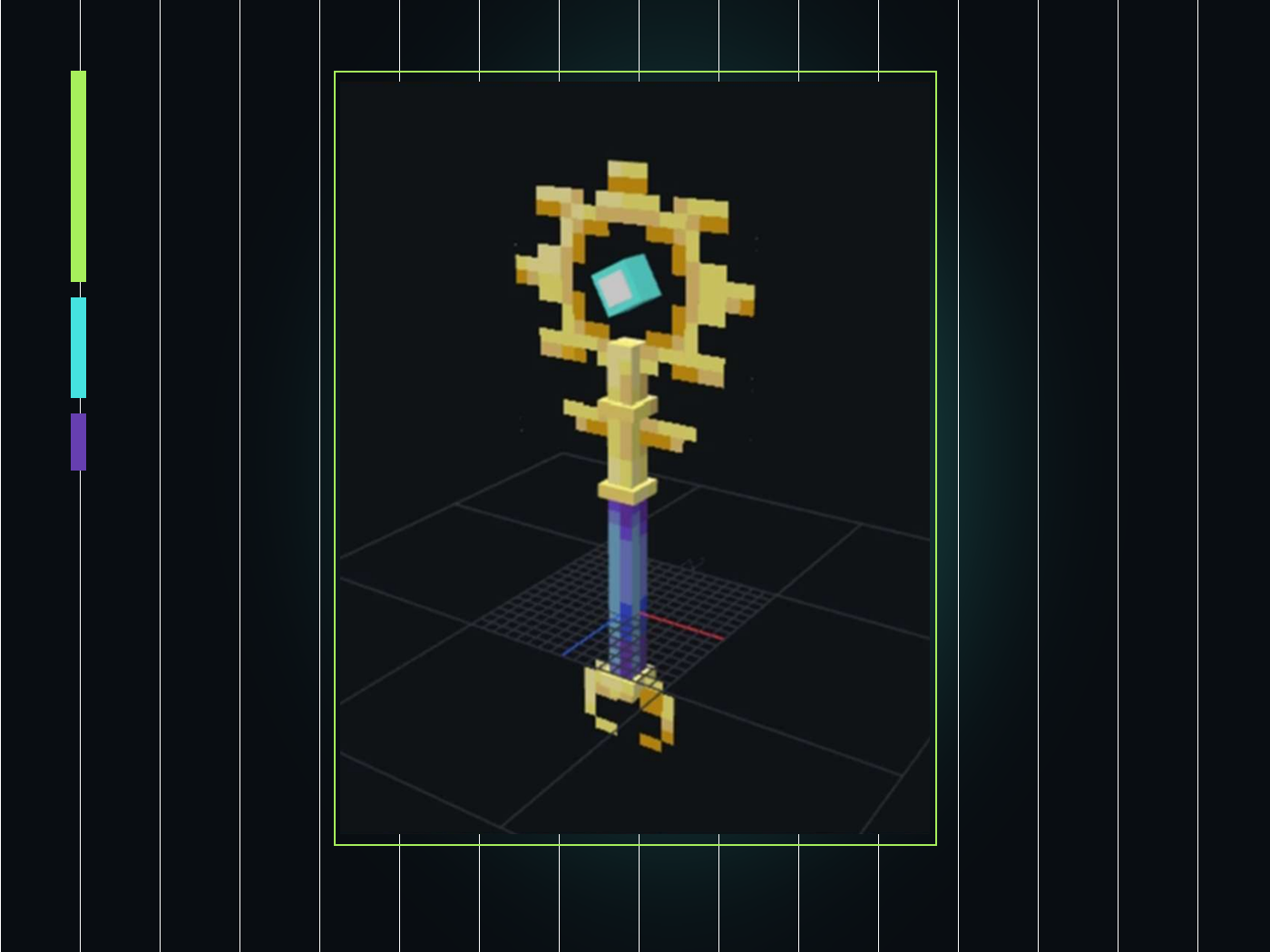
Ratio of reading models
Build a 2×27×2 main body, a 19×20×0 large pattern and an 8×11×0 small pattern based on the dimensions in the real project, and understand why the object model needs to capture the outline first.
Draw pixel light and dark
Instead of blurring the gradient into one piece, use limited color blocks to express highlights, inherent colors and shadows, allowing the staff to retain the pixel feel of Minecraft.
Organizations can be animated into groups
Put the cane head to be rotated into an independent group, check the pivot, and then use two linear key frames of 0° and 360° to make a loop that connects end to end.
Understanding Access Boundaries
Know that .bbmodel is the production source file, and understand why the static item model, animation model and final MOD code require different export and rendering schemes.
Source pack · First understand the materials in your hand
An editable project, three textures and an illustrated tutorial to solve different problems respectively.
The core of the download package is teacherma-magic-wand.bbmodel. It records 9 elements, 2 structure groups, UV coordinates, 3 embedded textures, and 1 animation; that is, even if the external PNG is temporarily moved, the embedded texture will usually still be visible when opening the source project. External PNGs make it easy to inspect, back up, and plug in projects individually. The PDF is a 12-page Chinese production guide. The interface screenshots in the course come from this original material.
Workflow · First create a global map
Each step only solves one problem: shape, perspective, color, movement, and finally talks about derivation.
It is easiest for beginners to reverse the order: before the model is finalized, they rush to draw fine textures; before the grouping and pivots are checked, they pile up many key frames. In this way, every time the scale is changed, the UVs and animations may be reworked. This lesson adheres to "from large to small": first confirm the silhouette, then confirm the player's perspective, and finally invest in texture and movement details.
Step 1 · Safely open the project
Save a copy first, and then move the first element; this step can save the entire class.
- 1
Completely decompress the material package
Do not open the model directly in the compressed package preview window. Put all files into the same project directory and keep the file names to avoid losing contact with the texture path and tutorial reference.
- 2
Open the source file with Open Model
Start Blockbench, select File → Open ModelOpen
teacherma-magic-wand.bbmodel. If asked about the format, continue in the Free Model format in which the project was saved. - 3
Save personal copy now
Use File → Save As, for example named
my-magic-wand-v01.bbmodel. After that, the version number will be increased every time a major stage is completed, and the original file will always serve as the "returnable answer". - 4
Check three work areas
View elements and groups in Edit, view maps in Paint, and find the file named
animationanimation. At this time, observe first and do not delete unfamiliar elements in batches.
Step 2 · Generate model framework
First use three numbers to establish the ratio: 2×27×2, 19×20×0, 8×11×0.
The main body is a very slender cuboid, which is responsible for stabilizing the visual center of gravity; the large pattern on the head of the stick and the small pattern on the bottom are close to two-dimensional decorative pieces, which are responsible for forming recognition. The original project used a total of 8 Cubes and 1 Mesh. Cube is suitable for regular grips, connecting rings and decorative blocks, while Mesh is more suitable for irregular contours such as energy beams.
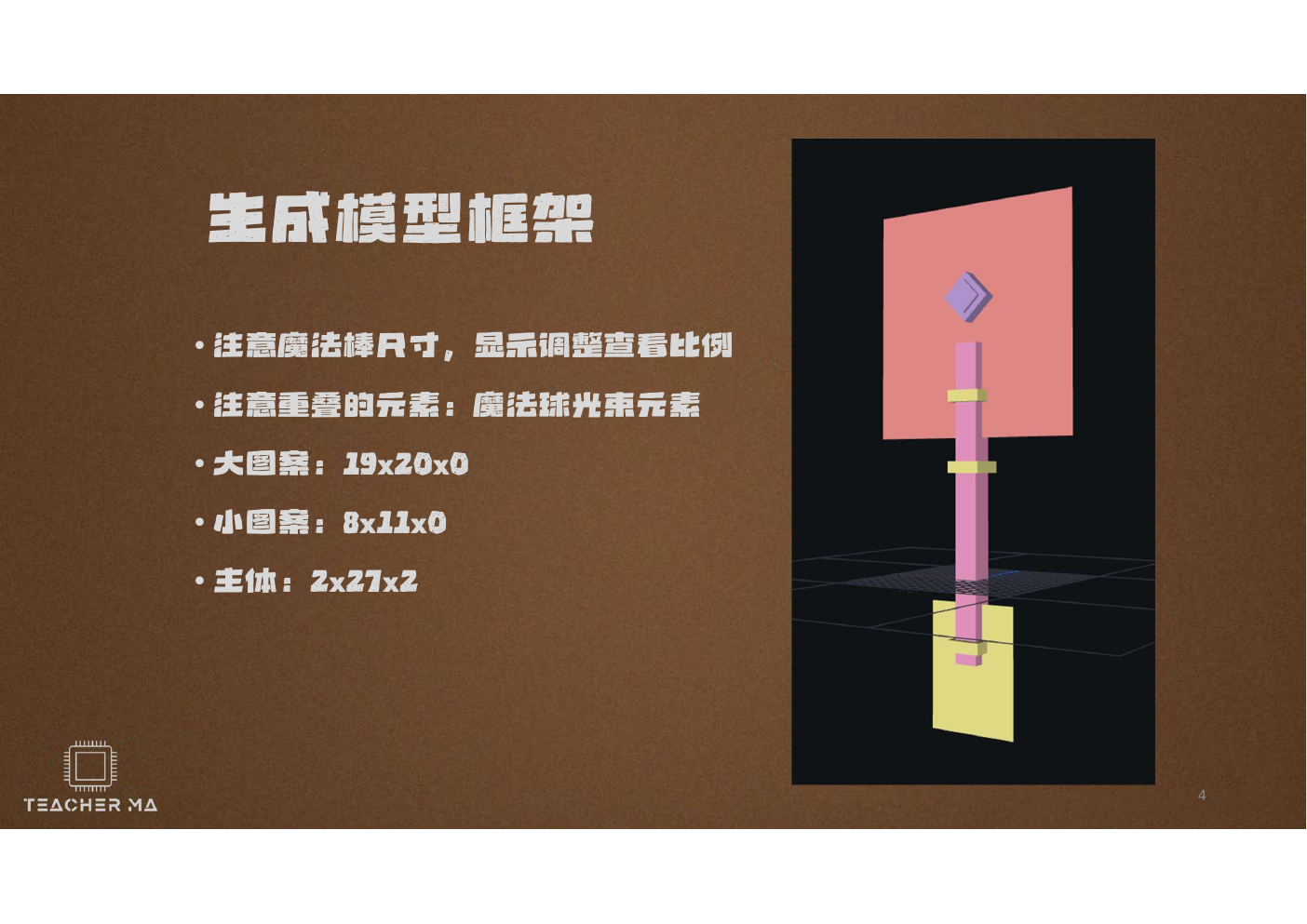
What should be observed when setting up a framework?
First, look at the center line. The long handle, energy core and ring should be organized around the same longitudinal axis, otherwise there will be an obvious "circle" after rotation. Second, look at the white space. The energy core cannot be completely blocked by the golden frame, and the cyan core should be visible from both the first-person view and the inventory thumbnail. Third, look at the thickness. Models can use zero-thickness planes to form pixel patterns, but different rendering schemes handle double-sided displays differently; if the backside disappears, check the face orientation, material double-sided settings, or change to a very thin cube.
Don't pursue the perfect circle from the beginning. Minecraft style pays more attention to whether the pixel ladder is neat and whether the left and right are balanced. You can place the structure on one side first, and then copy, mirror, or place the other side with the same coordinates. Each time a new element is added, it is changed to a readable name in the Outliner, for example handle,head_ring,energy_coreWhen you make an animation, you'll be in a row. cube Much clearer.
Step 3 · Perspective acceptance
Just because the model is centered in the editor does not mean that it is comfortable in the player's hands.
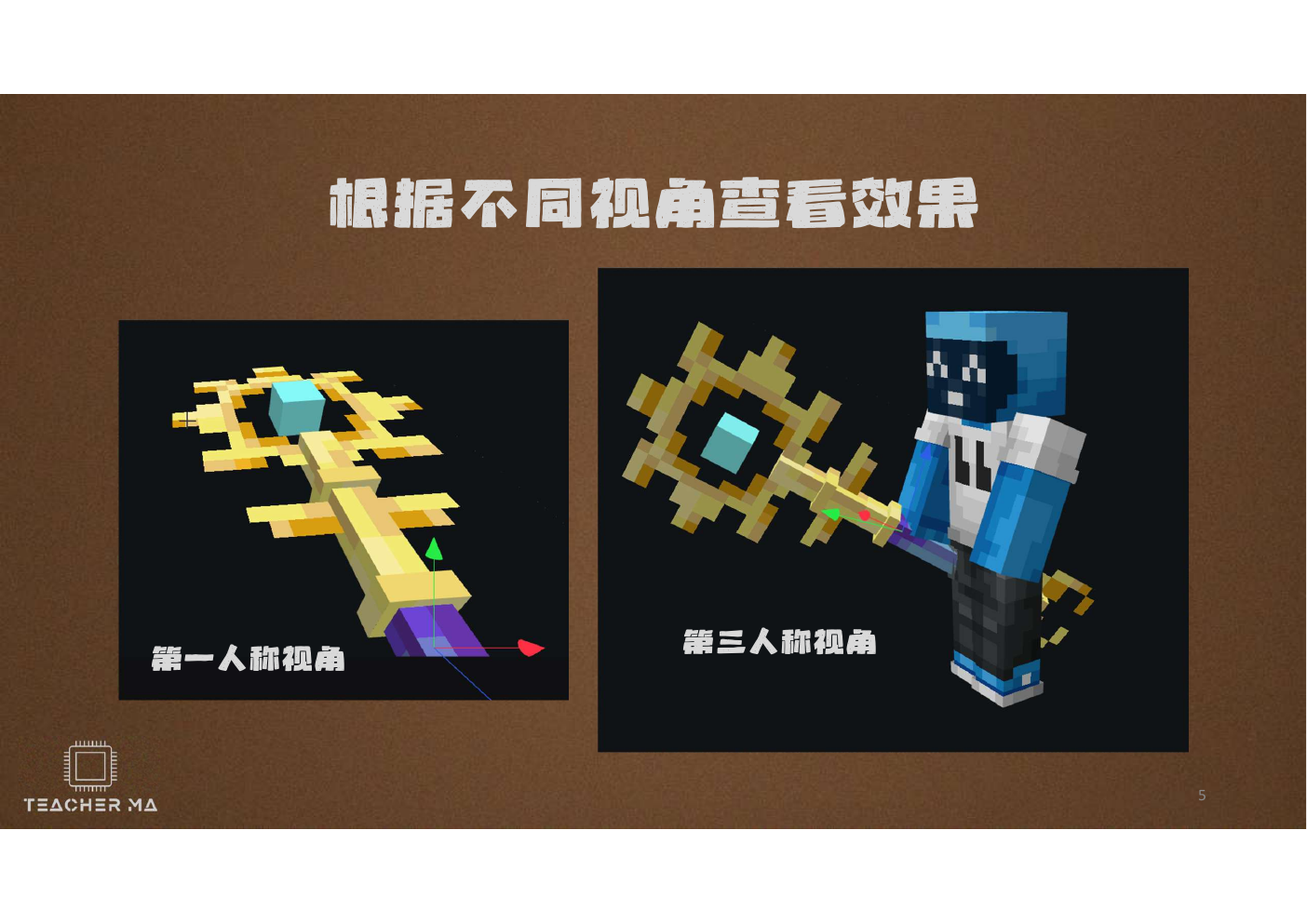
In first person, players most often stare at the center of the screen. If the head of the stick is too large or positioned too high, the beautiful energy ball will become a visual obstruction; if the model is too low, only a small portion of the handle will be left. For the third person, observe whether the palm falls on the handle area, whether the staff passes through the arm, and whether it appears to be too long when running. Every time you adjust position, rotation, or scale, you should return to these two perspectives for a quick inspection.
Is the crosshair clear? Will the tip of the staff obscure the target? Is the wand too close to the edge of the screen?
Are the hands held in the correct position? Is the model oriented toward nature? Does it wear mold or touch the body?
Can you still recognize the golden ring and cyan core after zooming out? Is the outline too detailed?
Step 4·Draw the subject skin
The pixel quality comes from "layered color blocks", not from applying a soft-edged pen back and forth.
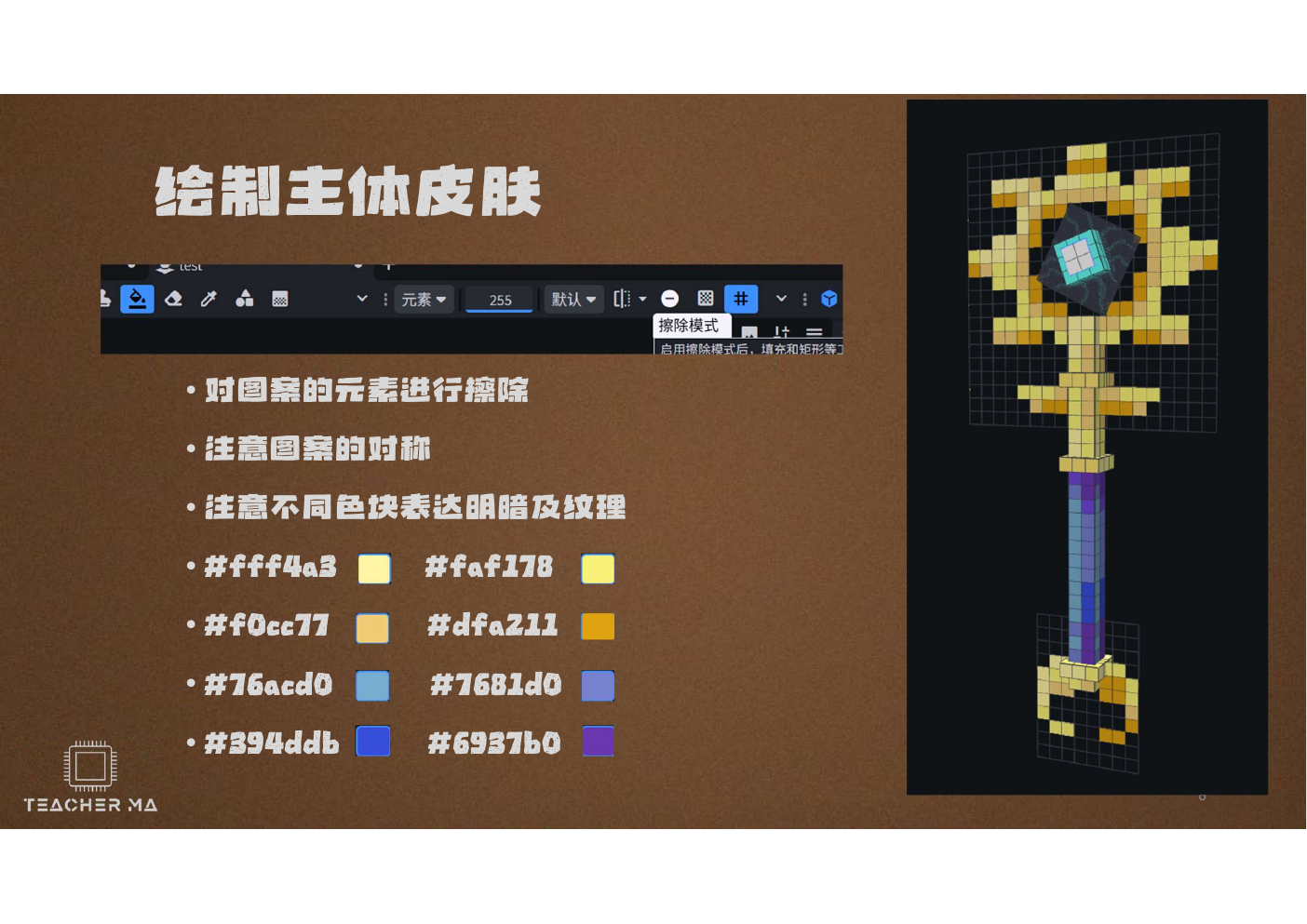
Erase unwanted pixels in the pattern area first, then start with the large color block. Cane head highlight can be used #fff4a3, bright gold use #faf178, middle color use #f0cc77For the dark side. #dfa211. The blue and purple areas can be found from #76acd0,#7681d0 Transition #394ddb and #6937b0. These colors don't have to be copied verbatim, but they illustrate a solid principle: Lights increase lightness, shadows decrease lightness and slightly alter hue, rather than just layering black on top of the primary color.
When drawing a symmetrical pattern, you can complete half of it first and then mirror the other half. What really matters is not mechanical symmetry, but equal visual weight: one more bright pixel on the left, and the right may need to be balanced with a slightly darker pixel. After drawing, reduce the view to a size close to the game inventory icon. If the golden outline becomes mushy after zooming out, you should reduce the fragmented noise and re-open the gap between the brightest and darkest colors.
Step 5 · Draw energy ball beam
The light beam must have direction and attenuation: it will be brighter closer to the energy ball and gradually dissipate outward.
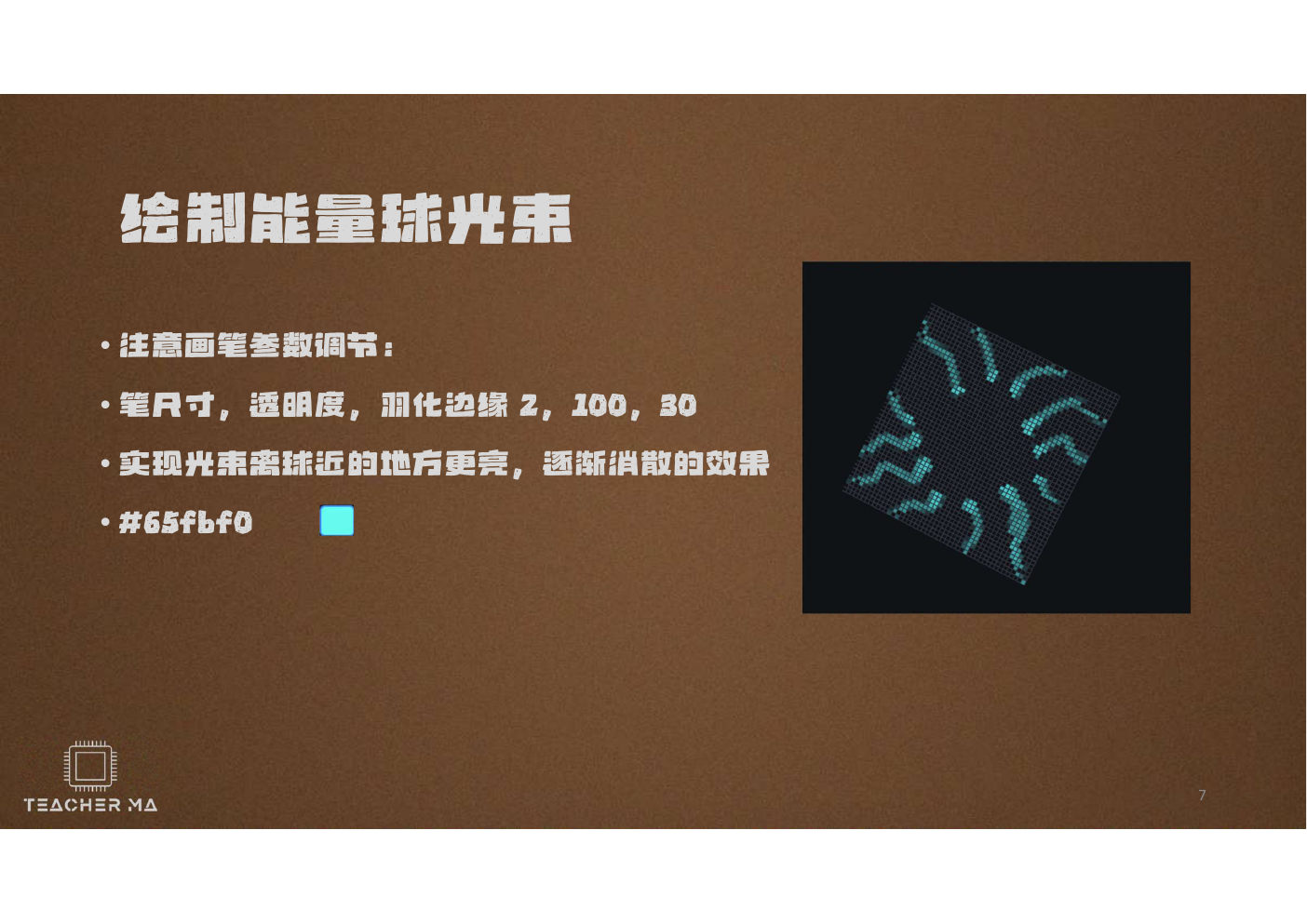
#65fbf0. The parameters are the starting point, and in the end it still depends on the scaled pixel effect.The beam is not a circle of thick burrs. Start by drawing a few main directions around the energy core, then add shorter branches. Use a lighter, more solid teal at the roots, which becomes sparser toward the outside. Even when using feathering, maintain pixel outlines to avoid large areas of soft fog that would be inconsistent with the Minecraft art style. After you finish a frame, you can temporarily switch the canvas to a dark background and check the edges for any isolated dirty pixels.
in the material package magic-wand-energy-animation.png is a 128 × 384 vertical animated texture strip. It is taller than the normal 64×64 main map because multiple animated frames are sequenced in the same image. Don't randomly crop it into a square, or convert it to a lossy JPG in an image compression tool; the transparency channel and the position of each pixel are part of the animation.
Step 6 · Create loop animation
Two keyframes can complete a circle: 0 seconds is 0°, and 3 seconds is 360° on the Z axis.
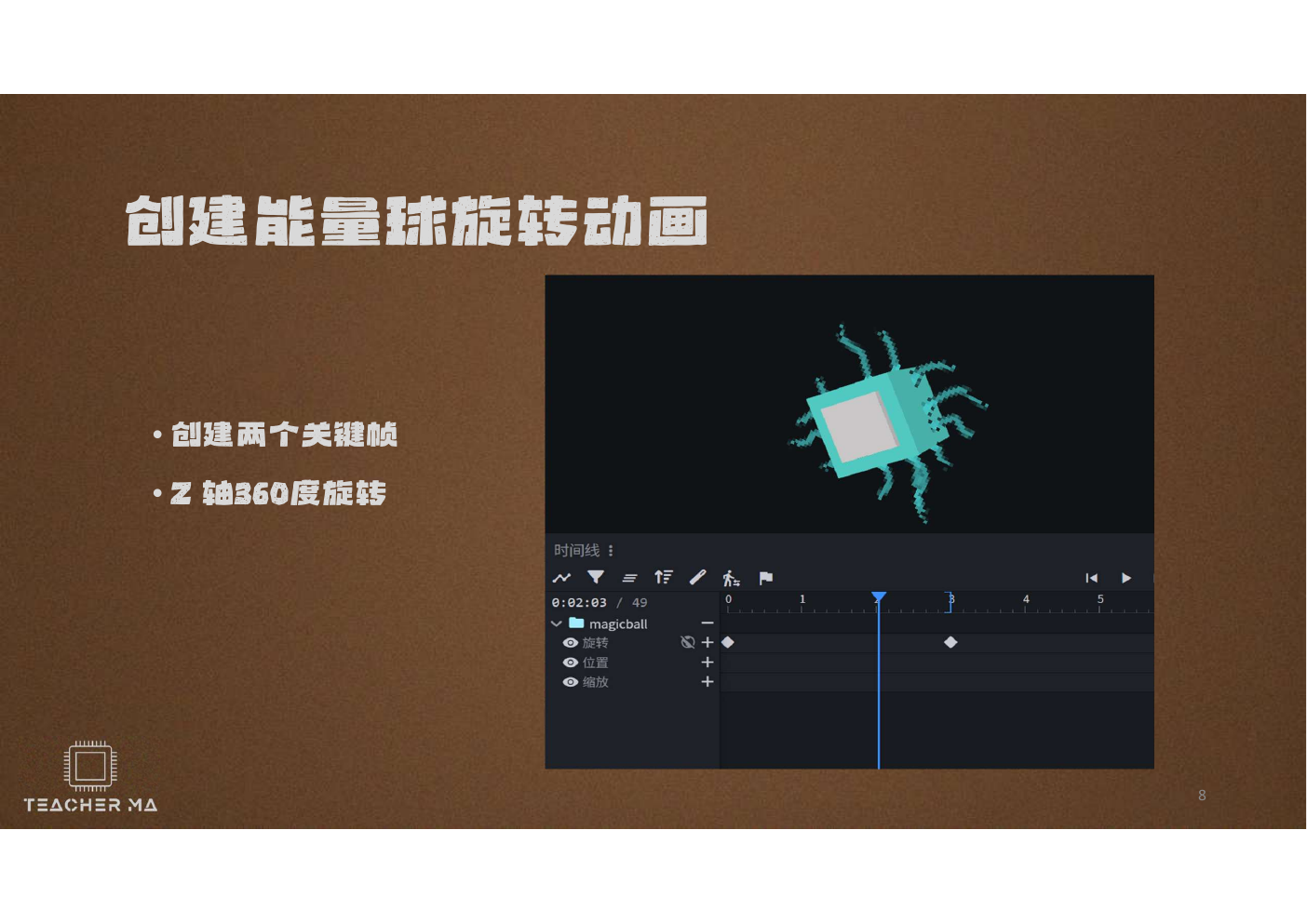
The animation in the real source project is named animation, 3 seconds long, looped as loop, the time-axis adsorption value of 24. Animation works in the top structure group: the first Rotation key frame is 0 seconds and the Z value is 0; the second key frame is 3 seconds and the Z is 360; both use Linear linear plugs. Because 0° and 360° are in the same visual direction, there is no sudden fallback when recycling back to the first set.
Pivot is more important than angle
If the energy ball draws a large circle around the distance like a wiper when rotating, it is not that 360° is written incorrectly, but that the Pivot Point is not at the expected center. First pause at an intermediate moment, such as 1.5 seconds, and observe whether the ring rotates around the center of the energy core; if it is eccentric, return to the Edit workspace to correct the grouping origin, and then preview again. The moving cane head and the immovable handle are divided into two groups just so that the animation only affects the top.
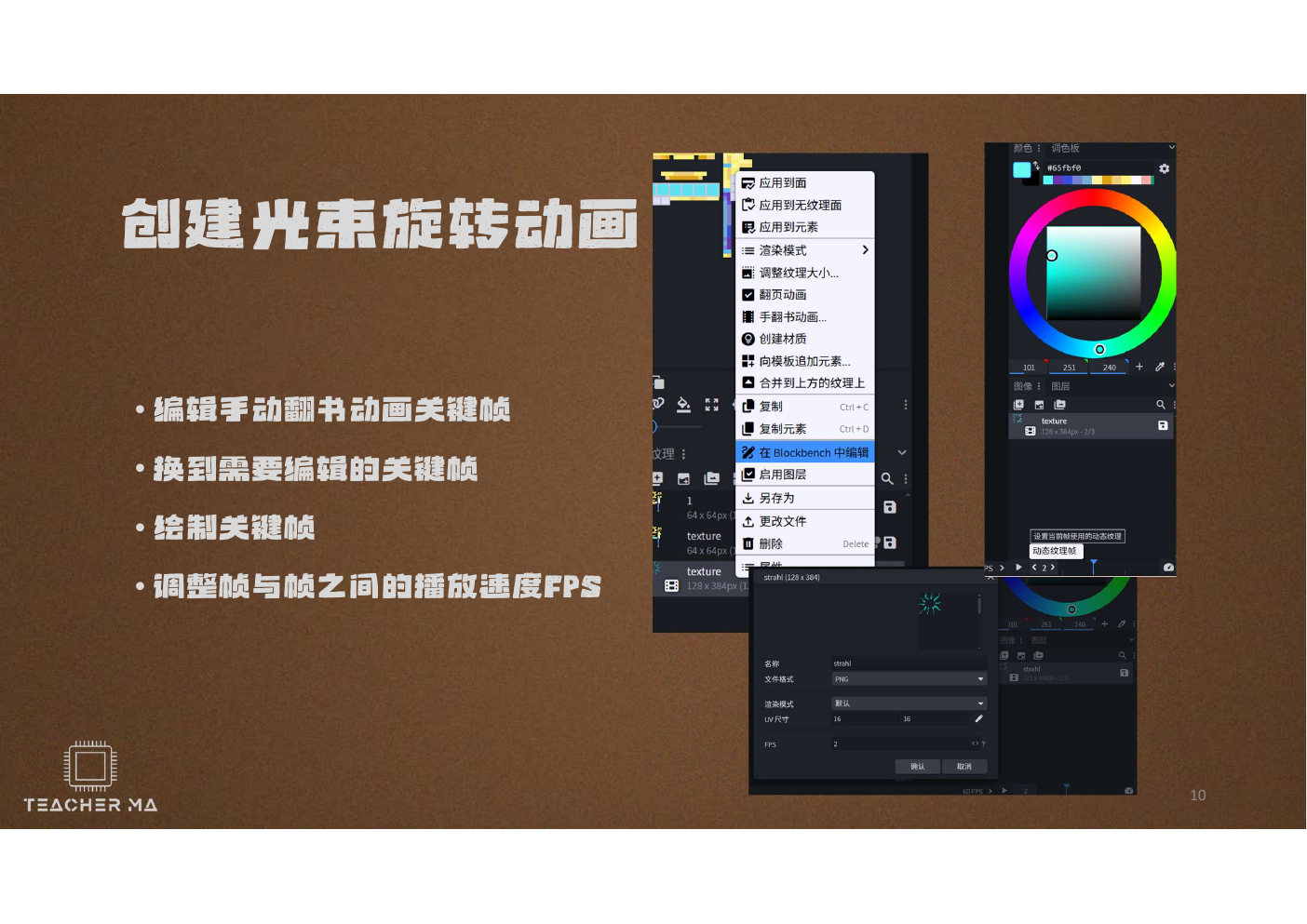
Texture animation is more like manually turning pages of a book: each frame is a slightly changing beam pattern. When editing, confirm the currently selected keyframe to avoid drawing all changes into the same frame. Higher FPS does not mean more advanced; if the number of frames is too low but played too fast, it will turn into glaring flickering. First use a slower speed to clearly see the changes in each frame, and then gradually increase it to a rhythm that meets the "continuous energy accumulation".
Step 7 · Access Minecraft MOD
Choose "static item" or "animated model" first; this will determine the subsequent technical route.
The source project uses Blockbench's Free Model format, which is suitable for free modeling and saving animations, but it is not one that can be directly put into Minecraft. mods The JAR of the folder is also not equivalent to the original Java item model JSON. When connecting to the MOD, model resources, item registration and animation rendering are three different tasks.
Make static items first
Select the most recognizable static position to be exported or recreated in object model formats supported by the target version, in conjunction with Java/Fabric/Forge's item registration, model JSON and PNG tab entry. The items can be displayed first and animated.
Preserve bones and animations
Use an animation rendering scheme that matches your Minecraft version and loader, leaving grouping, pivots, animation definitions, and textures to a custom renderer. The export formats and code entries of different libraries are different, and examples from one version cannot be copied to another version.
If you have just completed the Fabric left-click ignition course on this site, you can regard this Blockbench work as a "visual upgrade project": Reserved maik:magic_wand For registration and left-click events, first replace the static map and model; wait until the static display is stable, and then study animation rendering separately. In this way, when an error occurs, it can be determined whether the problem comes from the gameplay logic, resource path or animation layer.
Save & deliver · Save and deliver
The source project is responsible for "continuing creation", and the export file is responsible for "entering the target project", both of which must be retained.
- 1
Save editable source files
Keep the latest .bbmodel while leaving an unmodified original version. Adding a date or version number to the name is safer than overwriting the same file over and over again.
- 2
Export textures individually
Save the 64 × 64 main texture and 128 × 384 beam animation texture as PNG, keep the background transparent, and do not let chat software or picture websites automatically compress it.
- 3
Export model according to target platform
First confirm the version requirements of Forge, Fabric or Bedrock, and then select the format. If the exporter does not support Mesh, skeleton or texture animation, reduce the feature testing first and do not pretend that "it will be displayed if the export is successful".
- 4
Establish minimum test scenario
First test a prop in a blank development world. Confirm the four states of inventory, first person, third person and ground drop, and then add skills, sound effects and particles.
Download the editable material package for this lesson for free
Contains original .bbmodel, two 64 × 64 staff maps, one 128 × 384 beam animation texture, 12 pages of Chinese PDF and preview images. Download permissions do not change based on appreciation.
Debug clinic · Troubleshooting according to symptoms
First determine whether the problem belongs to the model, texture, animation or MOD access. Do not make random changes everywhere at the same time.
After opening .bbmodel, all the textures are lost or become solid colors.
First make sure that you are opening the fully decompressed project and not the temporary preview in the compressed package. Check the Textures panel to see if there are still 3 embedded textures; if the embedded textures are present, resaving a copy will usually restore them. If you deleted the texture entry, import the corresponding PNG from the same directory and check that the UVs still point to the correct texture.
When the ball turns around, it draws circles far away.
This is a classic axis question. Pause to 1.5 seconds, select the top group responsible for rotation and see if Pivot Point is located in the center of the energy core. Do not hide the bias by adding more key frames; fix the original point and retain two critical frame tests of 0 and 3 seconds.
When the animation loop reaches the end, it suddenly shakes.
Check whether the first frame and the last frame are 0° and 360° respectively, whether the animation length is exactly 3 seconds, whether the interpolation is Linear, and whether Loop is turned on. If the texture animation is also playing, the model rotation must be paused separately to determine whether the jitter comes from the bones or the texture frame.
I can't see the floor on the back.
The zero thickness plane may show only one side. First check the direction and material settings of the face; if the target export format does not support both sides, you can copy the reverse side or change the plane to a thin cube.
The picture is normal at Blockbnch, but it's purple-and-black wrong texture.
This is usually not a painting problem, but the resource path does not correspond to it. Check namespaces, folders, model references and PNG filename case; confirm that the exported model format fits the target version. Let static tabs be displayed before an animation is processed.
The first person blocks the screen, and the third person is far away from the hand.
The two viewing angles use different display transformations and cannot be taken into account only by the overall mobile model. Keep the geometric center of the model stable, and then adjust rotation, translation, and zoom respectively for GUI, first person, third person, and other display scenes.
After putting .bbmodel into the resource directory, the game does not read it at all.
.bbmodel is the editing project of Blockbench, and is not the resource format automatically read by the original game. You need to export the corresponding files according to the target loader and rendering scheme, and register the item, resource or animation renderer in the MOD. First read the version and format requirements for the solution you are using.
Practice · Turn the example into your own work
Don't change it all in one go; change one variable at a time and write down your predicted results.
Change a set of energy colors
Keep the golden outer frame, and only change the cyan energy core and blue-purple handle to red-orange, emerald or shadow purple. Prepare at least three colors: highlights, middle colors and shadows.
Change rotation rhythm
Copy the project, change 3 seconds to 1.5 seconds and 6 seconds and try once. Record which one is more like an attack prop and which one is more like a continuous energy-charging prop.
Design the second layer of energy rings.
Duplicate the top structure, scale and reverse rotate. Check the pivots of both groups before deciding if more keyframes are needed to avoid overshooting.
Five-minute self-test
Why do we need to check the first person and third person first, and then draw the fine texture?
Because viewing angle testing may force you to modify scale, position, and contours. Structural changes will affect UV; if you refine the texture too early, it will be easy to repeat the work later.
Why is 0° to 360° suitable for cyclic rotation?
Both angles are identical in visual direction. With linear interpolation and Loop, the last frame can be connected naturally when returning to the first frame.
What are the main map and animation texture strips responsible for respectively?
The 64 × 64 main texture is responsible for the static appearance of the cane head, handle and energy core; the 128 × 384 texture strip saves the beam animation frames in sequence, using continuous images to create a sense of flow.
Why can the model be played in Blockbench, but it does not mean that it will be played automatically in the game?
Blockbench is responsible for editing and previewing. The game end also needs to be able to understand the rendering scheme of the corresponding model and animation format, and have the MOD code load and play it at the correct time.
Evidence · Basis of this lesson
The dimensions, colours and animation parameters of the course are derived from authenticated local materials.
teacherma-magic-wand.bbmodel: 9 elements, 2 structural groups, UV, 3 embedded tabs, and 3-second loop animation.magic-wand-blockbench-guide.pdf: model frame size, hand-held perspective, colouring, beam brush parameters, key frames and FPS diagrams.magic-wand-texture-main.pngwithmagic-wand-texture-clean.png: Two 64 x 64 scepter pixels.magic-wand-energy-animation.png:128 x 384 beam animated strips.README.txtwithSTART-HERE-从这里开始.txt: description of how to open, use range and " Source model is not a key to install MOD.
Lesson complete
Now you don't just "open a model", but you complete a prop art production line.
The model framework determines the outline, the perspective check determines the usability, the pixel map determines the material, the grouping and pivot determine who can move, the keyframes determine the rhythm of movement, and the export plan connects the work to the specific Minecraft platform. When making wands, hammers, guns, or sci-fi tools in the future, you can follow this idea: first establish a clear visual target, and then verify one level at a time.