Before starting
Master lessons 10, 13, 15-19, and be able to understand the division of labor between the server and the client. It is recommended to complete this in two sessions.
 PixelCraft
Roblox Studio · Lesson 29
Connect crystal collection, task progress, end point and interface to make a small game with a beginning, a goal and a result.
Course overview
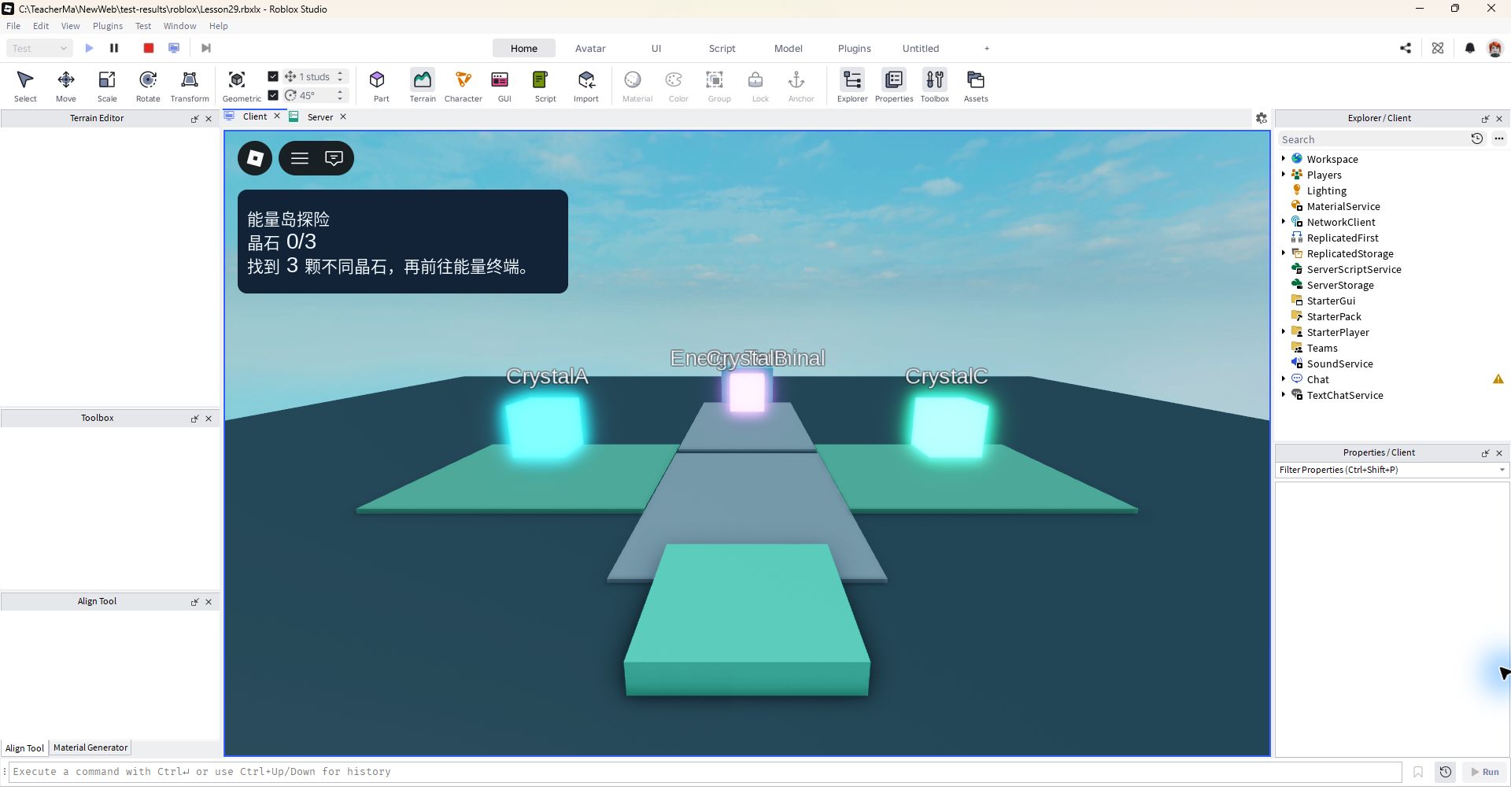
Your goal is very clear: start from the camp, find three different crystal stones, and then return to the terminal to complete the task. The screen will tell you your progress, and the terminal will check to see if you've actually collected them all.
The lesson starts with a brand-new Basepate, using the objects listed below and two full scripts.
Master lessons 10, 13, 15-19, and be able to understand the division of labor between the server and the client. It is recommended to complete this in two sessions.
A treasure hunt game that can be played independently by two people: collection, progress, end point verification and completion prompts are fully connected.
It cannot be completed if it is not collected; repeated crystals are not counted; the progress of the two players is independent; the completion reward is only issued once.
Learning route
Every time a small step is completed, it is tested. Say what you expect to see first, and then use Play and Output to check it. Don't rush to write all the code at once.
The first version only made three crystals and one terminal. There are no countdowns, stores and cloud saves to avoid multiple systems from failing at the same time. Go through a round first, then choose an expansion.
Strictly consistent object names are the first step in connecting scenes and code. You can change the colors and decorations, but don't change the names and levels used by the script yet.
IslandCount is the number of crystals, IslandFinished indicates whether it has been completed, and IslandMessage provides prompts to the interface. The collected table records the specific crystals that have been collected to prevent repeated touching to refresh the progress.
HUD only reads the server status and does not issue rewards or determine task completion. During initialization, first listen for changes and then render again to avoid missing the previous state when the interface is opened.
"Cleared once" is not enough to prove that the task is reliable. You also need to try missing, receiving twice, and submitting twice to confirm that the rules still hold in these situations.
Save v01 first, then pick an extension: clearer road signs, complete particles, or a gentle night scene. Don't add timer, save and store at the same time.
Step by step
The first version only made three crystals and one terminal. There are no countdowns, stores and cloud saves to avoid multiple systems from failing at the same time. Go through a round first, then choose an expansion.
In this session, the collected progress will be retained when the character is reborn; it will be reset after leaving. When completed, you will get a medal for this game, and the number will not increase if you reuse the terminal.
Step by step
Strictly consistent object names are the first step in connecting scenes and code. You can change the colors and decorations, but don't change the names and levels used by the script yet.
Arrange the crystals in a visible place, and then hide them next to the route after the test is successful. Hiding objectives too early will make it difficult to tell whether the gameplay is too difficult or the code is unresponsive.
Workspace
├─ Crystals (Folder)
│  ├─ CrystalA (Part)
│  ├─ CrystalB (Part)
│  └─ CrystalC (Part)
└─ Terminal (Part)
   └─ ProximityPrompt
ServerScriptService
└─ IslandQuest (Script)
StarterPlayer > StarterPlayerScripts
└─ IslandHud (LocalScript)
Step by step
IslandCount is the number of crystals, IslandFinished indicates whether it has been completed, and IslandMessage provides prompts to the interface. The collected table records the specific crystals that have been collected to prevent repeated touching to refresh the progress.
The terminal only reads the server's own count and does not accept "I have collected it all" reported by the client. Medals are added only after the status check, distance check and one-time mark have all been passed.
local Players = game:GetService("Players")
local crystals = workspace:WaitForChild("Crystals")
local terminal = workspace:WaitForChild("Terminal")
local prompt = terminal:WaitForChild("ProximityPrompt")
local TARGET = 3
local collected, lastUse = {}, {}

local function setup(player)
    if collected[player] then return end
    collected[player] = {}
    player:SetAttribute("IslandCount", 0)
    player:SetAttribute("IslandFinished", false)
    player:SetAttribute("IslandMessage", "找到 3 颗不同晶石,再前往能量终端。")
    local stats = Instance.new("Folder")
    stats.Name = "leaderstats"
    local medals = Instance.new("IntValue")
    medals.Name = "Medals"
    medals.Value = 0
    medals.Parent = stats
    stats.Parent = player
end
local function near(player, part, distance)
    local character = player.Character
    local root = character and character:FindFirstChild("HumanoidRootPart")
    local humanoid = character and character:FindFirstChildOfClass("Humanoid")
    return root and humanoid and humanoid.Health > 0
        and (root.Position - part.Position).Magnitude <= distance
end
Players.PlayerAdded:Connect(setup)
for _, player in ipairs(Players:GetPlayers()) do setup(player) end
Players.PlayerRemoving:Connect(function(player)
    collected[player], lastUse[player] = nil, nil
end)

for _, crystal in ipairs(crystals:GetChildren()) do
    if not crystal:IsA("BasePart") then continue end
    crystal.Touched:Connect(function(hit)
        local character = hit:FindFirstAncestorOfClass("Model")
        local player = character and Players:GetPlayerFromCharacter(character)
        if not player or not near(player, crystal, 8) then return end
        local record = collected[player]
        if not record or record[crystal] or player:GetAttribute("IslandFinished") then return end
        record[crystal] = true
        local count = math.min(TARGET, (player:GetAttribute("IslandCount") or 0) + 1)
        player:SetAttribute("IslandCount", count)
        if count == TARGET then
            player:SetAttribute("IslandMessage", "集齐啦!前往能量终端,按提示完成任务。")
        else
            player:SetAttribute("IslandMessage", "找到 " .. crystal.Name .. ",继续寻找其他晶石。")
        end
    end)
end

prompt.Triggered:Connect(function(player)
    if not collected[player] or not near(player, terminal, 12) then return end
    local now = os.clock()
    if now - (lastUse[player] or -math.huge) < 0.5 then return end
    lastUse[player] = now
    if player:GetAttribute("IslandFinished") then return end
    local count = player:GetAttribute("IslandCount") or 0
    if count < TARGET then
        player:SetAttribute("IslandMessage", "还差 " .. (TARGET - count) .. " 颗不同晶石。")
        return
    end
    player:SetAttribute("IslandFinished", true)
    player.leaderstats.Medals.Value += 1
    player:SetAttribute("IslandMessage", "任务完成!你获得了一枚探险奖章。")
    print(player.Name, "finished Energy Island")
end)
Step by step
HUD only reads the server status and does not issue rewards or determine task completion. During initialization, first listen for changes and then render again to avoid missing the previous state when the interface is opened.
The panel width takes 84 per cent of the screen and limits maximum width; text maintains a fixed word number and allows for line change. It is easier to read than harden a long list of tips into a very small box.
local player = game:GetService("Players").LocalPlayer
local gui = Instance.new("ScreenGui")
gui.Name = "IslandGui"
gui.ResetOnSpawn = false
local panel = Instance.new("Frame")
panel.Position = UDim2.fromOffset(16, 16)
panel.Size = UDim2.new(0.84, 0, 0, 132)
panel.BackgroundColor3 = Color3.fromRGB(18, 35, 55)
panel.Parent = gui
local limit = Instance.new("UISizeConstraint")
limit.MaxSize = Vector2.new(420, 132)
limit.Parent = panel
local corner = Instance.new("UICorner")
corner.CornerRadius = UDim.new(0, 12)
corner.Parent = panel
local label = Instance.new("TextLabel")
label.Position = UDim2.fromOffset(12, 10)
label.Size = UDim2.new(1, -24, 1, -20)
label.BackgroundTransparency = 1
label.TextColor3 = Color3.fromRGB(240, 247, 255)
label.TextSize = 20
label.TextWrapped = true
label.TextXAlignment = Enum.TextXAlignment.Left
label.Parent = panel
gui.Parent = player:WaitForChild("PlayerGui")

local function render()
    local count = player:GetAttribute("IslandCount")
    local finished = player:GetAttribute("IslandFinished")
    local message = player:GetAttribute("IslandMessage") or "等待任务数据…"
    local heading = finished and "探险完成!" or "能量岛探险"
    label.Text = heading .. "\n晶石 " .. tostring(count or 0) .. "/3\n" .. message
end
for _, name in ipairs({"IslandCount", "IslandFinished", "IslandMessage"}) do
    player:GetAttributeChangedSignal(name):Connect(render)
end
render()
Step by step
"Cleared once" is not enough to prove that the task is reliable. You also need to try missing, receiving twice, and submitting twice to confirm that the rules still hold in these situations.
Two players can share the same crystal, but each player has their own progress. The crystals will not disappear globally. This is a deliberately chosen rule for this project.

Step by step
Save v01 first, then pick an extension: clearer road signs, complete particles, or a gentle night scene. Don't add timer, save and store at the same time.
The finished product of this course is a classroom prototype and does not promise complete online anti-cheating or lasting rewards. The next lesson will wrap up testing, device experience, and security sharing.
Homework
Record six situations according to the acceptance form. If problems are found, repair them first and then beautify them.
Add a unique landmark or story background to the energy island, but do not change the core object name.
The particles are played once after the server confirms the first completion, not every time the HUD is refreshed.
Exit questions
No, the terminal reads its own progress from the server and verifies the conditions.
IslandFinished is set to true before awarding, and subsequent submissions will be returned early.
Resumes the same Player task record; recommences a new session after Stop.
No, first complete the minimum closed loop, and then add a verified function.
Explore further
The text code can be copied directly. First confirm the script type, placement, and whether this code is a complete version or a small experiment; do not run multiple versions of the same script superimposed. The source of the interface reference picture has been marked. The object names in the picture may be different from those in this lesson. Please refer to the operation steps.
Download the code and placement instructions for this lesson