Before starting
Complete conditions, events and module lessons. Create a new Lesson28 and put only one experimental Script to avoid interference from old code.
 PixelCraft
Roblox Studio · Lesson 28
Practice reading Output, adding breakpoints, observing variables, and using assert to turn "it seems to work" into a repeatable test.
Course overview
Debugging is not about proving that it's wrong, but about looking for the difference between what computers actually do and what I want them to do. Every developer meets it.
You can record expectations, actual and minimal modifications so that the problem can be repeated by others.
Complete conditions, events and module lessons. Create a new Lesson28 and put only one experimental Script to avoid interference from old code.
Three interpretable repair records, and a piece of test code that can automatically check boundaries.
Reads the first false script name and line number; normal, boundary and failure are re-validated after restoration.
Learning route
Every time a small step is completed, it is tested. Say what you expect to see first, and then use Play and Output to check it. Don't rush to write all the code at once.
"The gold coin is broken" is too vague. "Enter the game, touch Coin once, and Coins change from 0 to 2" can help others find the problem.
Create Coin in Workspace, and then run the following small example of intentional errors in DebugLab. Cion is misspelled, FindFirstChild returns nil, and an error is reported when the next line accesses Color.
Writing >= as > will not generate a syntax error, but will reject players who "just meet the threshold". Test it with three numbers and you'll find it easier than trying it just once.
If the number increases twice each time the button is clicked, first search whether there are two scripts, or the same event is Connected twice. The render function that updates the interface should not reconnect the event every time.
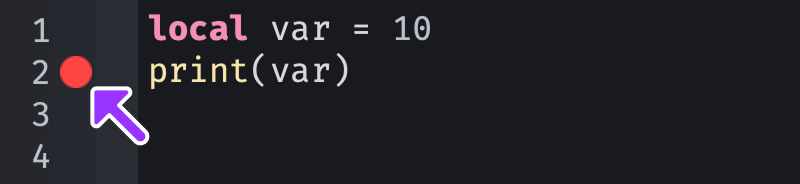
Set a breakpoint next to the Script Editor line number and let the program stop before comparison or assignment during Play. Hover with a Watch or variable to see energy instead of guessing what it is.
Meaningless print every frame will drown out the real problem; objects that are constantly Instance.new but not cleaned up will accumulate more and more. Measure and position first, then decide what to optimize.
Step by step
"The gold coin is broken" is too vague. "Enter the game, touch Coin once, and Coins change from 0 to 2" can help others find the problem.
Only one reason is changed in each round of debugging. After making changes, return to the same starting point and repeat the operation to determine whether the repair is effective.
Step by step
Create Coin in Workspace, and then run the following small example of intentional errors in DebugLab. Cion is misspelled, FindFirstChild returns nil, and an error is reported when the next line accesses Color.
The fix is to change the name to Coin and explicitly check if the object exists if necessary. Adding a wait to the wrong name will not create an object.
local coin = workspace:FindFirstChild("Cion") -- 故意拼错
coin.Color = Color3.fromRGB(80, 220, 130)
Step by step
Writing >= as > will not generate a syntax error, but will reject players who "just meet the threshold". Test it with three numbers and you'll find it easier than trying it just once.
Below is the complete test after repair. assert will stop when the condition does not hold and indicate which case failed. There are no scene dependencies here and it is suitable for independent operation.
local function canEnter(energy)
    return energy >= 5
end
assert(canEnter(4) == false, "Below threshold")
assert(canEnter(5) == true, "Exactly at threshold")
assert(canEnter(6) == true, "Above threshold")
print("All boundary checks passed")
Step by step
If the number increases twice each time the button is clicked, first search whether there are two scripts, or the same event is Connected twice. The render function that updates the interface should not reconnect the event every time.
If you need to repeat and close functions over a long period of time, keep the connection object and, if not, Discontract. The normal buttons are usually connected only once at the start of the script.
Step by step
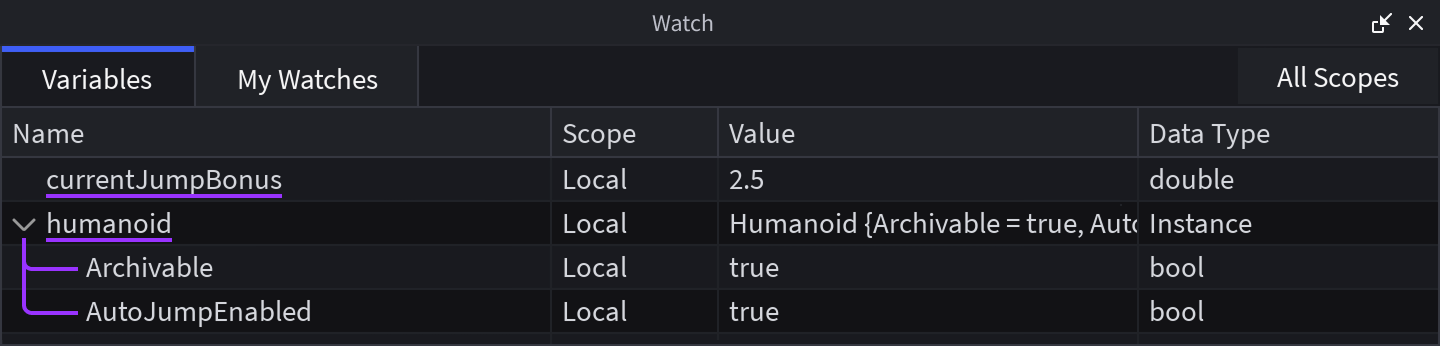
Set a breakpoint next to the Script Editor line number and let the program stop before comparison or assignment during Play. Hover with a Watch or variable to see energy instead of guessing what it is.
Removes or disables breakpoints after debugging and runs again. Otherwise, the next test will suddenly be suspended and you will think the game is stuck.
Step by step
Meaningless print every frame will drown out the real problem; objects that are constantly Instance.new but not cleaned up will accumulate more and more. Measure and position first, then decide what to optimize.
The acceptance of this lesson is a repeatable result, not a claim of "no bugs at all". Keep a record of what you measured and what you didn’t measure so that you can continue next time.
Homework
Write down the recurrence steps, expectations, actual conditions, reasons, modifications and re-test results.
Change the threshold to 8, and add a test for each of 7, 8, and 9.
Check previous projects for duplicate scripts, loops without waits, or uncleaned connections.
Exit questions
It does not mean that, for example, if the boundary comparison is written incorrectly, it may run normally but give wrong results.
The subsequent errors may just be a chain reaction caused by the previous problem.
Cooling may mask the phenomenon, and duplicate scripts or duplicate Connects should still be looked for.
Clear the breakpoint, run normally again, and repeat the original reproduction steps.
Explore further
The text code can be copied directly. First confirm the script type, placement, and whether this code is a complete version or a small experiment; do not run multiple versions of the same script superimposed. The source of the interface reference picture has been marked. The object names in the picture may be different from those in this lesson. Please refer to the operation steps.
Download the code and placement instructions for this lesson