Before starting
Understand servers, Attributes, ProximityPrompt and pcall. It is recommended to study in two sessions, completing the practice mode first.
 PixelCraft
Roblox Studio · Lesson 25
First use the offline practice mode to understand reading and saving, and then learn to use pcall and UpdateAsync to protect the highest record.
Course overview
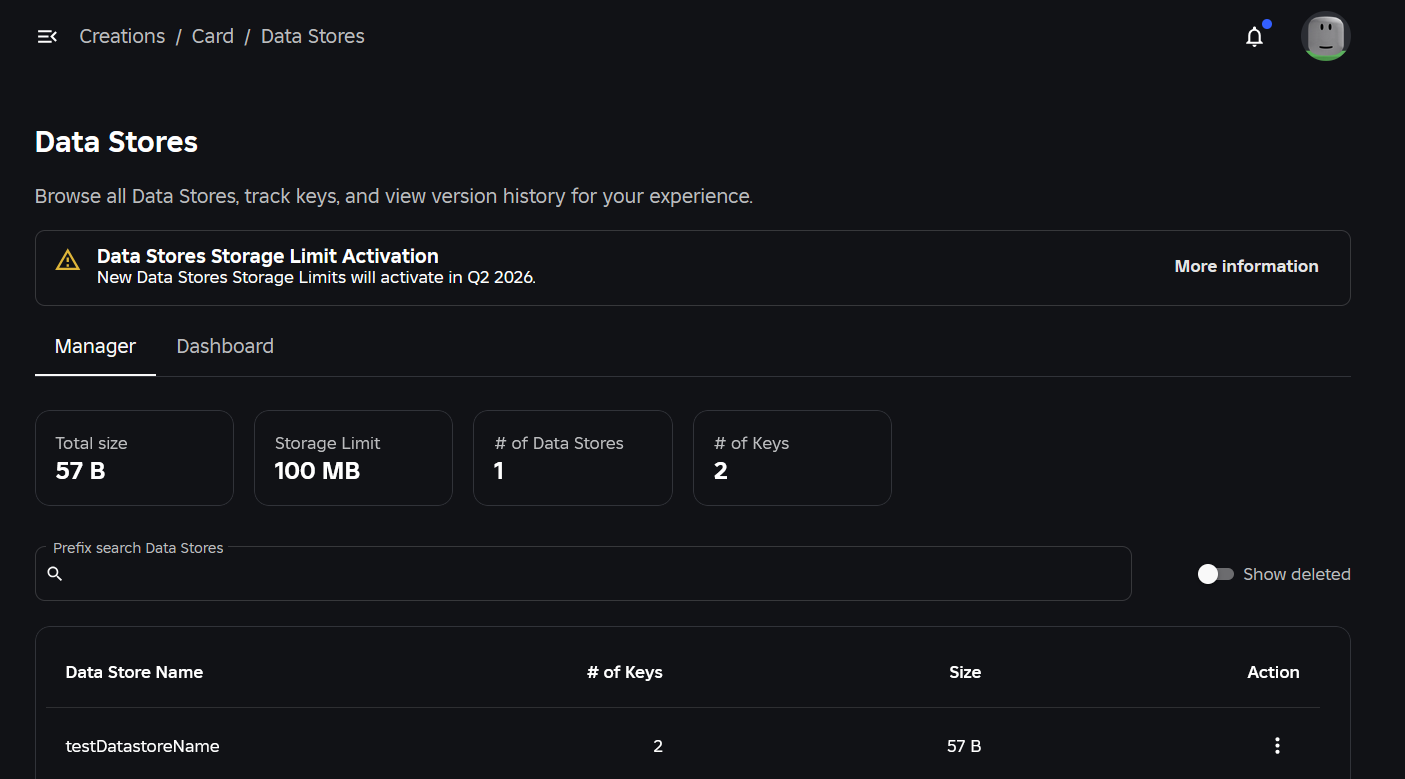
The previous gold coins and tasks only live in the current server. DataStore allows data to still exist after leaving it, but the network request will fail, so "click to save" does not mean "saved successfully".
This course is divided into two rounds. The first cycle defaults to PRACTICE=true, using the memory practice of the current server only; the second cycle is for you and your parents or teachers to prepare an independent test experience before switching to the real DataStore. Practice mode does not cross Stop saving.
Understand servers, Attributes, ProximityPrompt and pcall. It is recommended to study in two sessions, completing the practice mode first.
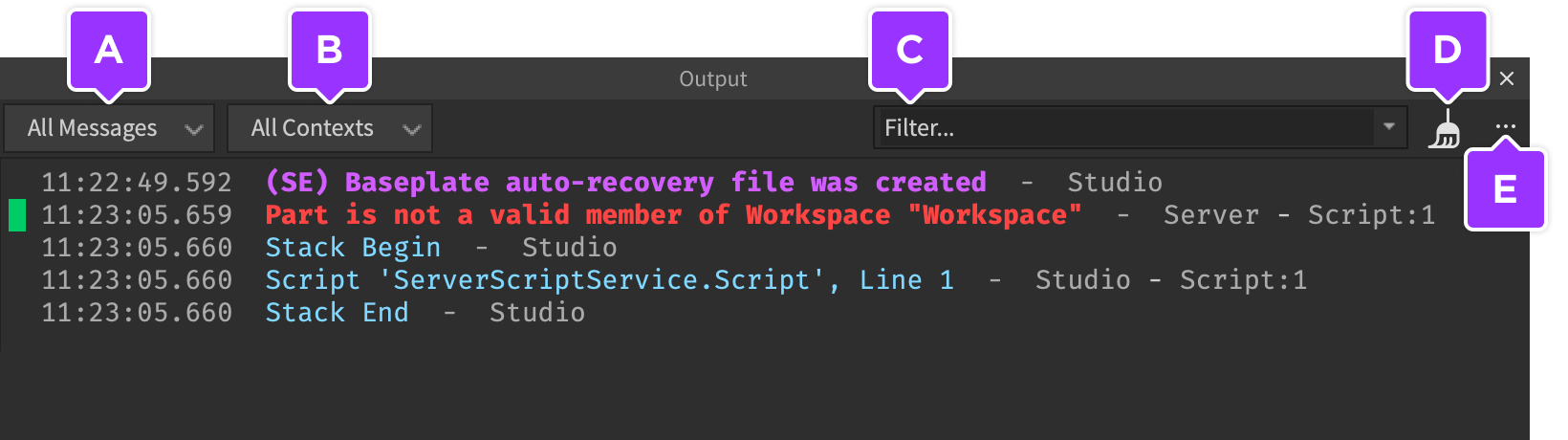
Press a scoring station to increase 10 points, press a save station to save the highest record; Output clearly displays practice or cloud results.
The highest record will not be reduced; overwriting is prohibited when the read fails; "save successfully" cannot be output when the read fails.
Learning route
Every time a small step is completed, it is tested. Say what you expect to see first, and then use Play and Output to check it. Don't rush to write all the code at once.
Place two small Parts in the new Baseplate: ScoreStation and SaveStation, and add ProximityPrompt respectively. One gives points for the round and one tries to save.
Each player uses UserId to form a data key, which is more stable than player nicknames. When saving, use UpdateAsync to read the current value and return a larger record to prevent the old server from writing higher scores lower.
The code is a little longer, you can read the setup first, and then read the two Prompt callbacks. Don't memorize it all at once; first find the two rules of "save after successful loading" and "the highest record value is the larger value".
The real DataStore can only be accessed by the server. Please use a stand-alone testing experience with a parent or teacher to enable the required API access as per your current Studio settings; do not connect exercises to live game data.
Resetting after Stop in practice mode is expected behavior and cannot be used as proof of successful cross-session saves. Cloud mode must read the same or higher record after re-entering to complete this verification.
Step by step
Place two small Parts in the new Baseplate: ScoreStation and SaveStation, and add ProximityPrompt respectively. One gives points for the round and one tries to save.
This is not a full-line player data system. It only demonstrates that you save the " highest record only up and down " manually, and does not exit automatic saving, currency transactions or complex session locks.
Step by step
Each player uses UserId to form a data key, which is more stable than player nicknames. When saving, use UpdateAsync to read the current value and return a larger record to prevent the old server from writing higher scores lower.
The callback of UpdateAsync may be retried, so it only calculates the return value, does not play sound effects, does not issue rewards, and cannot task.wait. When the read fails, 0 is not regarded as the real old data and continues to be overwritten.
Step by step
The code is a little longer, you can read the setup first, and then read the two Prompt callbacks. Don't memorize it all at once; first find the two rules of "save after successful loading" and "the highest record value is the larger value".
Both sites have server distance checks and cooling. The practice mode follows the same process as the cloud mode, except that the underlying storage is different and the Output prefix will clearly distinguish it.
local Players = game:GetService("Players")
local PRACTICE = true -- 先保持 true;内存练习不跨 Stop 保存
local store = nil
if not PRACTICE then
    store = game:GetService("DataStoreService"):GetDataStore("Lesson25_Best_v1")
end
local memory = {}
local ready, saving, lastSave, lastScore = {}, {}, {}, {}
local scoreStation = workspace:WaitForChild("ScoreStation")
local saveStation = workspace:WaitForChild("SaveStation")
local mode = PRACTICE and "[PRACTICE]" or "[DATASTORE]"

local function readValue(value)
    if value == nil then return 0 end
    assert(typeof(value) == "number" and value == value, "Invalid stored data")
    assert(value >= 0 and value < math.huge and value % 1 == 0, "Invalid score")
    return value
end
local function near(player, station)
    local character = player.Character
    local root = character and character:FindFirstChild("HumanoidRootPart")
    local hum = character and character:FindFirstChildOfClass("Humanoid")
    return root and hum and hum.Health > 0 and (root.Position - station.Position).Magnitude <= 12
end
local function setup(player)
    player:SetAttribute("RunScore", 0)
    local key = "u_" .. player.UserId
    local ok, value = pcall(function()
        if PRACTICE then return readValue(memory[key]) end
        return readValue(store:GetAsync(key))
    end)
    if player.Parent ~= Players then return end
    if not ok then warn(mode, "Load failed; saving disabled", value); return end
    ready[player] = true
    player:SetAttribute("BestScore", value)
    print(mode, player.Name, "loaded", value)
end
Players.PlayerAdded:Connect(setup)
for _, player in ipairs(Players:GetPlayers()) do task.spawn(setup, player) end

scoreStation.ProximityPrompt.Triggered:Connect(function(player)
    if not ready[player] or not near(player, scoreStation) then return end
    local now = os.clock()
    if now - (lastScore[player] or -math.huge) < 0.5 then return end
    lastScore[player] = now
    local score = math.min(9990, (player:GetAttribute("RunScore") or 0) + 10)
    player:SetAttribute("RunScore", score)
    print(mode, "RunScore", score)
end)

saveStation.ProximityPrompt.Triggered:Connect(function(player)
    if not ready[player] or saving[player] or not near(player, saveStation) then return end
    local now = os.clock()
    if now - (lastSave[player] or -math.huge) < 10 then return end
    lastSave[player] = now
    saving[player] = true
    local key = "u_" .. player.UserId
    local score = player:GetAttribute("RunScore") or 0
    local ok, result = pcall(function()
        if PRACTICE then
            memory[key] = math.max(readValue(memory[key]), score)
            return memory[key]
        end
        return store:UpdateAsync(key, function(old)
            return math.max(readValue(old), score)
        end)
    end)
    saving[player] = nil
    if not ok then warn(mode, "Save failed; try again later", result); return end
    if player.Parent == Players then player:SetAttribute("BestScore", result) end
    print(mode, "Saved best:", result)
end)
Players.PlayerRemoving:Connect(function(player)
    ready[player], lastSave[player], lastScore[player] = nil, nil, nil
end)
Step by step
The real DataStore can only be accessed by the server. Please use a stand-alone testing experience with a parent or teacher to enable the required API access as per your current Studio settings; do not connect exercises to live game data.
This is permission and cloud data operations, not the threshold for this lesson to be completed. Without a suitable test environment, PRECTICE=true completes process learning, does not use another person’s account number or bypass limits.
Step by step
Resetting after Stop in practice mode is expected behavior and cannot be used as proof of successful cross-session saves. Cloud mode must read the same or higher record after re-entering to complete this verification.
This top value combination is for record, and it is not suitable to increase or reduce gold coins. Writing all currencies as math.max will allow the money spent to come back; do not use an example to different data rules.
Homework
Draw four routes of successful loading, failed loading, successful saving, and failed saving.
Indicate which one is not saved across Stop and which one must have an independent cloud test environment.
Use Attribute to display "Saving/Saved/Save Failed", but the status is still determined by the server.
Exit questions
It is suitable to correspond to the player stably, and the nickname may change.
Reading failure does not mean that old data do not exist, writing 0 may overwrite real records.
It shouldn't, it may retry, it should just calculate and return the new value.
No, the balance will decrease and different data design is required.
Explore further
The text code can be copied directly. First confirm the script type, placement, and whether this code is a complete version or a small experiment; do not run multiple versions of the same script superimposed. The source of the interface reference picture has been marked. The object names in the picture may be different from those in this lesson. Please refer to the operation steps.
Download the code and placement instructions for this lesson