Before starting
Understanding Vector3, Part, and nil checks. Create a new Lesson22 Baseplate.
 PixelCraft
Roblox Studio · Lesson 22
Use Raycast to send out an invisible detection line, filter itself and read hit objects, locations and distances.
Course overview
Without actually throwing a block, you can also know whether there is a wall ahead. Raycast checks in one direction from the starting point, returning the first object encountered.
This is a ranger, not a weapon. You can read distance and draw results with a fine light to help you understand the vector.
Understanding Vector3, Part, and nil checks. Create a new Lesson22 Baseplate.
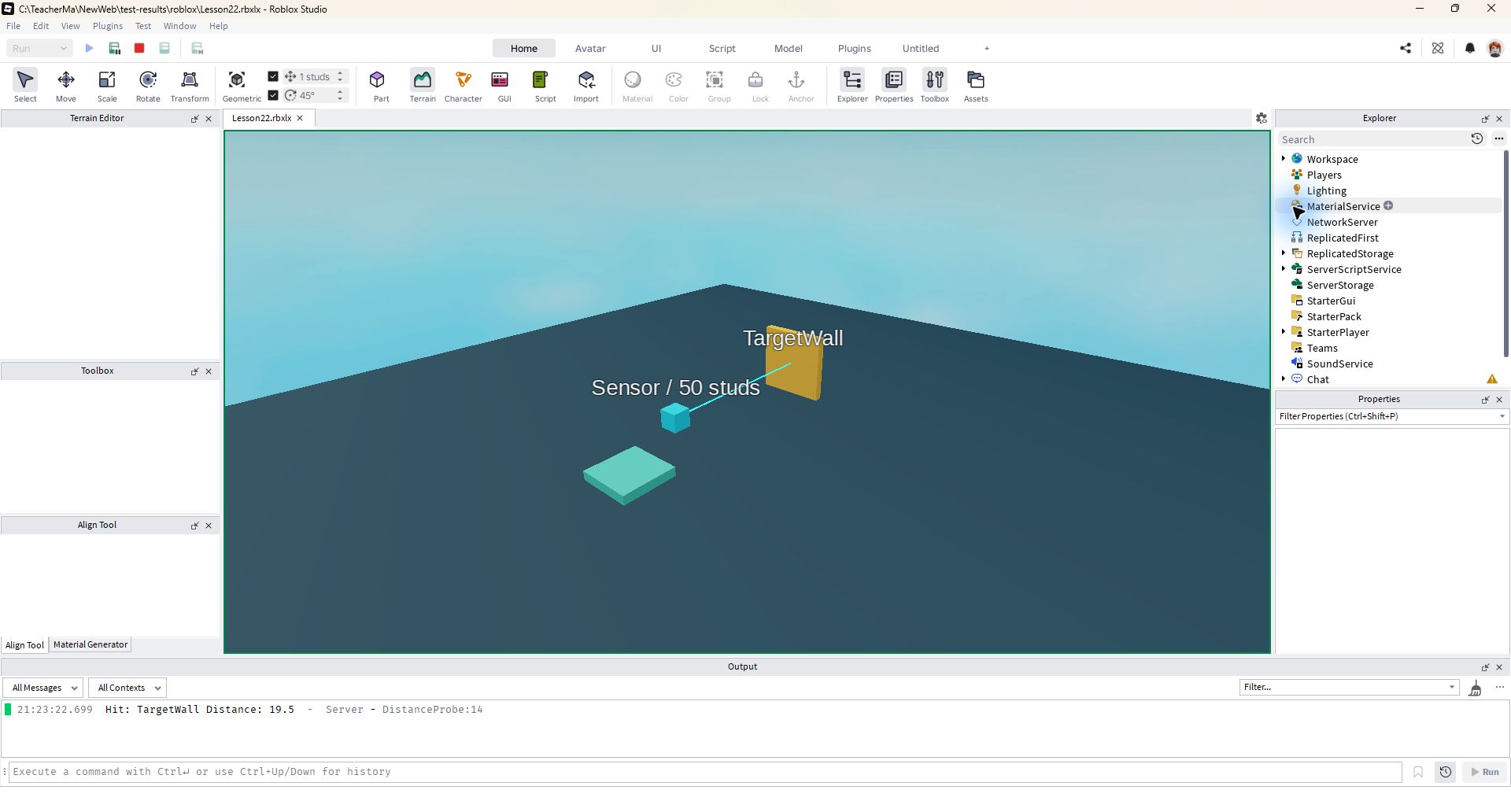
A Sensor that detects 50 studs forward, and the Output displays the hit object and distance.
Hit the wall when there is a wall, and return nil when there is no wall; changing the length will change the detectable range.
Learning route
Every time a small step is completed, it is tested. Say what you expect to see first, and then use Play and Output to check it. Don't rush to write all the code at once.
Let's start with the most predictable arrangement: detector at Z=-4, wall at Z=-24, both at X=0. The detection direction is the Sensor's local front, which is the LookVector.
The length of LookVector itself is about 1, multiplied by 50 to detect 50 studs. The second argument to Raycast is not the endpoint coordinate.
RaycastParams is used to exclude Sensor to avoid detecting itself. When the result is nil, you cannot continue to read result.Instance and must branch.
CanCollide determines physical obstruction, and CanQuery determines whether it can participate in spatial query. A decoration that does not collide may still be detected by the ray.
Ranging returns the first hit surface, rather than always penetrating the scene to find the target name. Add a box in front and the result should be a box.
Step by step
Let's start with the most predictable arrangement: detector at Z=-4, wall at Z=-24, both at X=0. The detection direction is the Sensor's local front, which is the LookVector.
By default Organization=0,0, 0, 0, 0, lookVector to negative Z. Switching Sensor will also change the direction of the ray, and position and direction will not be confused with direction.
Step by step
The length of LookVector itself is about 1, multiplied by 50 to detect 50 studs. The second argument to Raycast is not the endpoint coordinate.
If the starting point origin and the end point target are known, the direction vector should be target - origin. If you pass the target directly, you may get another completely different ray.
Step by step
RaycastParams is used to exclude Sensor to avoid detecting itself. When the result is nil, you cannot continue to read result.Instance and must branch.
The visible thin lines are the additional Parts we created and are not automatically generated by Raycast. It is set to CanQuery=false to avoid being blocked by its own auxiliary lines when probing again in the future.
local sensor = workspace:WaitForChild("Sensor")
local MAX_DISTANCE = 50
task.wait(3)
local origin = sensor.Position
local direction = sensor.CFrame.LookVector * MAX_DISTANCE
local params = RaycastParams.new()
params.FilterType = Enum.RaycastFilterType.Exclude
params.FilterDescendantsInstances = {sensor}

local result = workspace:Raycast(origin, direction, params)
local finish = origin + direction
if result then
    finish = result.Position
    print("Hit:", result.Instance.Name, "Distance:", result.Distance)
else
    print("Nothing within", MAX_DISTANCE)
end

local distance = (finish - origin).Magnitude
if distance > 0 then
    local line = Instance.new("Part")
    line.Name = "ProbeLine"
    line.Anchored = true
    line.CanCollide = false
    line.CanTouch = false
    line.CanQuery = false
    line.Material = Enum.Material.Neon
    line.Color = Color3.fromRGB(70, 220, 230)
    line.Size = Vector3.new(0.12, 0.12, distance)
    line.CFrame = CFrame.lookAt(origin, finish) * CFrame.new(0, 0, -distance / 2)
    line.Parent = workspace
end
Step by step
CanCollide determines physical obstruction, and CanQuery determines whether it can participate in spatial query. A decoration that does not collide may still be detected by the ray.
This lesson does not damage the hit object, nor does it delete the wall. Clarify the measurement results first, and then connect the results to other gameplay methods.
Step by step
Ranging returns the first hit surface, rather than always penetrating the scene to find the target name. Add a box in front and the result should be a box.
Don't create auxiliary lines infinitely every frame just to keep updating the distance. Continuous probing requires reusing objects, controlling frequency, and cleaning up resources that are no longer in use.
Homework
(b) Record the object name and distance in three cases: walls, open areas and boxes.
Rotate the Sensor 90° around the Y axis and reposition the wall to the new front.
Change the direction to Vector3.new(0,-20,0) and measure the distance from the Sensor to the ground.
Exit questions
No, it is a direction vector with length; when the end point is known, use the end point minus the starting point.
If there is no hit, nil will be returned and nil.Instance cannot be read.
No, it is an auxiliary part created by the script.
Avoiding a follow-on ray hit its own visual support.
Explore further
The text code can be copied directly. First confirm the script type, placement, and whether this code is a complete version or a small experiment; do not run multiple versions of the same script superimposed. The source of the interface reference picture has been marked. The object names in the picture may be different from those in this lesson. Please refer to the operation steps.
Download the code and placement instructions for this lesson