Before starting
Understand table, Player and server scripts. Create a new Lesson19, which does not rely on the old gold coin system.
 PixelCraft
Roblox Studio · Lesson 19
Use Attributes to record the collection progress of each player so that task objectives and reward rules can be clearly checked.
Course overview
The gold is suitable for repeated collection, and the items of the mission are usually calculated only once. This time you have a clear goal: to find three different energy crystals.
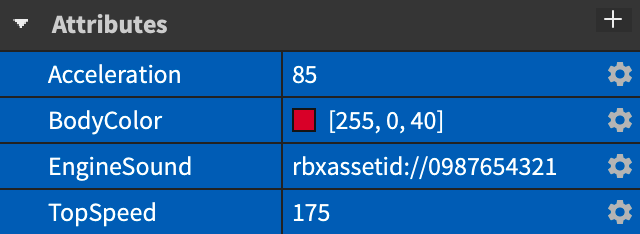
Attributes are like small labels attached to objects. We log Crystals and QuestComplete on the Player, making progress easy to read and inspect in Properties.
Understand table, Player and server scripts. Create a new Lesson19, which does not rely on the old gold coin system.
Three crystals that each person can collect once. After collecting them all, set QuestComplete to true.
No progress will be made by touching the same crystal repeatedly; only three different crystals can be completed; two people will not steal the task items from each other.
Learning route
Every time a small step is completed, it is tested. Say what you expect to see first, and then use Play and Output to check it. Don't rush to write all the code at once.
Create a folder containing only crystal parts, and the script can find them all at once. Don't put lights, signposts, and scripts in there that the program might mistake.
Crystals saves the collected quantity, QuestComplete saves whether it is completed. SetAttribute sets a value, and GetAttribute reads it; they are different from the built-in Position and Color, and are self-defined labels.
collected[player] is the collection table of this player, which uses crystal objects as keys. Touching the same object repeatedly will return immediately, while touching another one will continue processing.
The same crystal may have been claimed by A, but is still available for B, so the shared appearance cannot simply represent everyone's task status.
The task is completed not by touching three times, but by touching three different crystal stones. Write this sentence down first, and then check whether the code complies with it.
Step by step
Create a folder containing only crystal parts, and the script can find them all at once. Don't put lights, signposts, and scripts in there that the program might mistake.
For simplicity, this lesson keeps the spar visible. Whether each player has collected it is determined by the server's records, not by global hidden crystals.

Step by step
Crystals saves the collected quantity, QuestComplete saves whether it is completed. SetAttribute sets a value, and GetAttribute reads it; they are different from the built-in Position and Color, and are self-defined labels.
Collection records must be modified by the server. The client can use GetAttributeChangedSignal to update the HUD in the future, but it cannot treat the number it changes as the actual task progress.
Step by step
collected[player] is the collection table of this player, which uses crystal objects as keys. Touching the same object repeatedly will return immediately, while touching another one will continue processing.
All judgments are made before increasing progress. The distance check allows a range of 8 studs for small hedrons; this range needs to be redesigned when changing to larger objects.
local Players = game:GetService("Players")
local folder = workspace:WaitForChild("Crystals")
local TARGET = 3
local collected = {}
local function setup(player)
    collected[player] = {}
    player:SetAttribute("Crystals", 0)
    player:SetAttribute("QuestComplete", false)
end
Players.PlayerAdded:Connect(setup)
for _, player in ipairs(Players:GetPlayers()) do setup(player) end
Players.PlayerRemoving:Connect(function(player) collected[player] = nil end)

for _, crystal in ipairs(folder:GetChildren()) do
    if not crystal:IsA("BasePart") then continue end
    crystal.Touched:Connect(function(hit)
        local character = hit:FindFirstAncestorOfClass("Model")
        local player = character and Players:GetPlayerFromCharacter(character)
        local root = character and character:FindFirstChild("HumanoidRootPart")
        local humanoid = character and character:FindFirstChildOfClass("Humanoid")
        if not player or not root or not humanoid or humanoid.Health <= 0 then return end
        if (root.Position - crystal.Position).Magnitude > 8 then return end
        local record = collected[player]
        if not record or record[crystal] then return end
        record[crystal] = true
        local count = (player:GetAttribute("Crystals") or 0) + 1
        player:SetAttribute("Crystals", count)
        player:SetAttribute("QuestComplete", count >= TARGET)
        print(player.Name, "Crystals:", count, "/", TARGET)
    end)
end
Step by step
The same crystal may have been claimed by A, but is still available for B, so the shared appearance cannot simply represent everyone's task status.
This lesson uses Output and personal Attribute verification. A personal HUD will be added to the comprehensive project; if you want the received crystals to fade out only for you, you also need the client's personal display logic.
Step by step
The task is completed not by touching three times, but by touching three different crystal stones. Write this sentence down first, and then check whether the code complies with it.
If new spar are later dynamically created, this connection to GetChildren on startup will not automatically overwrite them. The items in this lesson are placed before starting; dynamic generation requires additional processing of ChildAdded.
Homework
Design three different routes to verify that they can be done regardless of which one is found first.
Write "Collect three different crystals" to avoid players mistakenly thinking that the same crystal can be brushed three times.
Add CrystalD and change TARGET to 4, and redo the repeated collection test.
Exit questions
No, it is a custom attribute defined through SetAttribute.
This lesson stipulates that everyone has one copy, and server deletion will cause other players to lose it.
collected[player][crystal] records the objects that this player has collected.
The code in this lesson does not; it only traverses existing child objects at startup.
Explore further
The text code can be copied directly. First confirm the script type, placement, and whether this code is a complete version or a small experiment; do not run multiple versions of the same script superimposed. The source of the interface reference picture has been marked. The object names in the picture may be different from those in this lesson. Please refer to the operation steps.
Download the code and placement instructions for this lesson